
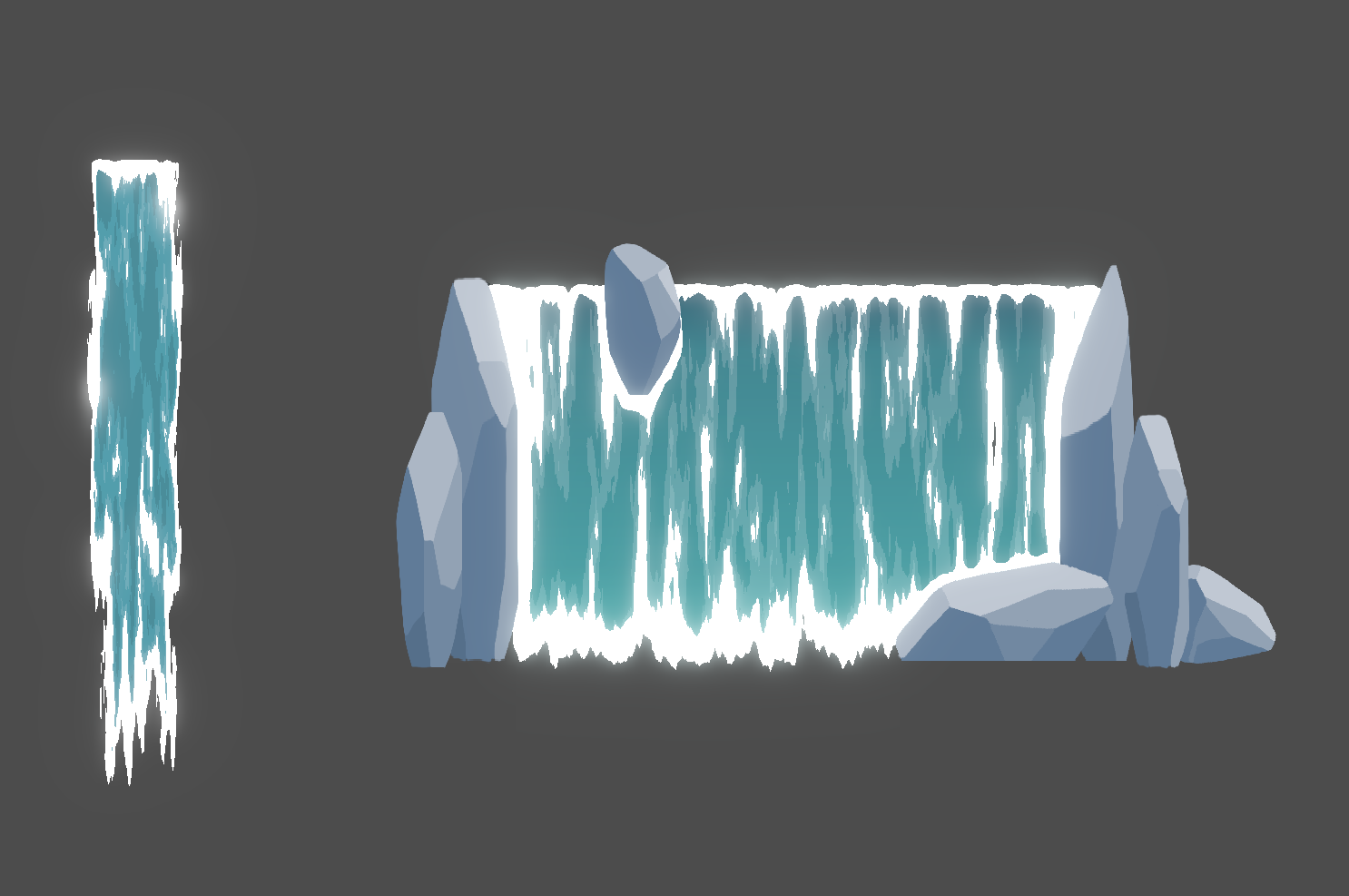
Waterfall shader

A waterfall shader I made.
How to use:
– Add a ColorRect or a sprite to a scene (set resolution to 65×400 if you want to use the default example or change the “resolution” shader parameter to be the same size)
– In the shader parameters, add a noise texture + a gradient for the water.
– Done! It should look like in the demo picture. Adjust the variables to finetune the style. Check out the video for a demo with the shader in motion + tutorial that explains the code step by step.
(The live preview of the shader on this page don’t seem to work. Set it up in a project or check out the video demo instead)
Shader code
shader_type canvas_item;

uniform vec2 sprite_or_color_rect_resolution = vec2(65.0, 400.0); // Sprite or ColorRect

// If the waterfall is very tall or wide and the noise pattern start to repeat too much in the waterfall,
// increase the resolution of the sampler2D noise texture
uniform sampler2D noise_texture : repeat_enable; // Tick the checkbox "seamless" on the noise texture too
uniform float noise_zoom = 2.0;
uniform vec2 noise_stretch = vec2(1.0, 0.1);

// color_noise() can use either some set colors or a gradient.
//uniform vec3 water_color_light: source_color = vec3(0.333, 0.643, 0.702);
//uniform vec3 water_color_dark: source_color = vec3(0.287, 0.553, 0.605);
uniform sampler2D water_gradient : source_color; // GradientTexture1D
uniform vec3 foam_color: source_color = vec3(0.915, 0.965, 0.938);

// number of thresholds = number of lighter layers in the water.
// For example threshold 1 = 0.5 and threshold 2 = 0.7 means any noise greyscale value above 0.5 = first lighter layer blue etc
uniform float lighter_water_color_threshold_1 = 0.47;
uniform float lighter_water_color_threshold_2 = 0.57;
uniform float foam_color_threshold = 0.6;

uniform float waterfall_speed = 140.0;
uniform float waterfall_noise_blend_speed = 8.0;

uniform float opacity_strength = 0.9; // higher value = opacity at the edges only, lower value = gaps in the middle of the waterfall too
uniform float opacity_edge_up = 2.0;
uniform float opacity_edge_down = 50.0;
uniform float opacity_edge_left = 6.0;
uniform float opacity_edge_right = 6.0;

uniform float edge_foam_up = 7.0;
uniform float edge_foam_down = 70.0;
uniform float edge_foam_left = 5.0;
uniform float edge_foam_right = 5.0;

// terrain_foam_mask sprite should be the same resolution as the waterfall sprite/colorRect.
// Paint grey/white on top of an transparent background where the extra foam should be. Let the white fade to opaque for the foam to look better.
uniform bool use_terrain_foam_mask = false;
uniform sampler2D terrain_foam_mask;

uniform sampler2D screen_texture : hint_screen_texture;


float get_moving_noise_layer(vec2 uv, vec2 noise_scale, vec2 move_dir, vec2 random_noise_offset) {
	// random_noise_offset = make it so the same noise texture can be reused for many layers without a visual "loop/symmetry" in the pattern.
	vec2 speed = vec2(waterfall_noise_blend_speed, waterfall_speed) * noise_scale;
	return texture(
		noise_texture,
		uv + move_dir * TIME * speed + random_noise_offset
	).r;
}

vec3 color_noise(float noise, vec2 uv) {
	// waterfall_color.rgb = noise > 0.5 ? water_color_light : water_color_dark; // If using a set number of colors instead of a gradient, use something like this instead

	// Add more or less if checks depending on how many lighter layers in the water that should exist.
	vec3 waterfall_color = texture(water_gradient, vec2(uv.y, 0.5)).rgb;
	if (noise > lighter_water_color_threshold_1) {
		waterfall_color += vec3(0.07);
	}
	if (noise > lighter_water_color_threshold_2) {
		waterfall_color += vec3(0.07);
	}

	if (noise > foam_color_threshold) {
		waterfall_color = foam_color;
	}

	return waterfall_color;
}

void fragment() {
	// Scaled UV
	// The waterfall effect should look the same regardless of the scale of the rect the waterfall is applied on
	// as well as regardless of the scale of the noise texture. Scale the UV to stay consistent.
	vec2 uv = UV;
	vec2 noise_scale = (noise_zoom * noise_stretch) / vec2(textureSize(noise_texture, 2));
	vec2 scaled_uv = uv * sprite_or_color_rect_resolution * noise_scale;

	// Move noise / flowing water effect
	// Move multiple instances of the noisemap in slightly different directions and blend them together.
	// Lighter areas of the noise can be used as one color and the darker another etc.
	float number_of_noise_layers = 3.0;
	float noise = (
		get_moving_noise_layer(scaled_uv, noise_scale, vec2(0.0, -1.0), vec2(46.2, -32.1)) +
		get_moving_noise_layer(scaled_uv, noise_scale, vec2(1.0, -1.0), vec2(23.7, 41.2)) +
		get_moving_noise_layer(scaled_uv, noise_scale, vec2(-1.0, -1.0), vec2(-81.3, 12.9))
	) / number_of_noise_layers;


	// Opacity edges
	// Apply a light gradient over the noise towards each edge to make the noise brighter towards the edges.
	// Apply it exponentially instead of linearly so it's extra strong towards the edges and extra less towards the middle.
	// Then the brightest parts of the noise can be rendered opaque.
	// Don't use this noise brightness layer for anything other than the opacity so the amount of foam etc can be handled separately
	float o_up = pow(1.0 - uv.y, sprite_or_color_rect_resolution.y / opacity_edge_up);
	float o_down = pow(uv.y, sprite_or_color_rect_resolution.y / opacity_edge_down);
	float o_left = pow(1.0 - uv.x, sprite_or_color_rect_resolution.x / opacity_edge_left);
	float o_right = pow(uv.x, sprite_or_color_rect_resolution.x / opacity_edge_right);

	float opacity_edges = o_up + o_down + o_left + o_right;
	float noise_copy = noise;
	noise_copy += opacity_edges;
	float waterfall_opacity = noise_copy > opacity_strength ? 0.0 : 1.0;


	// Foam
	// Foam works similar to the opacity edges, the brighest parts of the noise is colored as foam.
	// Add brightness on top the noise where the foam should be. Gradients for edge foam + optional terrain foam mask.
	// In general the overall idea is something like noise greyscale 0.0-1.0 -> 0.0-0.4=light blue, 0.4-0.7=dark blue, 0.7-0.9=foam, 0.9-1.0=opacity etc.
	float f_up = pow(1.0 - uv.y, sprite_or_color_rect_resolution.y / edge_foam_up);
	float f_down = pow(uv.y, sprite_or_color_rect_resolution.y / edge_foam_down);
	float f_left = pow(1.0 - uv.x, sprite_or_color_rect_resolution.x / edge_foam_left);
	float f_right = pow(uv.x, sprite_or_color_rect_resolution.x / edge_foam_right);

	float foam_edges = f_up + f_down + f_left + f_right;
	noise += foam_edges;

	if (use_terrain_foam_mask) {
		float terrain_foam = texture(terrain_foam_mask, uv).a;
		noise += terrain_foam;
	}

	// Color the noise
	vec3 waterfall_color = color_noise(noise, uv);


	//COLOR = vec4(vec3(noise), 1.0); // Noise with all noise layers and effects but not colored yet
	COLOR = vec4(waterfall_color.rgb, waterfall_opacity);
}
