
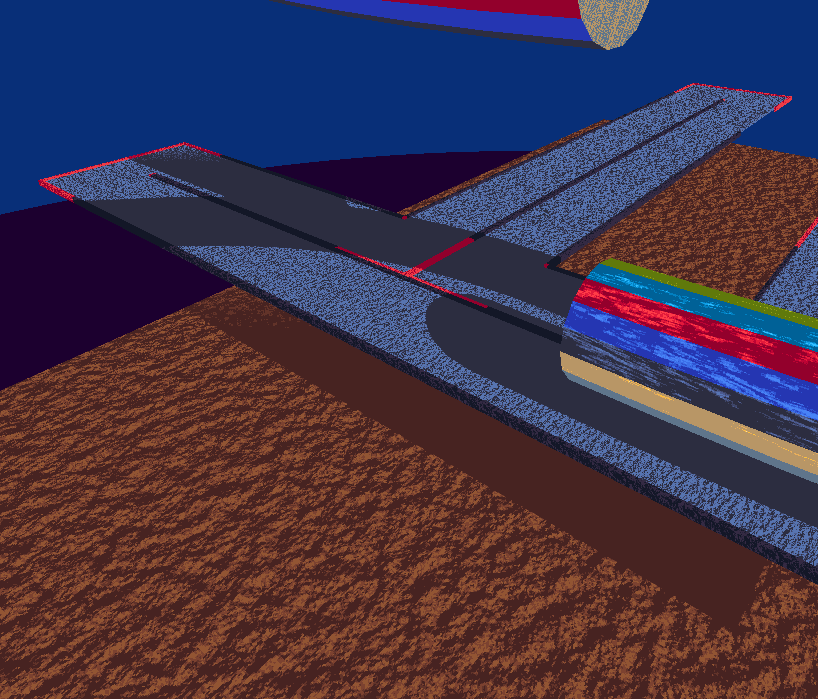
Light Enabled 3D Color Palette Material

Same as the previous one, but no longer separated into two passes.
UNIFORMS:
Texture Albedo: The texture used to determine what color from the palette to use.
RED: Metallic; GREEN: sub-palette (x); BLUE: sub-palette (y);
UV1 Scale & offset: UV controls for the Albedo Texture
Texture Normal: Normal Map texture
normal scale & offset: UV controls for normal Texture
From old color palette applicator:
rows: how many colors in sub-palette(x)
cols: how many sub-palettes (x) in texture
pal: the color palette texture
dither size: how chunky should the dither effect be: 1 is per pixel, 2 is 2 pixels wide+tall etc.
dither amount: 0 = no dither, 1 = smooth dither
palette power: power of light on the material’s surface (Higher makes for darker, almost metallic responses to light)
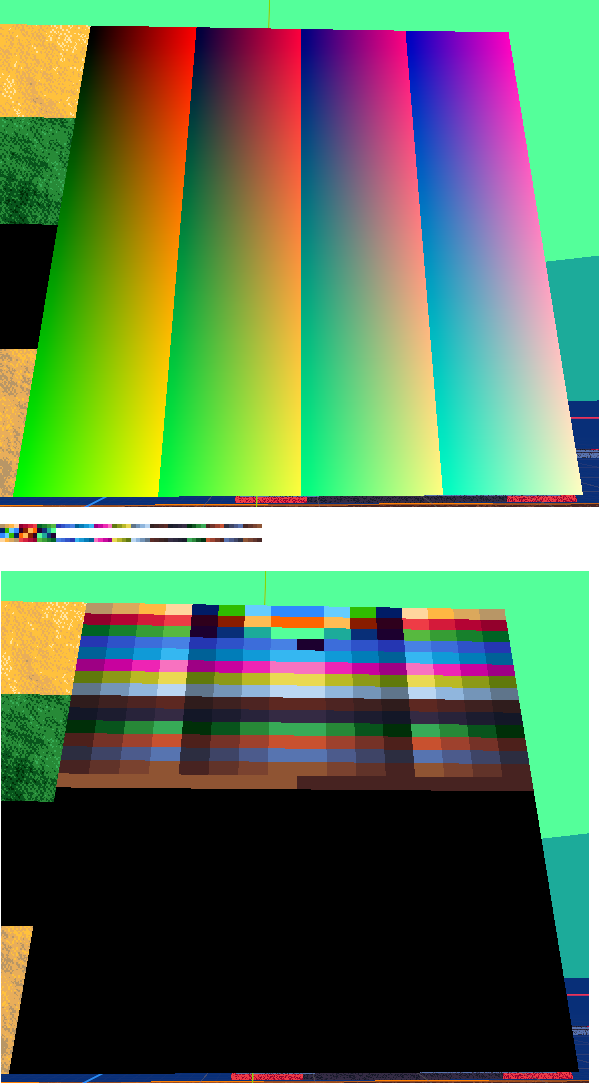
Picture one is the Gradient Test, which used a custom version of this shader to build the albedo texture. Top is the albedo itself. Middle is the Palette. Bottom is the result.
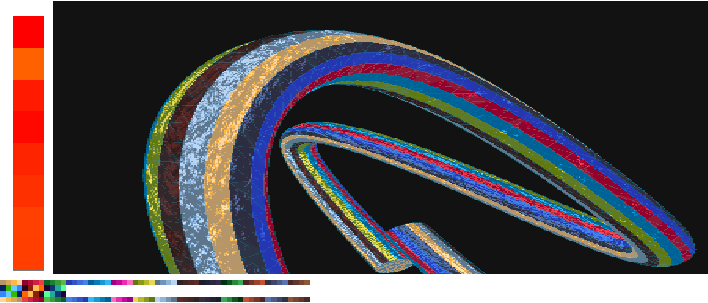
Picture 2 is the palette in practice. Left is the albedo_texture. Bottom is the palette. The Noodle is approximately colored to match the palette.The normal map on the noodle is just a fastnoise lite texture.
Due to 3D space shenanigans, some imperfect calculations are involved with color math involving powers of 2.2 and its reciprocal. This causes some very slight deviation in the resultant color on the GPU’s end of the calculations.
There are likely improvements to be made to how I handled sl + dl (speculative and diffused light) in the palette system. I just ignored dl and used the sl calculation to pick the brightness, which can be affected by metallic amount.
Implement palette uv scale and offset by adding as uniforms and applying them to line 171.
Shader code
// NOTE: Transparent pipeline does not like multiple light sources.

// from light pre-pass
shader_type spatial;
render_mode blend_mix,depth_draw_always;


uniform sampler2D texture_albedo : filter_nearest, repeat_enable;
uniform vec3 uv1_scale;
uniform vec3 uv1_offset;

uniform sampler2D texture_normal: hint_roughness_normal, filter_nearest, repeat_enable;
uniform vec2 normal_scale = vec2(1.0);
uniform vec2 normal_offset = vec2(0.0);


// from color applicator
const float lin = .45454545;
const float srgb = 2.2;

uniform float rows = 4.0;
uniform float cols = 32.0;

uniform sampler2D pal:  filter_nearest;
uniform float dither_size = 1;
uniform float dither_amount: hint_range(0.0, 1.0);

uniform float palette_power = 4.0;

float lerp(float val1, float val2, float mul) {
	return val1 + (val2 - val1) * clamp(mul, 0.0, 1.0);
}

vec3 lerp3(vec3 val1, vec3 val2, float mul) {
	return val1 + (val2 - val1) * clamp(mul, 0.0, 1.0);
}

vec3 to_srgb(vec3 color) {
	return vec3(pow(color.x,srgb), pow(color.y,srgb), pow(color.z,srgb));
}

vec3 to_linear(vec3 color) {
	return vec3(pow(color.x,lin),pow(color.y,lin),pow(color.z,lin));
}

vec3 dither(vec3 color_in, vec2 uv, vec2 screen_size) {
	float dith = max(1.0, dither_size);
	vec3 unaltered = color_in;
	float d = rows*cols;
	float f = 0.5/rows;

	color_in = to_linear(color_in);

	float output = 0.0;
	float a = floor(mod(uv.x * screen_size.x/dith, 2.0));
	float b = floor(mod(uv.y * screen_size.y/dith, 2.0));
	float c = mod(a + b , 2.0)+f;
	c = fract(52.9829189 * fract(dot(floor(uv*screen_size/dith), vec2(0.06711056, 0.00583715)))); // interleaved gradient noise as shown by Acerola


	//c = mod(a + b, 2.0)*rows*1.333-rows/2.0;

	color_in.r += lerp( -f, f, c);


	color_in = to_srgb(color_in);

	color_in = clamp(vec3(round(color_in.r*(d))/(d),round(color_in.g*(d))/(d),round(color_in.b*(d))/(d)),0.0, 1023.5/1024.0);
	return color_in;
}

vec2 PickColor(float x, float y, float z) {
	float f = rows * cols;
	x = clamp(x, 0.0, (f-(0.5/f)) / f );
	//y = clamp(y, (0.125/f), (f-0.125) / f );

	vec2 output = vec2(0.0);

	float offset = +0.5/(rows);

	x = mod(x, 1.0);
	y =  mod(y, 1.0);

	x = clamp(floor(x*(rows))/((cols*rows)), (0.0), 1023.0/1024.0 );
	y = clamp(floor(y*(cols))/((cols)), (0.0), 1023.0/1024.0 );

	z = clamp(floor(z*rows)/rows + offset,0.0, 1023.0/1024.0);

	output = vec2(y+x, z);

	return output;
}


void fragment() {

	vec2 base_uv = (UV + uv1_offset.xy) * uv1_scale.xy;
	vec4 albedo = texture(texture_albedo, base_uv);

	vec3 new_color = vec3(albedo.rgb);

	/* Bad News: fetching the screen texture throws this pass into the transparent pipeline. That makes it impossible to use the screen texture in the next pass,
	 as the image/object in question isn't accessable from the screen buffer like what would be useful. as of Godot 4.3
	 This makes multiple light sources act wierd. */
	vec3 color = (vec3(clamp(albedo.r, 0.0, 1.0), clamp(albedo.g, 0.0, 1.0), clamp(albedo.b, 0.0, 1.0)));

	vec2 index = PickColor(0.0, color.g, color.b);

	vec3 pal_read = (textureLod(pal, vec2(index.x, clamp(index.y, 0.0, 1023.5/1024.0)), 0.0).rgb);

	ALBEDO = to_srgb(pal_read);
	NORMAL_MAP = texture(texture_normal,(UV * normal_scale) + normal_offset).rgb;
	IRRADIANCE = vec4(1.0,1.0,1.0,1.0);
}

void light() {

	vec2 base_uv = (UV + uv1_offset.xy) * uv1_scale.xy;
	vec4 albedo = texture(texture_albedo, base_uv);

	// Part 1: light pass

	float LV = max(dot(LIGHT, VIEW), 0.0);
	vec3 half = normalize(LIGHT + VIEW);
	float LN = max(dot(LIGHT, NORMAL), 0.0);
	float NV = max(dot(NORMAL, VIEW), 0.0);
	vec3 bounce = normalize(2.0*dot(NORMAL, LIGHT)*NORMAL - LIGHT) * max(sign(dot(NORMAL, LIGHT)), 0.0);

	float custom = LN * (1.0 - albedo.r) + max(dot(VIEW, bounce), 0.0) * albedo.r;

	float NH = max(dot(half, NORMAL), 0.0);

	vec3 lcol = LIGHT_COLOR / PI;

	float at2 = ATTENUATION * ATTENUATION;

	vec3 dl_s = LN * ATTENUATION * lcol; // diffuse light
	vec3 sl_s = custom * lcol * ATTENUATION; // specular_light

	float dl = max(max(dl_s.x, dl_s.y), dl_s.z);
	float sl = max(max(sl_s.x, sl_s.y), sl_s.z);

	//DIFFUSE_LIGHT += LN * ATTENUATION * lcol;
	//DIFFUSE_LIGHT = to_srgb(ALBEDO.rgb) / PI;

	//SPECULAR_LIGHT += custom * lcol * ATTENUATION;
	//SPECULAR_LIGHT.yz = to_srgb(ALBEDO.rgb).gb / PI;

	// Part 2: color Applicator


	vec3 tex_uv = vec3(UV, 0.0);

	vec3 color = to_srgb(vec3(clamp(sl, 0.0, 1.0), clamp(albedo.g, 0.0, 1.0), clamp(albedo.b, 0.0, 1.0)));

	color.r = pow(color.r, palette_power);

	color.r = lerp(color.r, dither(color, SCREEN_UV, VIEWPORT_SIZE).r, dither_amount); // comment this line if you do not want to dither the palette

	vec3 corr = to_linear(color.rgb);

	//vec3 scr = textureLod(SCREEN_TEXTURE, SCREEN_UV, 1.0).xyz; // transparent

	//float scrb = max(scr.r, max(scr.b, scr.g));

	//vec2 index = PickColor(scrb + (corr.r - scrb) * albedo.a, corr.g, corr.b);

	vec2 index = PickColor(corr.r, corr.g, corr.b);

	vec3 pal_read = (textureLod(pal, vec2(index.x, clamp(index.y, 0.0, 1023.5/1024.0)), 0.0).rgb);


	//DIFFUSE_LIGHT.rgb += to_srgb(pal_read);
	//SPECULAR_LIGHT.rgb = to_srgb(pal_read);

	DIFFUSE_LIGHT = to_srgb(pal_read) - ALBEDO;
	SPECULAR_LIGHT += to_srgb(pal_read) - ALBEDO;
	//ALPHA = albedo.a;
	//DIFFUSE_LIGHT = vec3(1.0,0.0,0.0);
	//SPECULAR_LIGHT = vec3(1.0,0.0,0.0);


}
Live Preview

Comments 0
No comments yet.