
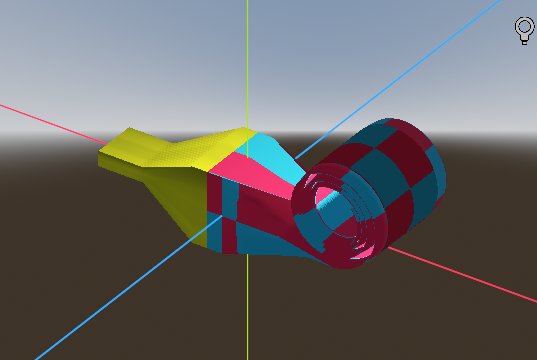
A Partyhorn/Blower (vertex animation able)
It’s a partyhorn! You know, the pole shaped thing when blowed maks noise
Set up:
1. Add a Meshinstance3D and use a box mesh
2. Set box mesh params like so:
- Size : (24.0,1.0,1.0)
- Subdivide width : 100-300-ish looks pretty good, more is better
- Subdivide height : 3 (Can’t change unless you modifie my script
- Subdivide depth : 6 (Can’t change unless you modifie my script
3. Add it a Shadermaterial and copy the code
4. Twick the params
5. Read the code and modification ( Spoiler: My code sucks.
How to use the animation:
In code: In whatever gdscript, access this material and use “set_shader_parameter()” on front_expaned_length
Use animationplayer: Same as anything else, add an animationplayer and animate the variable front_expaned_length
Shader code
shader_type spatial;
//Shader created by wo_ri_gou_le

//Plz set this same as the boxmesh you apllied to
uniform float box_xlength_meter = 24;
//Texture params
uniform int PATTERN:hint_range(0, 1, 1) = 1;
uniform vec2 scale = vec2(10.0,10.0);
uniform vec4 color_a : source_color = vec4(0.9, 0.1, 0.3, 1.0);
uniform vec4 color_b : source_color = vec4(0.1, 0.7, 0.8, 1.0);
uniform float dot_radius : hint_range(0.01, 0.5) = 0.3;
//
uniform bool front_use_texture = false;
uniform sampler2D front_texture;
uniform sampler2D back_texture;

//Vertex used params
uniform float roll_radius : hint_range(0.3, 1.0, 0.01) = 0.8;
uniform float roll_thickness : hint_range(0.01, 0.1, 0.01)= 0.04;
uniform float shrink_strength : hint_range(6.0, 26.0, 0.1)  = 26.0;
uniform float front_expanded_length : hint_range(0.1, 12.0, 0.1) = 0.1;
uniform float front_solid_length : hint_range(0.0, 0.8, 0.01) = 0.7;
varying float vertex_x;

void vertex() {
	vertex_x = VERTEX.x;
	//The front part that gets rolled
	float front_not_rolled_length = front_expanded_length+front_solid_length;
	if( VERTEX.x > front_not_rolled_length){
		float roll_remained_length = box_xlength_meter/2.0 - front_solid_length - front_expanded_length;
		float varring_roll_radius = roll_radius * ((front_expanded_length+roll_remained_length+16.0)/(roll_remained_length+16.0));
	    float theta = VERTEX.x - front_not_rolled_length;
		theta *= 1.9 / ((front_expanded_length+roll_remained_length+1.0)/(roll_remained_length+1.0));
		float shrink = shrink_strength/(pow(theta,1)+shrink_strength);
		float new_z = VERTEX.z * 1.4;
		if (VERTEX.y == 0.0){

		}
	    else if(VERTEX.y > 0.0){
			shrink -= roll_thickness;
			new_z *= 0.7;
		}
		else{
			shrink += roll_thickness;
			new_z *= 0.7;
		}
		float new_x = varring_roll_radius* sin(theta)*shrink + front_not_rolled_length+0.8;
		float new_y = varring_roll_radius* (1.0 - cos(theta)*shrink);

		VERTEX = vec3(new_x,new_y,new_z);
	}
	//The front part that is not rolled
	else if (VERTEX.x > 0.0){
		if (VERTEX.x > front_solid_length){
			float new_y = VERTEX.y*0.8;
			float new_z = VERTEX.z;
			new_z *= 1.0 - pow(abs(VERTEX.y)*1.3,1.4);
			if (VERTEX.y > 0.4){
				new_y *= 0.8;
			}
			VERTEX = vec3(VERTEX.x,new_y,new_z);
		}
		else{
			VERTEX.x = 0.0;
		}
	}
	else if (VERTEX.x > -0.4){
		VERTEX.x = -0.4;
	}
   	else if(VERTEX.x > -1.2){
		VERTEX.x = -1.2;
		VERTEX.y *= 0.2;
		VERTEX.z *= 0.6;
	}
   	else if(VERTEX.x < -1.2){
		VERTEX.x = -1.8;
		VERTEX.y *= 0.2;
		VERTEX.z *= 0.6;
	}
}

void fragment() {
	//simple texture stuff, change to whatever you prefer
	if (vertex_x > 0.0){
		if (front_use_texture){
			ALBEDO = texture(front_texture,UV).rgb;
		}
		else{
		    vec2 coord = UV * scale;

		    if (PATTERN == 0) {
		        // Checkerboard
		        float checker = mod(floor(coord.x) + floor(coord.y), 2.0);
		        ALBEDO = mix(color_b.rgb, color_a.rgb, checker);
		    } else {
				// Dot
		        vec2 cell = fract(coord);
		        vec2 center = vec2(0.5, 0.5);
		        float dist = distance(cell, center);
		        float circle = smoothstep(dot_radius, dot_radius - 0.02, dist);
		        ALBEDO = mix(color_a.rgb, color_b.rgb, circle);
		    }
		}
	}
	else{
		ALBEDO = texture(back_texture,UV).rgb;
	}
}
Live Preview



Just quick mention, the normal seems not working properly.. later I set them all to vec3(0.0,1.0,0.0) and then looks fine, whatever then
Here’s a quick attempt at fixing the normals, add this right before line 50:
The Z is pretty hard to get right considering the distortion.
It’s jank, but I love it
yeah supper crappy, thanks for your quick lesson! I knows little about normals that helps
Glad to help, I think it’s a very fun and ambitious shader. 😄 Re:normals, the idea is whatever function you use to displace the vertices you can use its derivative to recalculate the normals. I’m no calculus expert so I only came up with a very basic expression, lol. A more general approach is to use finite differences.