
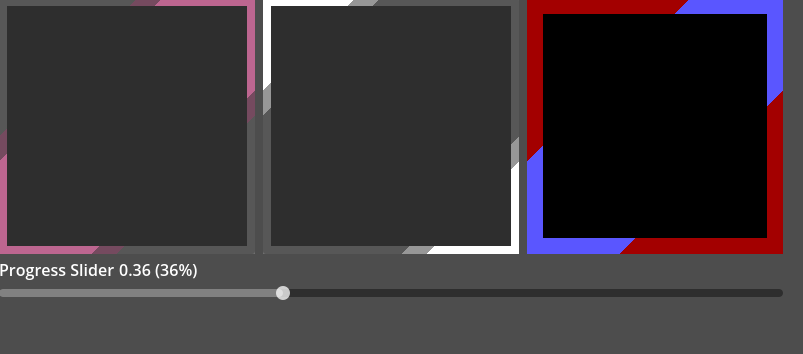
Angular Ability Cooldown Display

A simple shader for a sleek, angular way to display cooldowns or timers in your game!
Credits not required but welcome, let me know if you use this in your projects! 😀
Features controls for:
- Flip horizontally (Which is technically the same as flipping vertically!)
- Colours – Use either 3 or 5 colours for more control
- Smoothing – use one solid bar or have a second ‘smooth’ area.
Shader code
// Diagonal Ability Cooldown Shader by Skullbuns
// (Made in Godot 4.6.1.stable)

// A simple shader for a sleek, angular way to display cooldowns or timers in your game!
// Credits not required but welcome, let me know if you use this in your projects! :D

shader_type canvas_item;

group_uniforms setup;
uniform vec2 border_width = vec2(2,2); // Width of border in pixels
uniform vec2 panel_size = vec2(64, 64); //Size of the control node in pixels
uniform bool flip_h = false; //Fills from top right to bottom left outwards instead if true.

// Percentage as a range from 0 to 1. display cooldown remaining on this ability.
uniform float fill_progress : hint_range(0.0, 1.0) = 1.0;

//Defines the size of an outer boundary. This percent will be added to the fill_progress
// to create a semi-transparent section of the x%, even when fill_progress is at 0%.
uniform float edge_smooth : hint_range(0.0, 0.3) = 0.1;

group_uniforms colour_settings;

// Alpha values for the two boundaries above, plus the boundary outside of the current progress.
uniform vec4 solid_colour : source_color = vec4(0.278, 0.675, 0.949,1.0);
uniform vec4 smooth_colour : source_color = vec4(0.278, 0.675, 0.949, 0.5);
uniform vec4 empty_colour : source_color = vec4(1.0, 1.0, 1.0, 0.196);

//Optionally lerp colour for progress value too
uniform bool change_colour_with_progress = true;
uniform vec4 solid_low_colour : source_color = vec4(1.0, 0.247, 0.349,1.0);
uniform vec4 smooth_low_colour : source_color = vec4(1.0, 0.247, 0.349,0.5);


// Erases diagonal border the lower fill_progress is.
vec4 get_progress_colour(vec2 uv){

	// returns 0 to 1 based on how close to the diagonal center this pixel is
	float test_value = flip_h ? abs(uv.x+uv.y-1.0) : 1.0 - abs(uv.x+uv.y-1.0);

	// completely in the mask - this percent fill has been reached
	if (test_value > 1.0-fill_progress){
		if (change_colour_with_progress){
			return mix(solid_low_colour, solid_colour, fill_progress);
		}
		return solid_colour;
	}

	// smooth edge - keeps corners even when  at 0%
	if (test_value > 1.0-fill_progress-edge_smooth){
		if (change_colour_with_progress){
			return mix(smooth_low_colour, smooth_colour, fill_progress);
			}
		return smooth_colour;
		}

	return empty_colour;
}

// Checks if uv coordinate is near enough to the edge to be in the border.
bool is_border(vec2 uv){
	vec2 min_border_uv = border_width/panel_size;
	return (uv.x >= 1.0-min_border_uv.x) || (uv.y >= 1.0-min_border_uv.y)||(uv.x<min_border_uv.x)||(uv.y<min_border_uv.y);
}

// Snaps UV coordinate to nearest world-space pixel.
vec2 uv_to_pixel_coordinate(vec2 uv){
	vec2 pixel_step = vec2(1.0) / panel_size;
	//vec2 pixel_offset = pixel_step * 0.5;

	return floor((uv) / pixel_step) * pixel_step;
}


void fragment(){
	vec2 pixel_uv = uv_to_pixel_coordinate((UV));

	COLOR = vec4(0.0);
	if (is_border(pixel_uv)){
		COLOR = get_progress_colour(UV);
	}
}
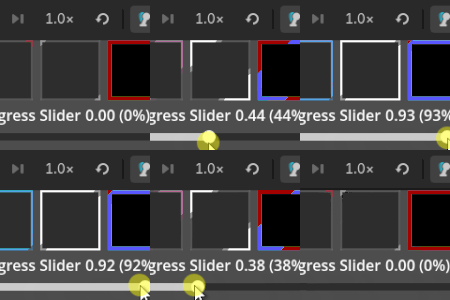
Live Preview

This is the best shader in the world… im defenetly crediting