
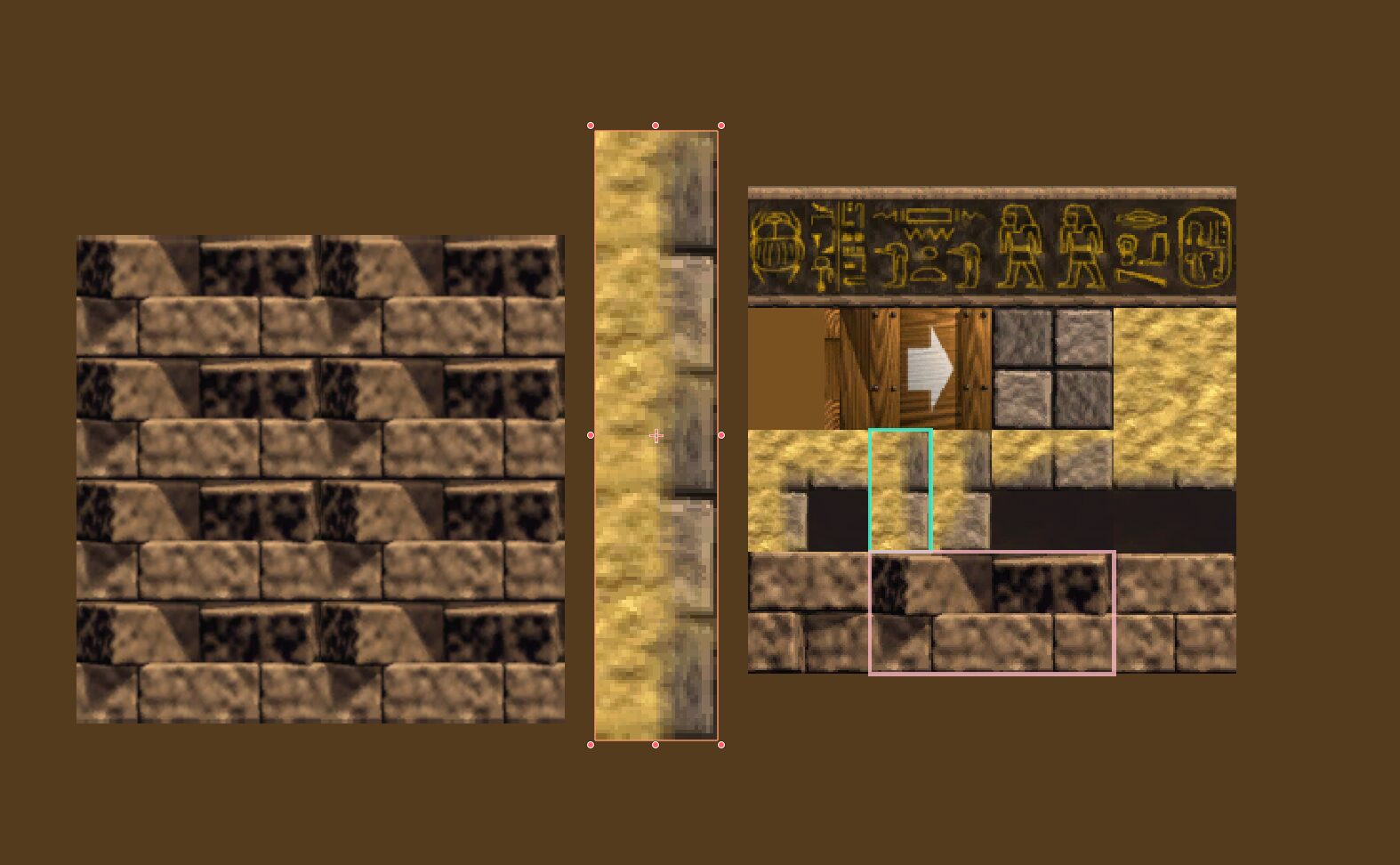
Atlas Region Tiled Repeat (2D)

For when you want to repeat the texture of a sprite that’s part of an atlas. When using linear filtering a little bit of the seem is visible even with the slight adjustment (seem_hiding and seem_scale) which reduces texture bleed a little.
All you need is to set your atlas as a regular texture (not an AtlasTexture) on the sprite and set up the region using the sprite region properties, then you can set the tile_factor shader parameter to adjust the tiling.
Setting the sprite’s scale and tile_factor to the same values should scale it up appropriately.
Shader code
shader_type canvas_item;

uniform vec2 tile_factor = vec2(1.0, 1.0);

void fragment() {
    vec2 tex_size = vec2(textureSize(TEXTURE, 0));
    vec2 seem_hiding = vec2(1.0/64.0) / tex_size;
    vec2 seem_scale = vec2(1.0) - seem_hiding * 2.0;

    vec2 tiled_pixel = mod((UV - REGION_RECT.xy) * tile_factor, REGION_RECT.zw) * seem_scale + seem_hiding;

    COLOR = texture(TEXTURE, (tiled_pixel + REGION_RECT.xy));
}