
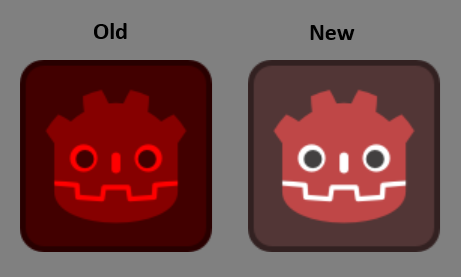
Better Modulation Shader V2 (Hue Shifting)

This is an improved version of the better modulation shader, this one uses hue shifting instead of just greyscaling the image.
Please note that this one is marginally slower than the original (that I posted a while back) grayscale image shader, it shouldn’t matter in most cases unless you are using this a lot. If the grayscale and this gives the same result for an image then using the grayscale version as it is slightly faster.
This is for changing the color of a mostly uniform image into another color, using the built in modulation will usually lend poor results.
This shader simply converts the image to hsv color, changes the hue, then converts back.
Simply attach the shader to any Sprite2d or TextureRect and set the color you want from the shader parameters.
Downside is that this applies to the whole image, if you wish to only apply this to a part of the image it gets a little bit more complicated but you can do that using SDFs. However at that point opening an image editor might be easier, this is the lazy quick approach that can be done in godot.
SDFs: https://iquilezles.org/articles/distfunctions2d/
Shader code
shader_type canvas_item;

uniform vec4 tint_color : source_color = vec4(1.0, 0.2, 0.2, 1.0);

uniform float preserve_saturation : hint_range(0.0, 1.0) = 1.0;
uniform float brightness : hint_range(0.0, 2.0) = 1.0;


// Convert RGB to HSV
vec3 rgb_to_hsv(vec3 c) {
    vec4 K = vec4(0.0, -1.0 / 3.0, 2.0 / 3.0, -1.0);

    vec4 p = mix(
        vec4(c.bg, K.wz),
        vec4(c.gb, K.xy),
        step(c.b, c.g)
    );

    vec4 q = mix(
        vec4(p.xyw, c.r),
        vec4(c.r, p.yzx),
        step(p.x, c.r)
    );

    float d = q.x - min(q.w, q.y);
    float e = 1.0e-10;

    return vec3(
        abs(q.z + (q.w - q.y) / (6.0 * d + e)),
        d / (q.x + e),
        q.x
    );
}


// Convert HSV to RGB
vec3 hsv_to_rgb(vec3 c) {
    vec3 p = abs(
        fract(c.xxx + vec3(0.0, 2.0 / 3.0, 1.0 / 3.0))
        * 6.0 - 3.0
    );

    return c.z * mix(
        vec3(1.0),
        clamp(p - 1.0, 0.0, 1.0),
        c.y
    );
}


void fragment() {
    vec4 original = texture(TEXTURE, UV);

    vec3 original_hsv = rgb_to_hsv(original.rgb);
    vec3 target_hsv = rgb_to_hsv(tint_color.rgb);

    // Change hue to the desired color
    original_hsv.x = target_hsv.x;

    // Preserve original saturation variations
    original_hsv.y = mix(
        target_hsv.y,
        original_hsv.y,
        preserve_saturation
    );

    // Preserve brightness variations
    original_hsv.z *= target_hsv.z * brightness;
    original_hsv.z = clamp(original_hsv.z, 0.0, 1.0);

    vec3 result = hsv_to_rgb(original_hsv);

    COLOR = vec4(result, original.a * tint_color.a);
}