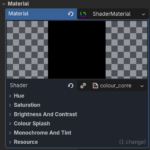
Colour Correction / Grading

Coming from a college education in mixed media, I figure I would make my own series of shaders to manipulate the camera into looking more cinematic.
Hue, Saturation, Brightness (Value) and Contrast are hopefully self-explanatory.
Colour Splash, allows you to desaturate all but a select colour or colours from the camera render.
Primary and secondary colours can be altered separately; this allows you to create cool things like complementary, duo-tone, and enhanced-analogous colour schemes in which the secondary colour can complement the primary colour without un-de-saturating the rest of the colour range.
Monochrome desaturates all colour from the camera render except for any tint colour added.
Tint, depending on the colour chosen and its strength. This will add a warm or cool effect to the overall camera render.
I’ve been inspired by colour grading/correction tools often found in video editing software like Davinci Resolve, Adobe After Effects, Sony Vegas Pro, etc.
This shader aims to allow you to dial in a set tone for your project all in one place. Using the values of Hue Saturation, and Brightness, you can dial in unique tone maps. This is somewhat superficial compared to the amount of manipulation you can achieve, but hopefully, more people find it helpful than a novelty.
Be careful of the monochrome and tint factors; it can be somewhat counterintuitive at first. But the monochromatic makes it possible to implement a wide range of Black n white, cyanotype, and sepia types of film effects, whereas tint adds an overall singular hue to the scene colours. This can be odd when you want it to be more blue, but the colours currently present are making the scene seem more green or purple.
I am going to admit I probably spent way too much time on this. I have probably made code that is inefficient and worse than just learning what Godot camera already has.
But this is my first shader upload of a planned five. The others are almost complete, but my energy to carry on has depleted in the last two weeks.
Any and all feedback would be appreciated.
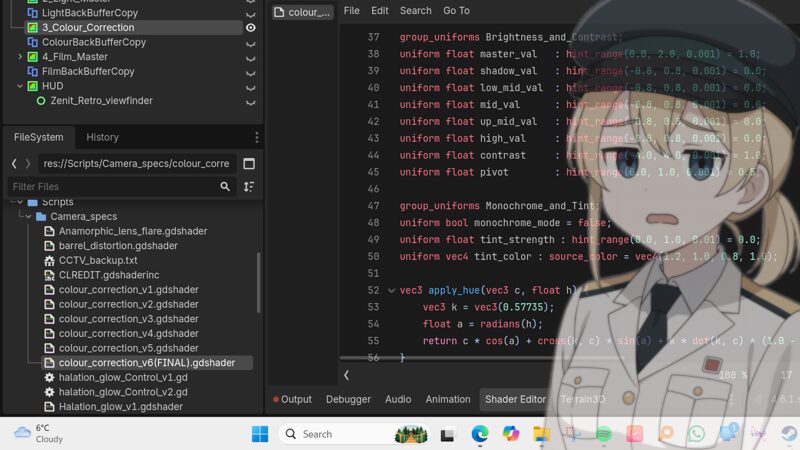
Shader code
shader_type canvas_item;

uniform sampler2D screen_texture : hint_screen_texture, repeat_disable, filter_nearest;

// Hue
group_uniforms Hue;
uniform float master_hue   : hint_range(-180.0, 180.0, 0.1) = 0.0;
uniform float shadow_hue   : hint_range(-180.0, 180.0, 0.1) = 0.0;
uniform float low_mid_hue  : hint_range(-180.0, 180.0, 0.1) = 0.0;
uniform float mid_hue      : hint_range(-180.0, 180.0, 0.1) = 0.0;
uniform float up_mid_hue   : hint_range(-180.0, 180.0, 0.1) = 0.0;
uniform float high_hue     : hint_range(-180.0, 180.0, 0.1) = 0.0;

// Saturation
group_uniforms Saturation;
uniform float master_sat   : hint_range(0.0, 2.0, 0.001) = 1.0;
uniform float shadow_sat   : hint_range(0.0, 2.0, 0.001) = 1.0;
uniform float low_mid_sat  : hint_range(0.0, 2.0, 0.001) = 1.0;
uniform float mid_sat      : hint_range(0.0, 2.0, 0.001) = 1.0;
uniform float up_mid_sat   : hint_range(0.0, 2.0, 0.001) = 1.0;
uniform float high_sat     : hint_range(0.0, 2.0, 0.001) = 1.0;

// Brightness and Contrast
group_uniforms Brightness_and_Contrast;
uniform float master_val   : hint_range(0.0, 2.0, 0.001) = 1.0;
uniform float shadow_val   : hint_range(-0.8, 0.8, 0.001) = 0.0;
uniform float low_mid_val  : hint_range(-0.8, 0.8, 0.001) = 0.0;
uniform float mid_val      : hint_range(-0.8, 0.8, 0.001) = 0.0;
uniform float up_mid_val   : hint_range(-0.8, 0.8, 0.001) = 0.0;
uniform float high_val     : hint_range(-0.8, 0.8, 0.001) = 0.0;
uniform float contrast     : hint_range(-4.0, 4.0, 0.001) = 1.0;
uniform float pivot        : hint_range(0.0, 1.0, 0.001) = 0.5;

// Colour Splash
group_uniforms Colour_Splash;

/**
 * Master switch for colour splash. Monochrome mode will disable it.
 */
uniform bool enable_colour_splash = false;

// ------------------- Primary Colour -------------------
/**
 * Primary hue (e.g. red = 0, orange = 30, etc.).
 */
uniform float primary_hue : hint_range(0.0, 360.0, 0.1) = 0.0;

/**
 * Width of the primary hue range.
 */
uniform float primary_range : hint_range(0.0, 0.5, 0.001) = 0.12;

/**
 * Strength of the primary colour splash (higher = bolder).
 */
uniform float primary_strength : hint_range(0.0, 2.0, 0.01) = 1.4;

// ------------------- Secondary Colour -------------------
/**
 * Enable secondary colour splash.
 */
uniform bool enable_secondary = false;

/**
 * Secondary hue (e.g. blue = 240).
 */
uniform float secondary_hue : hint_range(0.0, 360.0, 0.1) = 240.0;

/**
 * Width of the secondary hue range.
 */
uniform float secondary_range : hint_range(0.0, 0.5, 0.001) = 0.10;

/**
 * Strength of the secondary colour splash (lower = softer effect).
 */
uniform float secondary_strength : hint_range(0.0, 2.0, 0.01) = 0.7;
/**
* Strength of desaturation outside of the selected colours (0.0 = no desaturation, 1.0 = full desaturation, 1.0 - 2.25 = inverted colour range).
*/

uniform float desat_outside : hint_range(0.0, 2.25, 0.01) = 0.95;

// Monochrome and Tint
group_uniforms Monochrome_and_Tint;
/** CAUTION: Monochrome mode disables colour splash */
uniform bool monochrome_mode = false;
/** CAUTION: Tint affects splash colours */
uniform float tint_strength : hint_range(0.0, 1.0, 0.01) = 0.0;
uniform vec4 tint_color : source_color = vec4(1.2, 1.0, 0.8, 1.0);

vec3 apply_hue(vec3 c, float h) {
    vec3 k = vec3(0.57735);
    float a = radians(h);
    return c * cos(a) + cross(k, c) * sin(a) + k * dot(k, c) * (1.0 - cos(a));
}

float get_hue(vec3 c) {
    vec4 K = vec4(0.0, -1.0 / 3.0, 2.0 / 3.0, -1.0);
    vec4 p = mix(vec4(c.bg, K.wz), vec4(c.gb, K.xy), step(c.b, c.g));
    vec4 q = mix(vec4(p.xyw, c.r), vec4(c.r, p.yzx), step(p.x, c.r));
    float d = q.x - min(q.w, q.y);
    float e = 1.0e-10;
    return abs(q.z + (q.w - q.y) / (6.0 * d + e));
}

void fragment() {
    vec4 tex = texture(screen_texture, SCREEN_UV);
    vec3 color = tex.rgb;
    float lum = dot(color, vec3(0.299, 0.587, 0.114));

    float s_m  = smoothstep(0.25, 0.0, lum);
    float lm_m = smoothstep(0.0, 0.25, lum) * smoothstep(0.5, 0.25, lum);
    float m_m  = smoothstep(0.25, 0.5, lum) * smoothstep(0.75, 0.5, lum);
    float um_m = smoothstep(0.5, 0.75, lum) * smoothstep(1.0, 0.75, lum);
    float h_m  = smoothstep(0.75, 1.0, lum);

    // 1. Apply Hue
    color = apply_hue(color, master_hue + (shadow_hue * s_m) + (low_mid_hue * lm_m) + (mid_hue * m_m) + (up_mid_hue * um_m) + (high_hue * h_m));

    // 2. Apply Saturation (including monochrome kill switch)
    float gray = dot(color, vec3(0.3, 0.59, 0.11));
    float sat_multiplier = monochrome_mode ? 0.0 : 1.0;

    float final_sat = master_sat * (1.0 + (shadow_sat-1.0)*s_m + (low_mid_sat-1.0)*lm_m + (mid_sat-1.0)*m_m + (up_mid_sat-1.0)*um_m + (high_sat-1.0)*h_m);

    color = mix(vec3(gray), color, final_sat * sat_multiplier);

    // 3. Apply Colour Splash
    if (enable_colour_splash && !monochrome_mode) {
        float pixel_hue = get_hue(color);
        float current_lum = dot(color, vec3(0.299, 0.587, 0.114));

        vec3 base_color = mix(color, vec3(current_lum), 1.0 + desat_outside-1.0);

        float p_norm = primary_hue / 360.0;
        float p_dist = abs(pixel_hue - p_norm);
        p_dist = min(p_dist, 1.0 - p_dist);
        float p_mask = 1.0 - smoothstep(primary_range, primary_range + 0.08, p_dist);

        vec3 with_primary = mix(base_color, color, p_mask * primary_strength);

        if (enable_secondary) {
            float s_norm = secondary_hue / 360.0;
            float s_dist = abs(pixel_hue - s_norm);
            s_dist = min(s_dist, 1.0 - s_dist);
            float s_mask = 1.0 - smoothstep(secondary_range, secondary_range + 0.08, s_dist);

            color = mix(with_primary, color, s_mask * secondary_strength);
        } else {
            color = with_primary;
        }
    }

    // 5. Apply Brightness
    color += (shadow_val * s_m) + (low_mid_val * lm_m) + (mid_val * m_m) + (up_mid_val * um_m) + (high_val * h_m);
    color *= master_val;

    // 6. Apply Contrast
    color = (color - pivot) * contrast + pivot;

    // 7. Apply Monochrome and Tint
    float final_lum = dot(color, vec3(0.299, 0.587, 0.114));
    vec3 mono_tinted = vec3(final_lum) * tint_color.rgb;
    color = mix(color, mono_tinted, tint_strength);

    COLOR = vec4(clamp(color, 0.0, 1.0), tex.a);
}
Live Preview