
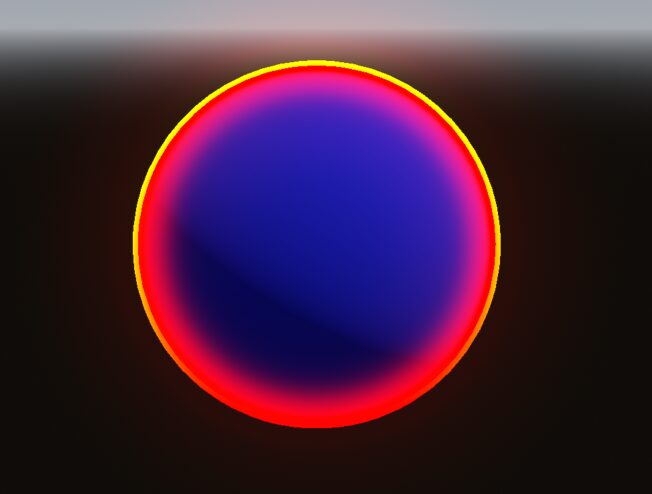
Fresnel Overlay
Fresnel with custom rim light to be used over existing materials.
Usage
Set it in the mesh “Material Overlay”
Shader code
shader_type spatial;

uniform float level : hint_range(0.0, 1.0) = 1.0;
uniform float emission_intensity : hint_range(0.0, 1.0);

uniform vec3 fresnel_color : source_color;
uniform float fresnel_intensity : hint_range(0.0, 10.0);
uniform float fresnel_power : hint_range(1.0, 10.0);

uniform vec3 rim_color : source_color;
uniform float rim_size : hint_range(0.0, 0.8);
uniform float rim_intensity : hint_range(0.0, 1.0);
uniform float rim_start : hint_range(-1.0, 1.0);
uniform float rim_end : hint_range(-1.0, 1.0);

void fragment()
{
	float dir = 1.0 - clamp(dot(normalize(NORMAL), normalize(VIEW)), 0.0, 1.0);
	float fresnel_amount = pow(dir, fresnel_power) * fresnel_intensity;
	vec3 fresnel = fresnel_color * fresnel_amount;

	float top_align = dot(normalize(NORMAL), vec3(0.0, 1.0, 0.0));
	float top_limit = smoothstep(rim_start, rim_end, top_align);
	float rim_amount = step(1.0 - rim_size, dir) * rim_intensity * top_limit;
	vec3 rim = rim_color * rim_amount;

	ALBEDO = fresnel + rim;
	EMISSION = (fresnel + rim) * emission_intensity * level;
	ALPHA = rim_amount + fresnel_amount * level;
}

void light() {
	DIFFUSE_LIGHT = vec3(1,1,1);
}