
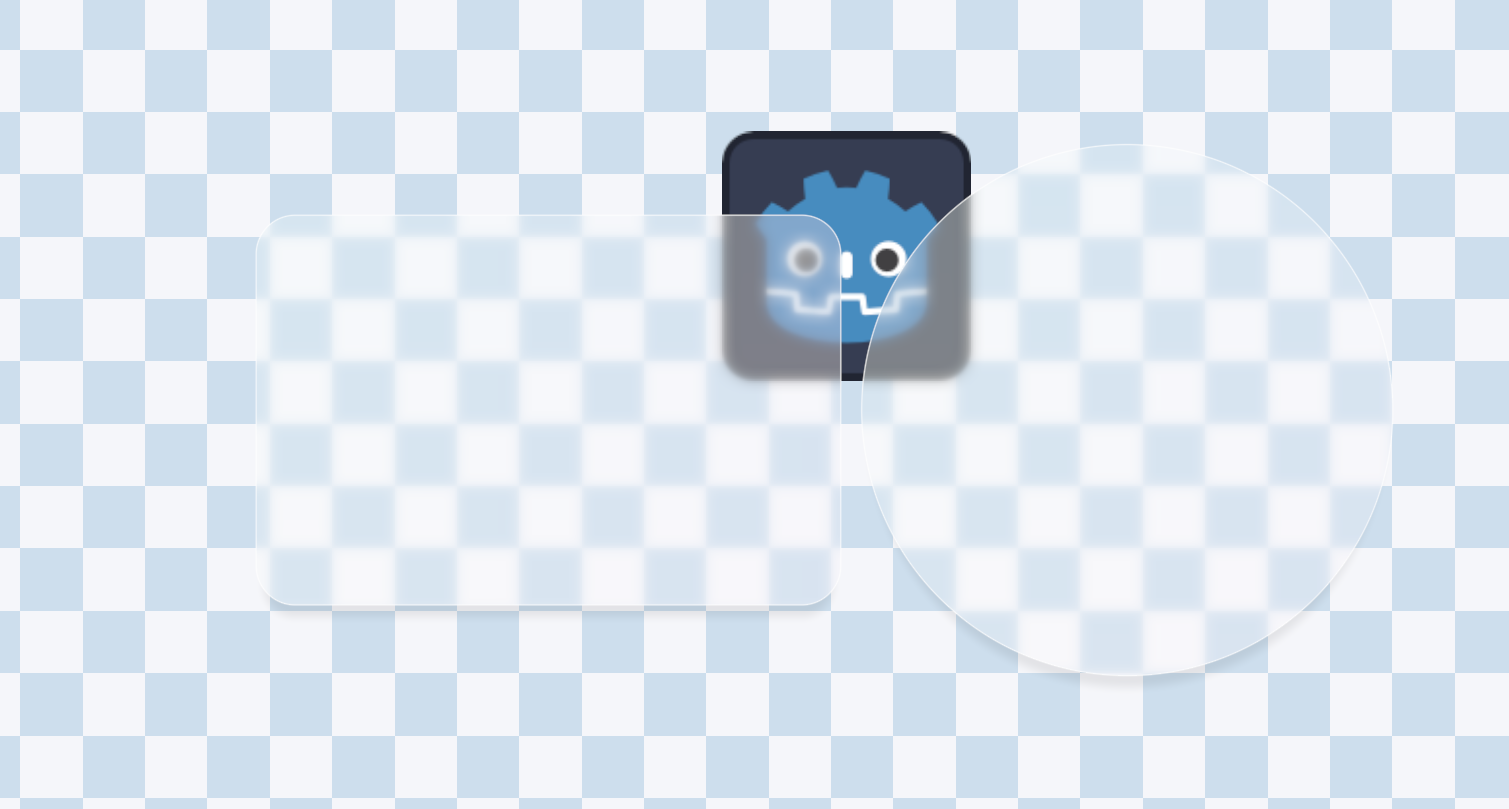
Frosted Glass Shader (Rounded Rect, Outline, Shadow)

1. Setup
Create a ColorRect or TextureRect node in your scene.
Assign a new ShaderMaterial to the node.
Load this shader file (CircleFrostedGlass.gdshader) into the material.
Important: Ensure the ColorRect is large enough to contain your shape + shadow + outline. The shader draws inside the node’s bounds.
2. Essential Parameters
node_size: This MUST match the size of your node (e.g., (400, 300)). You can set this manually in the inspector or use a script to update it automatically (see below).
shape_type: Choose 0 for Circle or 1 for Rounded Rectangle.
rect_size: The size of the visible glass pane in pixels.
corner_radius_*: Adjust the roundness of each corner independently (in pixels).
Shader code
shader_type canvas_item;

// Screen texture for frosted glass effect
uniform sampler2D screen_texture : hint_screen_texture, filter_linear_mipmap;

// === Shape Settings (Pixel Units) ===
// Shape type: 0=Circle, 1=Rounded Rectangle
uniform int shape_type : hint_range(0, 1) = 1;
// Rectangle size (pixels)
uniform vec2 rect_size = vec2(300.0, 200.0);
// Corner radii for each corner (pixels)
uniform float corner_radius_top_left = 20.0;
uniform float corner_radius_top_right = 20.0;
uniform float corner_radius_bottom_left = 20.0;
uniform float corner_radius_bottom_right = 20.0;
// Circle radius (pixels, used when shape_type=0)
uniform float circle_radius = 100.0;

// === Outline Settings ===
uniform bool outline_enabled = true;
uniform float outline_width = 2.0; // pixels
uniform vec4 outline_color : source_color = vec4(1.0, 1.0, 1.0, 0.8);

// === Shadow Settings ===
uniform bool shadow_enabled = true;
uniform vec4 shadow_color : source_color = vec4(0.0, 0.0, 0.0, 0.5);
uniform vec2 shadow_offset = vec2(10.0, 10.0); // pixel offset
uniform float shadow_blur = 15.0; // shadow blur radius

// === Edge Settings ===
uniform float edge_softness : hint_range(0.0, 5.0) = 1.0; // Edge antialiasing width (pixels)

// === Color Settings ===
uniform vec3 shape_color : source_color = vec3(0.3, 0.5, 0.9);
uniform float color_gradient_y : hint_range(0.0, 3.0) = 1.5;
uniform float color_gradient_x : hint_range(-2.0, 2.0) = -0.8;
uniform float color_multiplier : hint_range(0.1, 2.0) = 0.9;

// === Screen Blur Settings (Frosted Glass) ===
uniform bool enable_screen_blur = true;
uniform float blur_amount : hint_range(0.0, 10.0) = 3.0;
uniform int blur_samples : hint_range(1, 8) = 4;
// Glass opacity/tint strength (smaller value = more transparent/clear, larger value = more solid color)
uniform float glass_opacity : hint_range(0.0, 1.0) = 0.2;

// Node size (used for correct UV calculation, set via script)
uniform vec2 node_size = vec2(400.0, 400.0);

// Rounded Rectangle SDF
float rounded_rect_sdf(vec2 p, vec2 size, vec4 radii) {
    // radii: x=top-left, y=top-right, z=bottom-right, w=bottom-left
    vec2 r;
    if (p.x > 0.0) {
        r = (p.y > 0.0) ? radii.zw : radii.yz;
    } else {
        r = (p.y > 0.0) ? radii.xw : radii.xy;
    }
    float radius = (p.x > 0.0) ? r.x : r.y;

    vec2 q = abs(p) - size + radius;
    return min(max(q.x, q.y), 0.0) + length(max(q, 0.0)) - radius;
}

// Circle SDF
float circle_sdf(vec2 p, float r) {
    return length(p) - r;
}

// Gaussian Blur Sampling
vec3 blur_screen(vec2 screen_uv, vec2 pixel_size) {
    vec3 color = vec3(0.0);
    float total_weight = 0.0;

    for (int x = -blur_samples; x <= blur_samples; x++) {
        for (int y = -blur_samples; y <= blur_samples; y++) {
            vec2 offset = vec2(float(x), float(y)) * pixel_size * blur_amount;
            float weight = 1.0 / (1.0 + float(x * x + y * y));
            color += texture(screen_texture, screen_uv + offset).rgb * weight;
            total_weight += weight;
        }
    }

    return color / total_weight;
}

// Get SDF distance for the shape (Pixel Units)
float get_shape_sdf(vec2 p) {
    float dist;
    if (shape_type == 0) {
        // Circle
        dist = circle_sdf(p, circle_radius);
    } else {
        // Rounded Rectangle
        vec2 half_size = rect_size * 0.5;

        // Limit corner radius to half the side length
        float min_dim = min(half_size.x, half_size.y);
        vec4 radii = vec4(
            min(corner_radius_top_left, min_dim),
            min(corner_radius_top_right, min_dim),
            min(corner_radius_bottom_right, min_dim),
            min(corner_radius_bottom_left, min_dim)
        );

        dist = rounded_rect_sdf(p, half_size, radii);
    }
    return dist;
}

void fragment() {
    // Convert UV to pixel coordinates, center at (0,0)
    vec2 p = (UV - 0.5) * node_size;

    // 1. Draw Shadow (Behind Glass)
    vec4 final_color = vec4(0.0);

    if (shadow_enabled) {
        float s_dist = get_shape_sdf(p - shadow_offset);
        // Shadow mask: 1 inside, fades out outwards
        float s_mask = 1.0 - smoothstep(-shadow_blur, 0.0, s_dist);
        // Mix shadow
        final_color = mix(final_color, shadow_color, s_mask * shadow_color.a);
    }

    // 2. Draw Main Glass Shape
    float dist = get_shape_sdf(p);
    // Shape mask (1px antialiasing)
    float shape_alpha = 1.0 - smoothstep(0.0, edge_softness, dist);

    // Calculate gradient color (using normalized UV)
    vec2 uv_norm = UV - 0.5;
    // Correct UV aspect ratio for gradient calculation to keep visual consistency
    float aspect = node_size.x / node_size.y;
    uv_norm.x *= aspect;

    vec3 dynamic_color = vec3(
        shape_color.r + uv_norm.y * color_gradient_y,
        shape_color.g + uv_norm.x * color_gradient_x,
        shape_color.b
    ) * color_multiplier;

    vec3 glass_col = dynamic_color;

    // Apply Screen Blur (Frosted Glass Effect)
    if (enable_screen_blur) {
        vec2 screen_uv = SCREEN_UV;
        vec2 pixel_size = SCREEN_PIXEL_SIZE;
        vec3 blurred_bg = blur_screen(screen_uv, pixel_size);

        // Mix effect color with blurred background
        glass_col = mix(blurred_bg, glass_col, glass_opacity);
    }

    // Mix glass layer onto final color
    final_color = mix(final_color, vec4(glass_col, 1.0), shape_alpha);

    // 3. Draw Outline (Above Glass)
    if (outline_enabled) {
        // Outline mask: generated at edge, width is outline_width
        // abs(dist) < width/2 means outline centered on edge
        float outline_mask = 1.0 - smoothstep(outline_width * 0.5 - 0.5, outline_width * 0.5 + 0.5, abs(dist));

        // Use Alpha Compositing formula instead of simple mix to prevent gray edges
        vec4 src_color = outline_color;
        float src_alpha = outline_mask * outline_color.a;
        vec4 dst_color = final_color;

        // Final Alpha = SrcAlpha + DstAlpha * (1 - SrcAlpha)
        float out_alpha = src_alpha + dst_color.a * (1.0 - src_alpha);

        vec3 out_rgb = vec3(0.0);
        if (out_alpha > 0.0) {
            // Final RGB = (SrcRGB * SrcAlpha + DstRGB * DstAlpha * (1 - SrcAlpha)) / FinalAlpha
            out_rgb = (src_color.rgb * src_alpha + dst_color.rgb * dst_color.a * (1.0 - src_alpha)) / out_alpha;
        }

        final_color = vec4(out_rgb, out_alpha);
    }

    COLOR = final_color;
}

Pretty cool effect! love it!
Thanks for sharing this!
Here is a little advice: the node_size is actually able to be calculated inside fragment function like this:
vec2(1.0 / TEXTURE_PIXEL_SIZE.x, 1.0 / TEXTURE_PIXEL_SIZE.y)
btw: setup for corner radius top left seems invalid for some reason.
It works for TextureRect, but when using a ColorRect, the TEXTURE_PIXEL_SIZE will always be vec2(1.0), because there’s simply no user provided texture. So calculating the node_size from shader builtins is not always doable.
Another tip: use group_uniforms for better editor UX!
It looks so nice!