
Hatching shader

🇬🇧 Hatching Shader
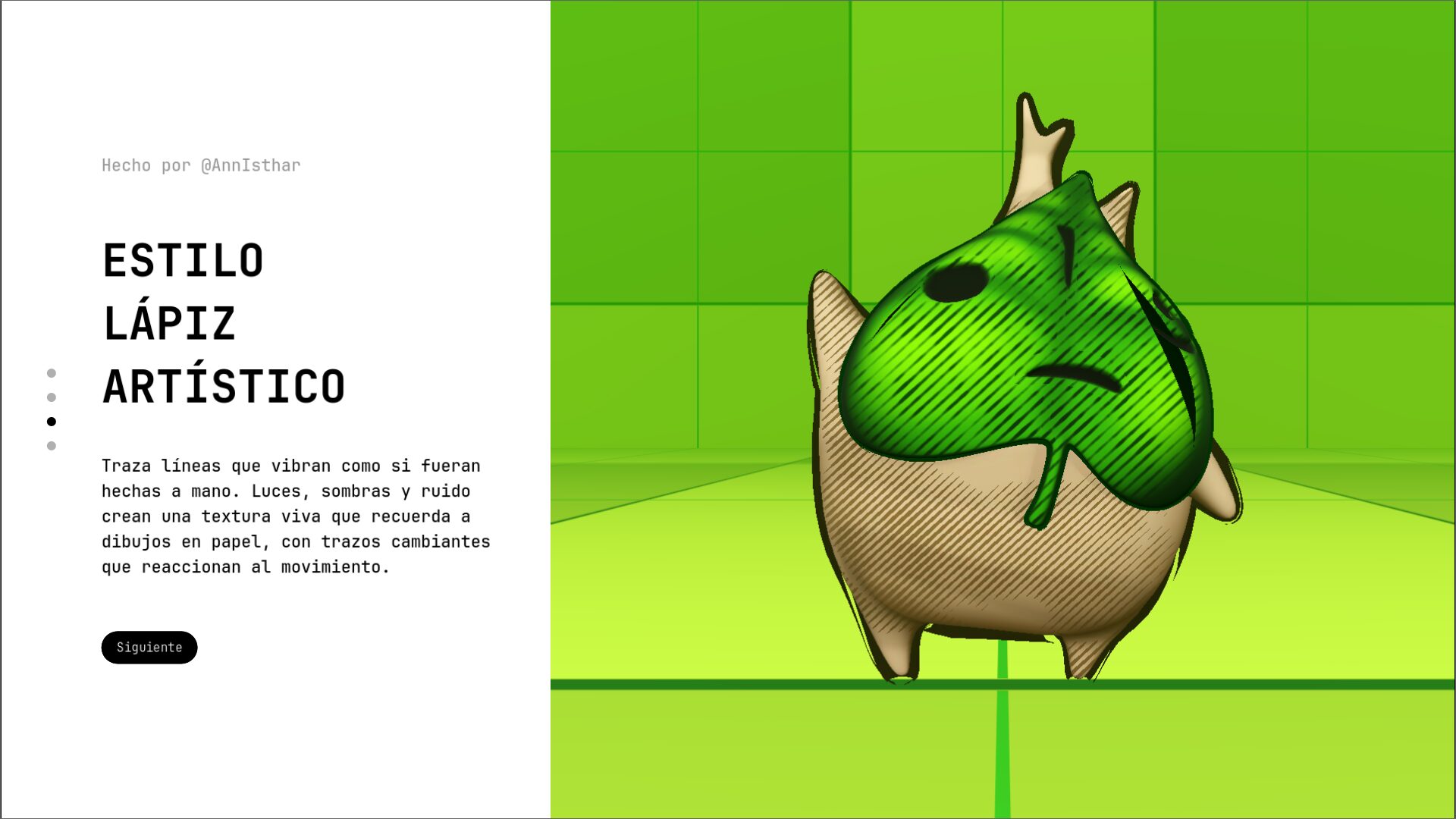
A stylized shader that adds linear or crosshatching shadow effects to 3D objects. Mimics hand-drawn pen strokes using screen-space shading.
Features:
-
Line and crosshatch shadow styles
-
Works with light direction
-
Ideal for sketch-style or illustrated games
🇪🇸 Shader de Hatching (Tramado)
Un shader que agrega sombreado con líneas, imitando trazos hechos a mano tipo boceto o tinta. Usa la dirección de la luz para generar sombras en tramado lineal o cruzado.
Características:
-
Estilos de sombra con líneas o cruces
-
Funciona con dirección de luz
-
Perfecto para juegos estilo cómic o dibujo
Shader code
shader_type spatial;
render_mode blend_mix,depth_draw_opaque,cull_back,specular_schlick_ggx, diffuse_toon;

// Texturas
uniform sampler2D albedo_texture : source_color;
uniform sampler2D roughness_texture : source_color;
uniform sampler2D overall_noise_texture : source_color;

// Luz
uniform vec3 light_direction = vec3(0.5, 0.0, 0.5);

// Rugosidad
uniform float roughness_amount : hint_range(0.0, 1.0) = 1.0;
uniform int roughness_channel : hint_range(0, 3) = 0;

// Colores y controles base
uniform vec4 background_color : source_color = vec4(0.3, 0.3, 0.3, 1.0);
uniform vec4 line_color : source_color = vec4(1.0, 1.0, 1.0, 1.0);

uniform float range : hint_range(0.0, 1.0) = 0.5;
uniform float softness : hint_range(0.0, 1.0) = 0.1;

uniform float angle : hint_range(0.0, 360.0) = 45.0;
uniform float pattern_scale : hint_range(1.0, 100.0) = 20.0;
uniform float line_thickness : hint_range(0.0, 1.0) = 1.0;
uniform float fade_thickness : hint_range(0.0, 1.0) = 0.5;
uniform float fresnel_thickness : hint_range(0.0, 1.0) = 0.5;

// Aleatoriedad
uniform float random_thickness : hint_range(0.0, 2.0) = 0.5;
uniform float random_offset : hint_range(0.0, 10.0) = 2.0;
uniform float random_angle : hint_range(0.0, 30.0) = 10.0;
uniform float overall_noise_scale : hint_range(1.0, 100.0) = 30.0;

// Nuevos parámetros para el efecto de movimiento
uniform float fps_effect_strength : hint_range(0.0, 1.0) = 0.5;
uniform float fps_speed : hint_range(0.1, 10.0) = 1.0;
uniform float line_jitter_amount : hint_range(0.0, 1.0) = 0.2;

void fragment() {
    vec3 normal = normalize(NORMAL);
    vec3 light_dir = normalize(light_direction);
    float NdotL = max(dot(normal, -light_dir), 0.0);
    float fresnel = pow(1.0 - max(dot(normal, VIEW), 0.0), 2.0);

    vec4 base_color = texture(albedo_texture, UV);

    // === Overall Noise ===
    float noise = texture(overall_noise_texture, UV * overall_noise_scale).r;

    // === Efecto de bajos FPS ===
    float frame_time = floor(TIME * fps_speed / 0.15) * 0.15;
    float fps_variation = sin(frame_time * 3.0) * fps_effect_strength;

    // === Aleatoriedad por fragmento con efecto FPS ===
    float rand_angle = angle + (noise - 0.5) * random_angle + fps_variation * 5.0 * line_jitter_amount;
    float rand_offset = (noise - 0.5) * random_offset + fps_variation * 2.0 * line_jitter_amount;
    float rand_thickness = line_thickness + (noise - 0.5) * random_thickness;

    // === Patrón de líneas con movimiento ===
    vec2 screen_pos = FRAGCOORD.xy / pattern_scale;
    float rad = radians(rand_angle);
    vec2 rotated_pos = vec2(
        screen_pos.x * cos(rad) - screen_pos.y * sin(rad),
        screen_pos.x * sin(rad) + screen_pos.y * cos(rad)
    );

    // Añadir variación temporal al patrón
    float temporal_offset = fps_variation * 2.0 * line_jitter_amount;
    float hatch = sin((rotated_pos.y + rand_offset + temporal_offset) * 3.14159);

    float dynamic_thickness = rand_thickness + fade_thickness * NdotL + fresnel * fresnel_thickness;
    float line_mask = smoothstep(-softness, softness, abs(hatch) - dynamic_thickness);

    float light_factor = smoothstep(range - 0.05, 1.0, NdotL);
    float final_mix = (1.0 - line_mask) * light_factor;

    vec3 final_color = mix(background_color.rgb, line_color.rgb, final_mix);

    ALBEDO = base_color.rgb * final_color;
    ALPHA = base_color.a;

    // Rugosidad
    vec4 r_tex = texture(roughness_texture, UV);
    float raw_roughness = roughness_amount;
    if (roughness_channel == 0) raw_roughness *= r_tex.r;
    else if (roughness_channel == 1) raw_roughness *= r_tex.g;
    else if (roughness_channel == 2) raw_roughness *= r_tex.b;
    else raw_roughness *= r_tex.a;

    ROUGHNESS = clamp(raw_roughness, 0.0, 1.0);
}
Live Preview

Couldn’t get it to work. Vid wasn’t helpful either. Shame, it looks really nice.
doesn’t work even with roughness/albedo/noise texture added.
Not exactly sure what i’m doing wrong. I tried translating the video but it didnt seem to help. 😢