
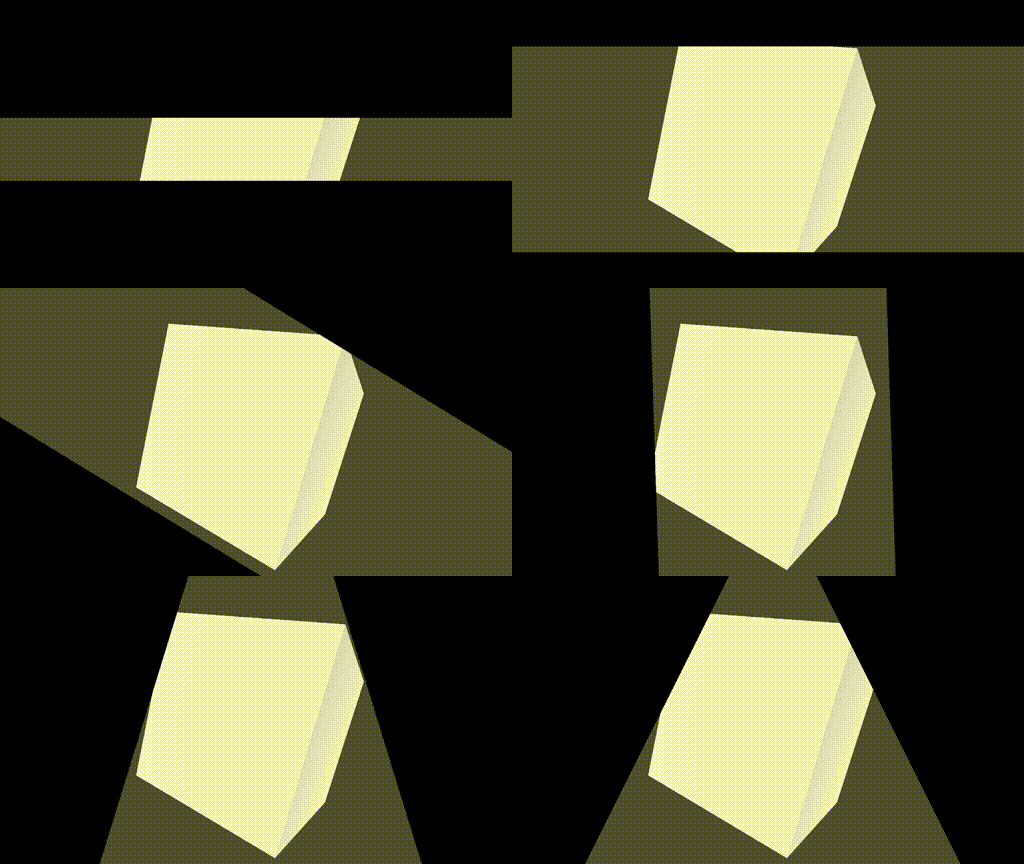
Immersive screen edges shader

The shader draws black stripes along the edges of the screen. They can be rotated in various ways and repositioned. To use the shader, create any sprite, expand it to fill the entire screen, and apply the shader to it.
Shader code
shader_type canvas_item;

uniform vec2 privot = vec2(960, 500);
uniform float roll = 0.0f;
uniform float rotate_angle = 0.0;
uniform float offset: hint_range(0.0, 1.0, 0.001) = 0.75;

bool is_inside(vec2 pos1, vec2 dir1, vec2 pos2, vec2 dir2, vec2 point) {
	return (dir1.x - pos1.x)*(point.y - pos1.y) - (dir1.y - pos1.y)*(point.x - pos1.x) < 0.0 &&
		   (dir2.x - pos2.x)*(point.y - pos2.y) - (dir2.y - pos2.y)*(point.x - pos2.x) > 0.0;
}

vec2 rotate(vec2 point, float angle) {
	return vec2(point.x * cos(angle) - point.y * sin(angle), point.x * sin(angle) + point.y * cos(angle));
}

void fragment() {
	COLOR = is_inside(privot + rotate(vec2(0, offset * (1.0/(SCREEN_PIXEL_SIZE.x * 4.0))), rotate_angle), privot + rotate(vec2(0.0, offset * (1.0/(SCREEN_PIXEL_SIZE.x * 4.0))) + vec2(1, roll), rotate_angle),
	 				  privot - rotate(vec2(0, offset * (1.0/(SCREEN_PIXEL_SIZE.x * 4.0))), rotate_angle), privot - rotate(vec2(0.0, offset * (1.0/(SCREEN_PIXEL_SIZE.x * 4.0))) + vec2(-1, roll), rotate_angle), FRAGCOORD.xy)
					  ? vec4(0.0,0.0,0.0,0.0) : vec4(0.0,0.0,0.0,1.0);
}