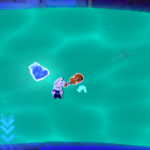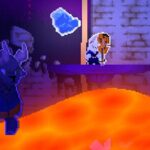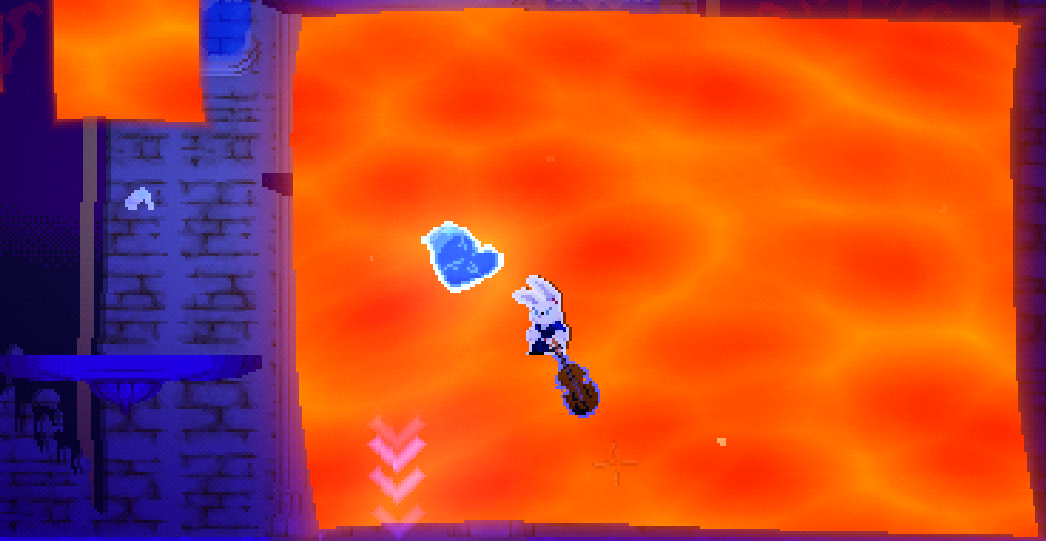
LAVA shader animated

This shader creates an animated lava-like or energy-like effect using a custom noise texture, multi-layer wave distortion, tri-color blending, and an outer glow system.
Features
- Custom noise texture support.
- Independent X/Y scrolling for the noise.
- UV wave distortion applied to the shape itself.
- Secondary wave layers for more natural movement.
- Separate wave distortion applied to the noise pattern.
- Adjustable noise scaling.
- Three-color gradient blending based on noise values.
- Pulsating color oscillation.
- Internal emissive glow generated from the noise.
- External glow around the edges with customizable colors.
- Animated glow intensity driven by the noise texture.
- Fully configurable through exposed uniforms.
How It Works
1. Shape Distortion
- The sprite UVs are distorted using multiple sine waves.
- Primary and secondary wave layers combine to create fluid movement.
- The result is a constantly shifting silhouette.
2. Edge Mask
- The shader calculates the distance from the distorted UVs to the sprite borders.
- An inner margin determines where the main effect appears.
- The border area is reserved for the outer glow effect.
3. Animated Noise
- The supplied noise texture is sampled using
SCREEN_UV. - The noise can scroll independently on both axes.
- Additional wave distortion is applied before sampling the texture.
- Noise scale controls the size of the pattern.
4. Lava Coloring
- Noise values are remapped into a three-color gradient:
- Color 1 → Darkest areas
- Color 2 → Mid tones
- Color 3 → Brightest areas
- This creates a molten lava or magical energy appearance.
5. Internal Glow
- Brighter noise regions receive an emissive boost.
- The glow intensity is controlled through
noise_glow_strength. - This gives the effect a hot, energetic look.
6. Oscillation
- A time-based sine function continuously shifts the noise values.
- This causes the colors to pulse and breathe over time.
7. Outer Glow
- Areas near the border transition into a customizable glow.
- Two colors are blended across the glow falloff.
- Glow intensity and softness are adjustable through:
outer_glow_levelouter_glow_power
- The glow brightness is also influenced by the animated noise texture.
Ideal Uses
- Lava surfaces
- Magical barriers
- Energy shields
- Fire effects
- Boss arenas
- Spell circles
- Portal borders
- UI effects
- Corrupted or demonic environments
Main Parameters
| Parameter | Description |
|---|---|
noise_texture |
Custom noise texture used for animation |
scroll_x, scroll_y |
Noise scrolling speed |
noise_scale |
Scale of the noise pattern |
wave_amplitude |
Strength of the main UV distortion |
wave_frequency |
Frequency of the main waves |
wave_speed |
Animation speed of the main waves |
inner_margin |
Border size used for glow transition |
noise_color_1 |
Dark color of the lava gradient |
noise_color_2 |
Mid color of the lava gradient |
noise_color_3 |
Bright color of the lava gradient |
noise_glow_strength |
Intensity of the internal emissive glow |
outer_glow_primary |
Main outer glow color |
outer_glow_secondary |
Secondary outer glow color |
outer_glow_level |
Overall glow intensity |
outer_glow_power |
Glow falloff softness |
oscillation_speed |
Speed of the color pulsing |
oscillation_strength |
Strength of the color pulsing |
Compatible with Godot 4.x CanvasItem shaders.
Simply assign any seamless noise texture to noise_texture and tweak the exposed parameters to create lava, fire, plasma, energy, or magical effects.
you can make noise here!
https://noisegen.bubblebirdstudio.com/
Shader code
shader_type canvas_item;
render_mode unshaded;

uniform sampler2D noise_texture : hint_default_white, repeat_enable;

uniform float scroll_x             : hint_range(-2.0, 2.0)  = 0.30;
uniform float scroll_y             : hint_range(-2.0, 2.0)  = 0.15;

uniform float noise_scale          : hint_range(0.0, 10.0)  = 1.0;

uniform float wave_amplitude       : hint_range(0.0, 0.12)  = 0.018;
uniform float wave_frequency       : hint_range(1.0, 20.0)  = 6.0;
uniform float wave_speed           : hint_range(0.0, 5.0)   = 1.20;
uniform float wave_secondary       : hint_range(0.0, 1.0)   = 0.40;

uniform float noise_wave_amplitude : hint_range(0.0, 0.3)   = 0.060;
uniform float noise_wave_frequency : hint_range(1.0, 20.0)  = 4.0;
uniform float noise_wave_speed     : hint_range(0.0, 5.0)   = 0.80;
uniform float noise_wave_secondary : hint_range(0.0, 1.0)   = 0.50;

uniform float inner_margin         : hint_range(0.01, 0.35) = 0.100;

uniform vec4  noise_color_1        : source_color = vec4(1.000, 0.133, 0.000, 1.0);
uniform vec4  noise_color_2        : source_color = vec4(1.000, 0.467, 0.000, 1.0);
uniform vec4  noise_color_3        : source_color = vec4(1.000, 0.933, 0.000, 1.0);

uniform float oscillation_speed    : hint_range(0.0, 5.0)   = 1.00;
uniform float oscillation_strength : hint_range(0.0, 1.0)   = 0.25;

uniform float noise_glow_strength  : hint_range(0.0, 3.0)   = 1.20;

uniform float outer_glow_level     : hint_range(0.0, 10.0)  = 4.00;
uniform float outer_glow_power     : hint_range(1.0, 8.0)   = 3.0;
uniform vec4  outer_glow_primary   : source_color = vec4(1.000, 0.267, 0.000, 1.0);
uniform vec4  outer_glow_secondary : source_color = vec4(1.000, 0.000, 0.000, 1.0);

void fragment() {
    vec2  uv = UV;
    float t  = TIME;

    // --- wave principal ---
    float t1 = t * wave_speed;
    float wx = sin(uv.y * wave_frequency       + t1)              * wave_amplitude
             + sin(uv.y * wave_frequency * 1.7 + t1 * 0.7 + 1.5) * wave_amplitude * wave_secondary;
    float wy = sin(uv.x * wave_frequency * 0.8 + t1 * 1.3)       * wave_amplitude
             + sin(uv.x * wave_frequency * 1.3 + t1 * 1.1 + 3.1) * wave_amplitude * wave_secondary;

    vec2 wuv = uv + vec2(wx, wy);

    // --- mascara ---
    float dist_x    = min(wuv.x, 1.0 - wuv.x);
    float dist_y    = min(wuv.y, 1.0 - wuv.y);
    float edge_dist = min(dist_x, dist_y);

    float lava_mask = step(inner_margin, edge_dist);
    float glow_t    = clamp(edge_dist / inner_margin, 0.0, 1.0);

    // --- wave do noise sobre SCREEN_UV ---
    float t2  = t * noise_wave_speed;
    vec2  suv = SCREEN_UV;
    float nwx = sin(suv.y * noise_wave_frequency       + t2)               * noise_wave_amplitude
              + sin(suv.y * noise_wave_frequency * 2.1 + t2 * 0.6 + 2.3)  * noise_wave_amplitude * noise_wave_secondary;
    float nwy = sin(suv.x * noise_wave_frequency * 0.9 + t2 * 1.4)        * noise_wave_amplitude
              + sin(suv.x * noise_wave_frequency * 1.5 + t2 * 1.2 + 0.8)  * noise_wave_amplitude * noise_wave_secondary;

    // noise_scale aplicado aqui: multiplica o UV antes do scroll e do sample
    vec2  noise_uv   = (suv + vec2(nwx, nwy)) * noise_scale + vec2(scroll_x, scroll_y) * t;
    float noise_val  = texture(noise_texture, noise_uv).r;

    // glow pulsa com noise cru (scale aplicado tambem, sem wave)
    float noise_edge = texture(noise_texture, suv * noise_scale + vec2(scroll_x, scroll_y) * t).r;

    // --- oscilacao ---
    float osc           = sin(t * oscillation_speed) * oscillation_strength * 0.5;
    float noise_shifted = clamp(noise_val + osc, 0.0, 1.0);

    // --- tri-color ---
    vec4 lava_col;
    if (noise_shifted < 0.4) {
        lava_col = mix(noise_color_1, noise_color_2, noise_shifted / 0.4);
    } else {
        lava_col = mix(noise_color_2, noise_color_3, (noise_shifted - 0.4) / 0.6);
    }

    lava_col.rgb += lava_col.rgb * pow(noise_val, 2.5) * noise_glow_strength;

    // --- glow externo ---
    float falloff    = pow(glow_t, outer_glow_power);
    vec4  glow_col   = mix(outer_glow_secondary, outer_glow_primary, falloff);
    glow_col.rgb    *= 1.0 + noise_edge * 0.4;
    float glow_alpha = clamp(falloff * outer_glow_level * 0.15, 0.0, 1.0);

    // --- composicao ---
    vec4 final_col;
    final_col.rgb = mix(glow_col.rgb, lava_col.rgb, lava_mask);
    final_col.a   = mix(glow_alpha,   1.0,          lava_mask);

    COLOR = final_col;
}
Live Preview