
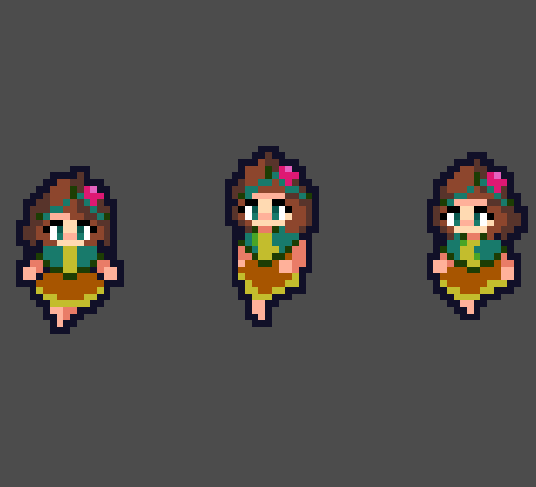
Lightweight Pixel Perfect Outline

This is an optimized and simple outline shader designed for pixel perfect art at low resolution. Make sure you leave at least 1 transparent pixel border in your sprites.
It also includes code for making the sprite blink a certain color. You can set the blink_time_scale parameter to 0 to ignore this.
Shader code
shader_type canvas_item;
uniform vec4 outline_color : source_color = vec4(1.0);
//Blinking modulates the base color.
//Set blink_time_scale to 0 if you don't want blinking.
uniform vec4 blink_color : source_color = vec4(1.0);
uniform float blink_time_scale : hint_range(0.0, 10.0, 0.1) = 0.0;

void fragment() {
	vec2 pixel_size = TEXTURE_PIXEL_SIZE;
	bool within = texture(TEXTURE, UV + pixel_size * vec2(1.0, 0.0)).a > 0.0;
	within = within || texture(TEXTURE, UV + pixel_size * vec2(1.0, 1.0)).a > 0.0;
	within = within || texture(TEXTURE, UV + pixel_size * vec2(1.0, -1.0)).a > 0.0;
	within = within || texture(TEXTURE, UV + pixel_size * vec2(0.0, -1.0)).a > 0.0;
	within = within || texture(TEXTURE, UV + pixel_size * vec2(0.0, 1.0)).a > 0.0;
	within = within || texture(TEXTURE, UV + pixel_size * vec2(-1.0, 1.0)).a > 0.0;
	within = within || texture(TEXTURE, UV + pixel_size * vec2(-1.0, -1.0)).a > 0.0;
	within = within || texture(TEXTURE, UV + pixel_size * vec2(-1.0, 0.0)).a > 0.0;
	bool outline = within && texture(TEXTURE, UV).a == 0.0;
	COLOR = mix(COLOR, COLOR * blink_color, 0.5 - 0.5 * cos(TIME * blink_time_scale));
	COLOR = float(!outline) * COLOR + float(outline) * outline_color;
}
Perfect and exactly what I needed. Thank you!
Thank you very much for this shader, i modified a little bit just to make the outline inside and remove the blinking, ill share if it helps someone:
//Shader modified from https://godotshaders.com/shader/lightweight-pixel-perfect-outline/
shader_type canvas_item;
uniform vec4 outline_color : source_color = vec4(1.0);

void fragment() {
    vec2 pixel_size = TEXTURE_PIXEL_SIZE;
    bool within = texture(TEXTURE, UV + pixel_size * vec2(1.0, 0.0)).a > 0.0;
    within = within || texture(TEXTURE, UV + pixel_size * vec2(0.0, -1.0)).a > 0.0;
    within = within || texture(TEXTURE, UV + pixel_size * vec2(0.0, 1.0)).a > 0.0;
    within = within || texture(TEXTURE, UV + pixel_size * vec2(-1.0, 0.0)).a > 0.0;
    bool outline = within && texture(TEXTURE, UV).a == 0.0;
    COLOR = float(!outline) * COLOR + float(outline) * outline_color;
}