

Multilayer Snowfall Shader

This shader simulates a snow effect with customizable parameters for appearance, movement, and layering. The main features include:
- Snow Appearance: Control the spread, size, color, and transparency of the snowflakes.
- Snow Movement: Set the speed, wind direction, and the number of depth layers.
- Noise Generation: The shader uses a noise matrix and pattern to generate the appearance and randomness of the snowflakes.
- Layered Snowflakes: Snowflakes are rendered in multiple layers with varying depths and movement.
Shader code
shader_type canvas_item;

// Snow appearance parameters
uniform float spread : hint_range(0.0, 1.5) = 0.5;        // Snowflake spread
uniform float size : hint_range(0.01, 5.0) = 0.5;        // Snowflake size
uniform vec4 snow_color : source_color = vec4(1.0);      // Snow color
uniform float snow_transparency: hint_range(-0.5, 1.0) = 0.2;   // Intensity of the snow transparency

// Snow movement parameters
uniform float speed : hint_range(0.0, 10.0) = 0.5;       // Fall speed
uniform float wind : hint_range(-2.0, 2.0) = 0.0;        // Wind direction and strength
uniform int num_of_layers = 40;                          // Depth layers

// Constants for noise generation
const mat3 NOISE_MATRIX = mat3(
    vec3(13.323122, 23.5112, 21.71123),
    vec3(21.1212, 28.7312, 11.9312),
    vec3(21.8112, 14.7212, 61.3934)
);

// Helper function to generate snowflake pattern
vec3 generate_snowflake(vec2 coord, float layer_index, float time, float wind_strength) {
    // Scale coordinates based on layer depth
    float layer_scale = 1.0 + layer_index * 0.5 / (max(size, 0.01) * 2.0);
    vec2 scaled_coord = coord * layer_scale;

    // Apply movement (falling + wind)
    vec2 movement = vec2(
        scaled_coord.y * (spread * mod(layer_index * 7.238917, 1.0) - spread * 0.5) +
        (-wind_strength) * speed * time * 0.5,  // Reverse the wind direction by negating wind_strength
        -speed * time / (1.0 + layer_index * 0.5 * 0.03)
    );
    vec2 final_coord = scaled_coord + movement;

    // Generate noise pattern
    vec3 noise_input = vec3(floor(final_coord), 31.189 + layer_index);
    vec3 noise_val = floor(noise_input) * 0.00001 + fract(noise_input);
    vec3 random = fract((31415.9 + noise_val) / fract(NOISE_MATRIX * noise_val));

    // Calculate snowflake shape
    vec2 shape = abs(mod(final_coord, 1.0) - 0.5 + 0.9 * random.xy - 0.45);
    shape += 0.01 * abs(2.0 * fract(10.0 * final_coord.yx) - 1.0);

    // Calculate edge softness
    float depth_offset = 5.0 * sin(time * 0.1);
    float edge_softness = 0.005 + 0.05 * min(0.5 * abs(layer_index - 5.0 - depth_offset), 1.0);

    // Calculate final shape
    float shape_value = 0.6 * max(shape.x - shape.y, shape.x + shape.y) + max(shape.x, shape.y) - 0.01;

    return vec3(smoothstep(edge_softness, -edge_softness, shape_value) *
                (random.x / (1.0 + 0.02 * layer_index * 0.5)));
}

void fragment() {
    vec3 snow_accumulation = vec3(0.0);

    // Generate snow for each layer
    for (int i = 0; i < num_of_layers; i++) {
        snow_accumulation += generate_snowflake(UV, float(i), TIME, wind);
    }

    // Calculate final color
    float snow_intensity = clamp(length(snow_accumulation), 0.0, 1.0);
    vec4 base_color = texture(TEXTURE, UV);

    // Apply transparency effect to the snow color
    vec4 transparency_color = vec4(snow_color.rgb * (1.0 + snow_transparency), snow_intensity);

    COLOR = mix(base_color, transparency_color, snow_intensity);
}
Live Preview
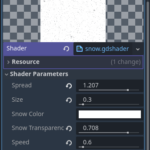

how do I make the background transparent
I changed base_color in line 65 to:
vec4 base_color = vec4(0.0);
Hello! Is there any way to remove the front layer snowflakes? I’ve looked through the code, but I’m not sure what value is responsible for their creation.
Hi. Line 59: change to
for (int i = 10; i < num_of_layers; i++) {
This will just skip the first 10 layers. If you need more, just increase the ‘i’ value.
AMAZING shader!
can this shader be used in madmapper or millumin?
I did try copy the shader and pasted the in to madmapper code ediotor, but gets a lot
of errors.
regards
Sebastian