
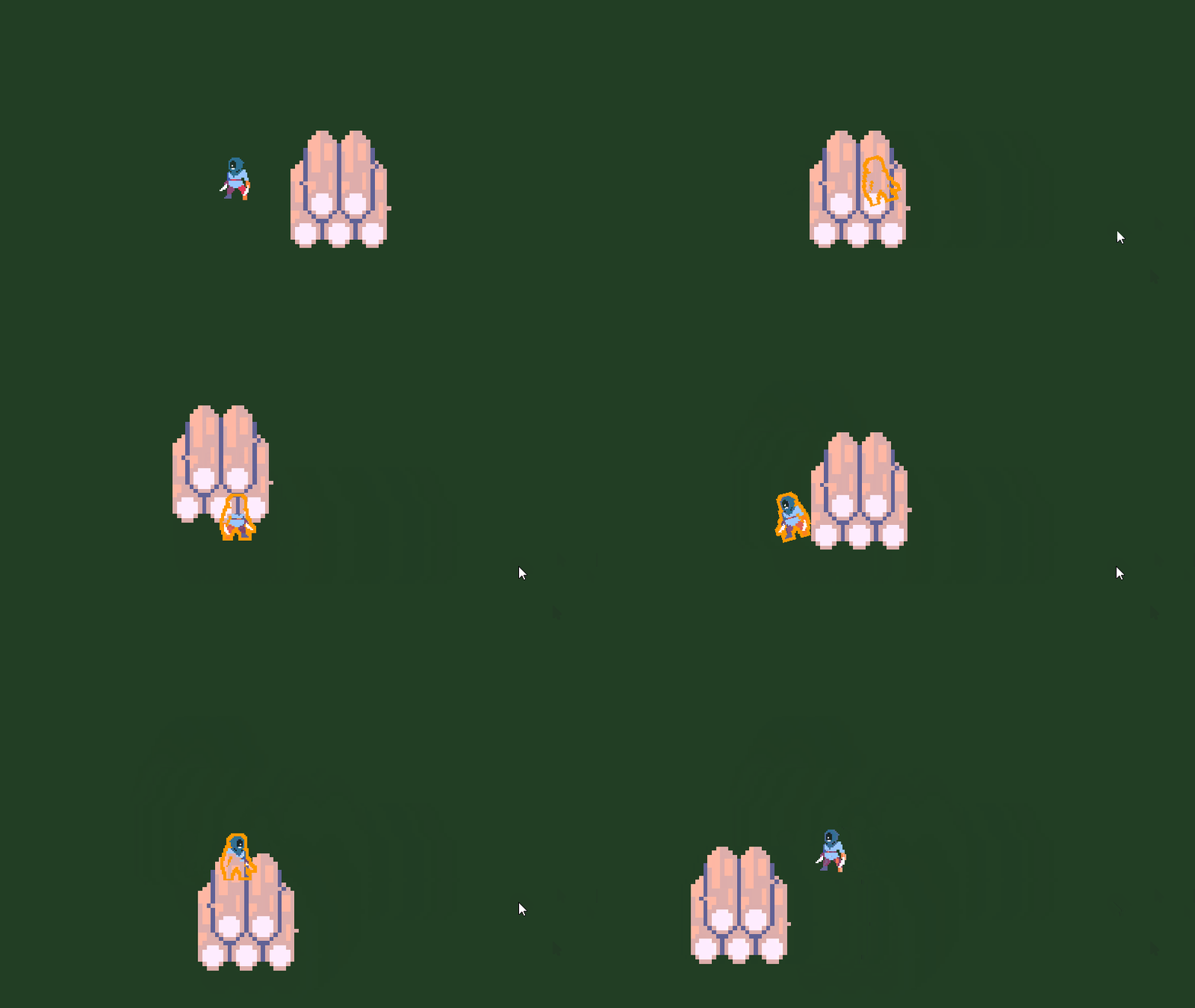
Occlusion Outline for Godot 4+
A simple and lightweight 2D outline system for Godot 4+ that makes your character visible when hidden behind walls or obstacles.
It creates a clone of your sprite with an outline shader and only displays it when occluded, ensuring pixel-perfect alignment with the original.
✨ Features
-
Works with Sprite2D and AnimatedSprite2D.
-
Fully compatible with Godot 4+.
-
Flip support (
flip_h,flip_v), pivot offsets, and texture regions. -
Occlusion detection works even if the player is inside a wall.
-
Customizable outline color, thickness, and alpha threshold.
🚀 Quick Use
-
Add files to your project
-
OcclusionOutline.gd→ anywhere in your scripts folder. -
occlusion_outline.gdshader→ put inres://shader/.
-
-
Prepare your scene
-
Your player must have a
Sprite2DorAnimatedSprite2D. -
Your walls/obstacles must have collisions on a dedicated physics layer.
-
-
Attach the script
-
Add
OcclusionOutline.gdas a script to your player (or a Node2D parent). -
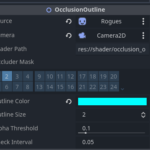
In the Inspector:
-
source → your Sprite2D or AnimatedSprite2D.
-
camera → your Camera2D.
-
occluder_mask → enable the collision layer used by walls.
-
Adjust outline_color, outline_size, and alpha_threshold to taste.
-
-
-
Run the game
-
The outline will only appear when your player is behind an obstacle.
-
Script :
extends Node2D
class_name OcclusionOutline

# Made by Seed from Kode Game Studio

# The original sprite node to outline (Sprite2D or AnimatedSprite2D)
@export var source: Node2D
# The camera used for occlusion checks (usually your main Camera2D)
@export var camera: Camera2D
# Put the path of the occlusion_outline.gdshader
@export var shader_path := "res://shader/occlusion_outline.gdshader"
# Physics collision layer mask for obstacles (e.g., walls)
@export_flags_2d_physics var occluder_mask := 2
# Outline color
@export var outline_color: Color = Color(1.0, 0.6, 0.0, 1.0)
# Outline thickness (in pixels)
@export_range(1, 5, 1) var outline_size := 2
# Alpha threshold for transparency detection
@export_range(0.0, 1.0, 0.01) var alpha_threshold := 0.1
# How often to check occlusion (seconds)
@export var check_interval := 0.05

var _outline_node: Node2D
var _mat: ShaderMaterial
var _accum := 0.0

func _ready() -> void:
	# Auto-detect the source sprite if not set
	if source == null:
		var s2d := get_node_or_null("Sprite2D")
		if s2d:
			source = s2d
		else:
			var a2d := get_node_or_null("AnimatedSprite2D")
			if a2d:
				source = a2d

	# Auto-detect the camera if not set
	if camera == null:
		camera = get_viewport().get_camera_2d()

	if not source or not (source is Sprite2D or source is AnimatedSprite2D):
		push_error("OcclusionOutline: 'source' must be a Sprite2D or AnimatedSprite2D")
		set_process(false)
		return

	# Create a CanvasLayer so the outline is rendered above everything else
	var layer := CanvasLayer.new()
	layer.layer = 100
	layer.follow_viewport_enabled = true
	add_child(layer)

	# Create a clone of the source sprite (only used for outline rendering)
	if source is AnimatedSprite2D:
		var s := source as AnimatedSprite2D
		var o := AnimatedSprite2D.new()
		o.sprite_frames = s.sprite_frames
		o.animation = s.animation
		o.frame = s.frame
		o.speed_scale = s.speed_scale
		# No '.playing' in Godot 4; mirror play state properly
		if s.is_playing():
			# If current animation is known, play it; else generic play()
			if s.animation != StringName():
				o.play(s.animation)
			else:
				o.play()
		else:
			o.stop() # or o.pause(), both OK at init
		# Visual flags
		o.flip_h = s.flip_h
		o.flip_v = s.flip_v
		o.centered = s.centered
		o.offset = s.offset
		_outline_node = o
	else:
		var s2 := source as Sprite2D
		var o2 := Sprite2D.new()
		o2.texture = s2.texture
		o2.hframes = s2.hframes
		o2.vframes = s2.vframes
		o2.frame = s2.frame
		o2.flip_h = s2.flip_h
		o2.flip_v = s2.flip_v
		o2.centered = s2.centered
		o2.offset = s2.offset
		o2.region_enabled = s2.region_enabled
		o2.region_rect = s2.region_rect
		o2.region_filter_clip_enabled = s2.region_filter_clip_enabled
		_outline_node = o2

	# Apply the outline shader
	var sh := load(shader_path) as Shader
	_mat = ShaderMaterial.new()
	_mat.shader = sh
	_mat.set_shader_parameter("outline_color", outline_color)
	_mat.set_shader_parameter("outline_size", outline_size)
	_mat.set_shader_parameter("alpha_threshold", alpha_threshold)

	(_outline_node as CanvasItem).material = _mat
	(_outline_node as CanvasItem).z_index = 10000
	(_outline_node as CanvasItem).z_as_relative = false
	layer.add_child(_outline_node)

	_outline_node.global_transform = source.global_transform
	_outline_node.visible = false

func _process(delta: float) -> void:
	if not source or not camera:
		return

	_accum += delta
	if _accum >= check_interval:
		_accum = 0.0
		_outline_node.visible = _is_occluded()

	# Keep the outline clone perfectly aligned with the source sprite
	_outline_node.global_position = source.global_position
	_outline_node.global_rotation = source.global_rotation
	_outline_node.global_scale = source.global_scale

	# Sync animation/frame/flip and other visual properties
	if source is AnimatedSprite2D and _outline_node is AnimatedSprite2D:
		var s := source as AnimatedSprite2D
		var o := _outline_node as AnimatedSprite2D

		# Mirror visual flags first
		o.flip_h = s.flip_h
		o.flip_v = s.flip_v
		o.centered = s.centered
		o.offset = s.offset
		o.speed_scale = s.speed_scale

		# Keep animation name in sync
		if o.animation != s.animation:
			o.animation = s.animation

		# Mirror play/pause state correctly
		if s.is_playing():
			# Ensure the outline is actually playing the right animation
			if not o.is_playing():
				if s.animation != StringName():
					o.play(s.animation)
				else:
					o.play()
			# Optionally sync the current frame (harmless even while playing)
			o.frame = s.frame
		else:
			# Pause/stop and force exact frame match
			if o.is_playing():
				o.pause()
			o.frame = s.frame

	elif source is Sprite2D and _outline_node is Sprite2D:
		var s2 := source as Sprite2D
		var o2 := _outline_node as Sprite2D
		o2.texture = s2.texture
		o2.hframes = s2.hframes
		o2.vframes = s2.vframes
		o2.frame = s2.frame
		o2.flip_h = s2.flip_h
		o2.flip_v = s2.flip_v
		o2.centered = s2.centered
		o2.offset = s2.offset
		o2.region_enabled = s2.region_enabled
		o2.region_rect = s2.region_rect
		o2.region_filter_clip_enabled = s2.region_filter_clip_enabled

func _is_occluded() -> bool:
	# Check if the player is inside or behind an obstacle using shape intersection
	var space := get_world_2d().direct_space_state
	var circle_shape := CircleShape2D.new()
	circle_shape.radius = 2.0

	var params := PhysicsShapeQueryParameters2D.new()
	params.shape = circle_shape
	params.transform = Transform2D(0, source.global_position)
	params.collision_mask = occluder_mask
	params.collide_with_areas = true
	params.collide_with_bodies = true

	var results := space.intersect_shape(params, 1)
	return results.size() > 0
Shader code
shader_type canvas_item;
render_mode unshaded, blend_mix;

// Made by Seed from Kode Game Studio !

uniform vec4 outline_color : source_color = vec4(1.0, 0.6, 0.0, 1.0); // Color of the outline
uniform int outline_size : hint_range(1, 5) = 2;                      // Thickness of the outline
uniform float alpha_threshold : hint_range(0.0, 1.0, 0.01) = 0.1;     // Alpha threshold for transparency

void fragment() {
    vec4 tex = texture(TEXTURE, UV);
    float a = tex.a;
    vec4 result = vec4(0.0);

    // Only draw the outline if the current pixel is transparent
    if (a <= alpha_threshold) {
        vec2 px = TEXTURE_PIXEL_SIZE;
        float maxa = 0.0;

        // Check surrounding pixels within the outline range
        for (int x = -outline_size; x <= outline_size; x++) {
            for (int y = -outline_size; y <= outline_size; y++) {
                if (x == 0 && y == 0) continue;
                vec2 offs = vec2(float(x), float(y)) * px;
                maxa = max(maxa, texture(TEXTURE, UV + offs).a);
            }
        }

        // If any neighbor pixel is opaque, draw the outline color
        if (maxa > alpha_threshold) {
            result = outline_color;
        }
    }

    COLOR = result;
}
Live Preview

Hi! I found a small issue in your script: sometimes
get_world_2d().direct_space_statereturnsnull, which makes_is_occluded()throw the error “Cannot call method ‘intersect_shape’ on a null value.”This happens because the outline clone is added to a
CanvasLayer, which doesn’t have a validWorld2Dfor physics queries. To fix it, you can either:_is_occluded()only from the node that’s inside the mainWorld2D, not from theCanvasLayer, ordirect_space_state, like:Also, moving the check to
_physics_processinstead of_processhelps ensure physics is ready before the query runs.But I loved it, thanks!