
Rain Drop (floor effect)
Rain ripple ground effect shader for Godot 4+.
Creates procedural raindrop ripples fixed to the ground, appearing behind the player to simulate rain hitting the floor.
Quick Use:
-
Add a
ColorRectto your scene and assign the shader material. -
Attach the provided helper script to the
ColorRect. -
Assign your
Camera2DandPlayerin the script’s export variables. -
Adjust shader parameters to fit your scene’s style.
Script
# RainDropEffect.gd
# Displays a rain ripple effect fixed to the ground, rendered behind the player.
# The effect stays aligned with the camera view but gives the illusion of being part of the world.
# Author: Seed (Kode Game Studio)

extends ColorRect

@export var cam: Camera2D        # Reference to the main camera
@export var player: Node2D       # Reference to the player (used to auto-find the camera and z-index placement)

func _ready() -> void:
	# If no camera is assigned, try to find one inside the player node
	if not cam and player:
		cam = player.find_child("Camera2D", true, false) as Camera2D

	# Make sure the rain effect is drawn behind the player
	if player:
		z_index = player.z_index - 1

	# Ensure the ColorRect anchors do not stretch unexpectedly
	anchors_preset = PRESET_TOP_LEFT

func _process(delta: float) -> void:
	if not cam:
		return

	# Get the size of the current viewport in pixels
	var view_size: Vector2 = get_viewport_rect().size

	# Position this ColorRect so its top-left corner matches the camera's top-left view
	global_position = cam.get_screen_center_position() - view_size * 0.5
	size = view_size

	# Send world position of the top-left corner and size to the shader
	var mat := material as ShaderMaterial
	if mat:
		mat.set_shader_parameter("world_top_left", global_position)
		mat.set_shader_parameter("rect_size_world", view_size)
Features:
-
Fully procedural animation (no textures)
-
Lightweight and real-time friendly
-
Works behind characters and objects
-
Includes a helper script for easy setup
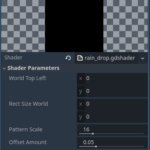
Shader Parameters:
-
pattern_scale – Controls ripple density (higher = more ripples)
-
offset_amount – Strength of the ripple displacement
-
effect_mix – Blend between original and displaced image
-
TIME – Automatically driven animation speed (built-in)
Shader code
// Rain Drop Ground Effect Shader
// Author: Seed (Kode Game Studio)
// Engine: Godot 4.x
// License: CC0 / MIT - Free to use and modify

shader_type canvas_item;
render_mode unshaded, blend_mix;

// We capture what's already rendered to the screen
// so the rain effect blends with the ground texture
uniform sampler2D SCREEN_TEXTURE : hint_screen_texture, filter_linear_mipmap;

// World-space top-left position of the rect (set from script)
uniform vec2 world_top_left;
// World-space size of the rect (set from script)
uniform vec2 rect_size_world;

// Custom parameters
uniform float pattern_scale : hint_range(4.0, 64.0) = 16.0; // Rain drop density
uniform float offset_amount : hint_range(0.0, 0.2) = 0.05;  // Distortion amount
uniform float effect_mix    : hint_range(0.0, 1.0) = 0.55;  // Effect strength

// Constants for droplet simulation
const int   MAX_RADIUS  = 2;
const bool  DOUBLE_HASH = false;
const float HASHSCALE1  = 0.1031;
const vec3  HASHSCALE3  = vec3(0.1031, 0.1030, 0.0973);

// Random helpers for procedural animation
float hash12(vec2 p){
    vec3 p3 = fract(vec3(p.xyx) * HASHSCALE1);
    p3 += dot(p3, p3.yzx + 19.19);
    return fract((p3.x + p3.y) * p3.z);
}
vec2 hash22(vec2 p){
    vec3 p3 = fract(vec3(p.xyx) * HASHSCALE3);
    p3 += dot(p3, p3.yzx + 19.19);
    return fract((p3.xx + p3.yz) * p3.zy);
}

void fragment(){
    // Convert UV to stable world coordinates (no camera-follow)
    vec2 pixel_world_pos = world_top_left + UV * rect_size_world;
    vec2 stable_uv = pixel_world_pos / pattern_scale;

    vec2 p0 = floor(stable_uv);
    vec2 circles = vec2(0.0);

    // Generate animated circular ripples
    for (int j = -MAX_RADIUS; j <= MAX_RADIUS; ++j){
        for (int i = -MAX_RADIUS; i <= MAX_RADIUS; ++i){
            vec2 pi  = p0 + vec2(float(i), float(j));
            vec2 hsh = DOUBLE_HASH ? hash22(pi) : pi;
            vec2 p   = pi + hash22(hsh);

            float t  = fract(0.3 * TIME + hash12(hsh));
            vec2  v  = p - stable_uv;
            float d  = length(v) - (float(MAX_RADIUS) + 1.0) * t;

            float h  = 1e-3;
            float d1 = d - h;
            float d2 = d + h;

            float p1 = sin(31.0 * d1) * smoothstep(-0.6, -0.3, d1) * smoothstep(0.0, -0.3, d1);
            float p2 = sin(31.0 * d2) * smoothstep(-0.6, -0.3, d2) * smoothstep(0.0, -0.3, d2);

            circles += 0.5 * normalize(v) * ((p2 - p1) / (2.0 * h) * pow(1.0 - t, 2.0));
        }
    }

    // Average the results
    circles /= float((MAX_RADIUS * 2 + 1) * (MAX_RADIUS * 2 + 1));

    // Build a pseudo-normal vector for distortion
    float len2 = clamp(dot(circles, circles), 0.0, 1.0);
    vec3 n = vec3(circles, sqrt(1.0 - len2));

    // Distortion offset
    vec2 shift = offset_amount * n.xy;

    // Sample screen before and after distortion
    vec3 base_color = texture(SCREEN_TEXTURE, SCREEN_UV).rgb;
    vec3 displaced  = texture(SCREEN_TEXTURE, SCREEN_UV - shift).rgb;

    // Blend the original and distorted image
    vec3 final_color  = mix(base_color, displaced, effect_mix);

    COLOR = vec4(final_color, 1.0);
}
Live Preview

Nice! Worked like a charm!
I wanted it for isolated puddles and just worked, but the full screen affect is really cool with the cam and player, so might do something with that down the road!
Thanks!