
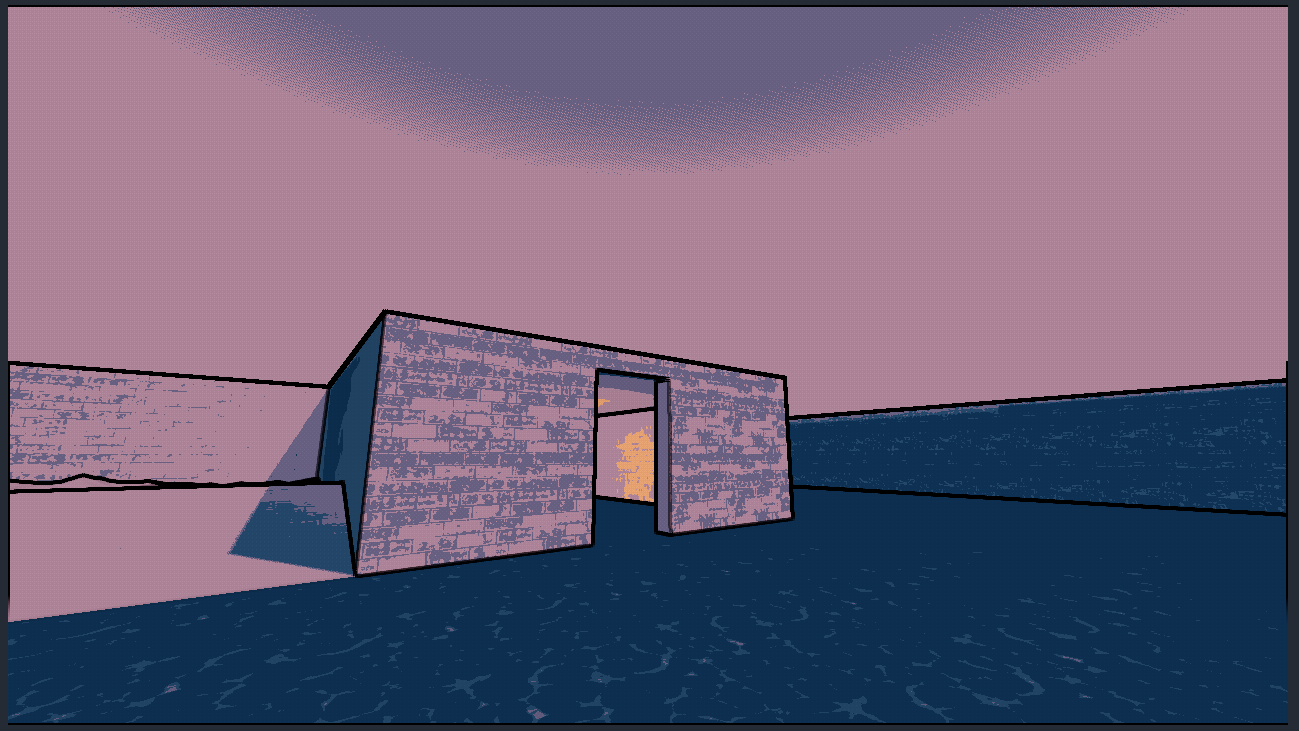
Outline, Posterization, Color Palette and Dithering

This shader implements edge detected outlines, custom color palettes and dithering, as a screen-space post processing effect. The goal of all of these was to create a “cel-shaded” look, through the outlines, posteriaztion, a (rather heavy-handed) dithering effect, and the ability to use a custom color palette.
Comments are available within the shader code, briefly explaining how each component works.
There are a few things I’ll possibly change in the future, to improve different parts of the shader, but it works as intended currently.
How to use:
Create a quad mesh as a child to your player camera, applying the shader to the mesh’s material, ensuring to enable “Flip Faces” on the mesh’s inspector settings.
The vertex shader automatically places the quad in front of the player’s camera.
Variables declared at the top of the shader allow you to edit the outline color, all 8 color palette colors, and includes booleans that can be attached to UI options, for enabling or disabling each effect individually.
Shader code
shader_type spatial;
render_mode unshaded;

uniform sampler2D DEPTH_TEXTURE : source_color, hint_depth_texture, filter_linear_mipmap;
uniform sampler2D NORMAL_TEXTURE : hint_normal_roughness_texture, filter_nearest;
uniform sampler2D SCREEN_TEXTURE : source_color, hint_screen_texture, repeat_disable, filter_nearest;

uniform float zNear = 0.05;
uniform float zFar = 100;

uniform bool enable_outline = false;
uniform vec3 outline_color : source_color = vec3(0.0,0.0,0.0);
uniform float outline_thickness = 10.0;

uniform bool enable_color_limit = true;
uniform int color_levels : hint_range(2, 32) = 8;

uniform bool enable_color_palette = true;
uniform vec4 color1  : source_color  = vec4(1.0,0.925,0.839,1.0);			//#bfbfbf - avg = 0.749
uniform vec4 color2  : source_color  = vec4(1.0,0.831,0.639,1.0);			//#71a668 - avg = 0.501
uniform vec4 color3  : source_color  = vec4(1.0,0.667,0.369,1.0);			//#6a86b0 - avg = 0.543
uniform vec4 color4  : source_color  = vec4(0.816,0.506,0.349,1.0);			//#76568f - avg = 0.453
uniform vec4 color5  : source_color  = vec4(0.553,0.412,0.478,1.0);			//#ab5c74 - avg = 0.496
uniform vec4 color6  : source_color  = vec4(0.329,0.306,0.408,1.0);			//#b89d6e - avg = 0.589
uniform vec4 color7  : source_color  = vec4(0.125,0.236,0.337,1.0);			//#4c5b6b - avg = 0.358
uniform vec4 color8  : source_color  = vec4(0.05,0.169,0.271,1.0);			//#2e253d - avg = 0.188

// In order, dark -> light
// 8,7,4,5,2,3,6,1
uniform bool enable_dithering = true;
uniform float dither_strength : hint_range(0.0, 1.0) = 0.3;

//This shader uses the sobel-feldman operation to create outlines for any object on the screen.
//It utilizes the depth and normal buffers to create the most accurate or complete outlines.

// We do this using two kernels Gx and Gy (1) , which are convolved (adding each element to its local neighbors)
// with the input data (2). First with the depth buffer (3), and then with the normal buffer (4).
// These results are then handled in the fragment shader (5), to be output to the player's screen.


// (1)
// Gx and Gy are two "kernels" that contain horizontal (x) and vertical(y) derivative approximations.
const mat3 Gx = mat3(
				vec3(-1,-2,-1),
				vec3(0, 0, 0),
				vec3(1, 2, 1)
);
const mat3 Gy = mat3(
				vec3(-1,0,1),
				vec3(-2,0,2),
				vec3(-1,0,1)
);

// (1)
// Calculating the scaled depth buffer, converting the depth from clip space, into view space.
float depth(sampler2D depth_texture, vec2 screen_uv, mat4 inv_proj_mat, in vec3 vertex)
{
	float depth_raw = texture(depth_texture, screen_uv)[0];
	vec3 ndc = vec3(screen_uv * 2.0 - 1.0, depth_raw);
	vec4 view_space = inv_proj_mat * vec4(ndc,1.0);
	view_space.z /= view_space.w;
	float linear_depth = view_space.z;
	float scaled_depth = (zFar-zNear)/(zNear + linear_depth * (zNear-zFar));

	return scaled_depth;
}

// (2)
// Next, we perform the sobel operation on the scaled_depth value.
// This is half of the process for the outlines, giving us most of the outline effect,
// but we'll also be performing the sobel operation on the normal values, for a more "complete"
// looking outline.
float sobel_depth(in vec2 uv, in vec2 offset, in vec3 vertex, mat4 inv_proj_mat)
{
	//used for multiplying the results of the depth calculation with
	//the Gx and Gy kernels;
	float xSobDepth = 0.0;
	float ySobDepth = 0.0;

	for (int row = 0; row < 3; row++)
	{
		for (int col = 0; col < 3; col++)
		{
			float depth = depth(DEPTH_TEXTURE, uv + offset * vec2(float(col-1),float(row-1)),inv_proj_mat,vertex);
			xSobDepth += Gx[row][col] * depth;
			ySobDepth += Gy[row][col] * depth;
		}
	}


	return sqrt(pow(xSobDepth,2.0) + pow(ySobDepth,2.0));
}

// (4)
// Calculates relative luminance for a pixel's color using the "weighted vector"
// which is a shade of green that approximates the way light is percieved by humans.
float luminance(vec3 color)
{
	const vec3 weight = vec3(0.2125, 0.7154, 0.0721);
	return dot(weight,color);
}

// Using the luminance, we can find even more edges by finding the major luminance differences
// found within the normal buffer. Using the calculated luminance value, we'll perform the sobel operation again,
// providing us with what will become our "full" edge detected results.
float sobel_normal(in vec2 uv, in vec2 offset)
{
	float xSobNormal = 0.0;
	float ySobNormal = 0.0;

	for (int row = 0; row < 3; row++)
	{
		for (int col = 0; col < 3; col++)
		{
			//vec2 uv = SCREEN_UV + vec2(float(col-1),float(row-1)) * SCREEN_PIXEL_SIZE;
			float lumi = luminance(texture(NORMAL_TEXTURE, uv + offset * vec2(float(col-1),float(row-1))).rgb);
			xSobNormal += Gx[row][col] * lumi;
			ySobNormal += Gy[row][col] * lumi;
		}
	}


	return sqrt(pow(xSobNormal,2.0) + pow(ySobNormal,2.0));
}


// Color posterization, or quantization, is handled by passing in the red, green and blue values of a color one at a time
// into the function. the "value" in this instance, would be one of those rgb values, from the color vec3/vec4.
// Meanwhile, the "levels" integer is the number of colors we want to "allow" within the color posterization.
// This function will take the input rgb float value, multiply it by the number of levels, and then round it to the nearest int.
// Then, lastly, it'll be divided again by the number of color levels, to bring it back to an rgb float value that falls between 0.0 and 1.0
// while still being affected by the rounding.

//There are likely better ways to handle this, but this was my first implementation and it worked well enough for this project.
float posterize(float val, int levels)
{
	return round(val * float(levels)) / float(levels);
}


// The dithering is fairly heavy handed, and is applied directly to the screen-space quad. This results
// in a full-screen "darkening" of sorts, instead of just being applied to the actual materials of objects
// to "fix" the color banding from the posterization, like it probably should be.
// Because of that, there are definitely better ways to implement this, and I'd definitely re-do it in the future.
float dither(vec2 position, float brightness)
{
	int x = int(mod(position.x, 4.0));
	int y = int(mod(position.y, 4.0));
	int index = x + y * 4;

	float dithering[16] = float[](
		0.0,0.5,0.125,0.625,
		0.75,0.25,0.875,0.375,
		0.1875,0.6875,0.0625,0.5625,
		0.9375,0.4375,1.0,0.8125
	);
	float threshold = dithering[index];
	return brightness < threshold ? 0.0 : 1.0;
}

void vertex() {
	//Positions the post-processing quad in front of the camera
	POSITION = vec4(VERTEX.xy,1.0,1.0);
}

void fragment() {
	// Called for every pixel the material is visible on.
	vec3 palette[8];
		palette[0] = color1.rgb;
		palette[1] = color2.rgb;
		palette[2] = color3.rgb;
		palette[3] = color4.rgb;
		palette[4] = color5.rgb;
		palette[5] = color6.rgb;
		palette[6] = color7.rgb;
		palette[7] = color8.rgb;

	vec3 screen_color = texture(SCREEN_TEXTURE, SCREEN_UV).rgb;

	vec3 final_color = screen_color;

	if(enable_color_limit)
	{
		// Posterizes the fragment's color using the limit value set in "color_levels"
		final_color = vec3(posterize(final_color.r,color_levels),posterize(final_color.g,color_levels),posterize(final_color.b,color_levels));

	}

	if (enable_color_palette)
	{
		vec3 difference = final_color - palette[0];
		float dist = dot(difference,difference);

		float closest_distance = dist;
		vec3 closest_color = palette[0];

		// Iterates through the color palette array, comparing the "distance" of the
		// source color, against the current palette color. It finds the palette
		// color with the shortest distance from the source color, and applies it to
		// the "final_color", of the current fragment. This "replaces" the original image's
		// colors with the best-fit from the palette.
		for( int i = 0; i < palette.length(); i++)
		{
			difference = final_color - palette[i];
			dist = dot(difference,difference);

			if(dist<closest_distance)
			{
				closest_distance = dist;
				closest_color = palette[i];
			}
		}
		final_color = closest_color;
	}

	// Applies the dithering to the screen, based on the dither strength.
	if(enable_dithering)
	{
		float brightness = dot(final_color, vec3(0.3,0.59,0.11));
		brightness += dither_strength * (dither(FRAGCOORD.xy, brightness) -0.5);
		final_color *= (1.0 + dither_strength * (dither(FRAGCOORD.xy, brightness) -0.5));
	}

	if(enable_outline)
	{
		vec2 offset = outline_thickness / VIEWPORT_SIZE;
		vec2 uv = SCREEN_UV;

		//Calculates the scaled depth for the current fragment
		float depth = depth(DEPTH_TEXTURE, uv, INV_PROJECTION_MATRIX,VERTEX);

		vec3 pixel_color = texture(SCREEN_TEXTURE, uv).rgb;

		//Performs the sobel operation on both the depth and normal
		float edge_depth = sobel_depth(uv, offset, VERTEX, INV_PROJECTION_MATRIX);
		float edge_normal = sobel_normal(uv, offset);

		//Using the results, we utilie smoothstep to combine the results of the
		// depth and normal calculations, to get our "final" outline calculations.
		float outline = smoothstep(0.0,1.0,10.0 * edge_depth + edge_normal);

		//These final outline calculations are then combined with the outline color, to create the
		// actual finished outlines, and are mixed with the final color.
		final_color = mix(final_color, outline_color, outline);
	}


	//The combined results of all of the effects are then output to the quad's albedo, displaying them on the screen.
	ALBEDO = final_color;
}

void light() {
	// Called for every pixel for every light affecting the material.
	// Uncomment to replace the default light processing function with this one.
}
Live Preview

Does not work.
useful change the size to fill your camera and u need turn off the two “use color” the Posterization effect cover your UI
Dithering and color Posterization works, the qube have to be big around the camera or change only takes effect in a tiny area.Cant see the sobel just yet, maybe the edge is too small I dig in the code, its a great Thanks a lot!
just change the size and everything will be fine
I get a large blue square over everything when i do it?
Is there any way to make this work for the Mobile renderer?
I put it in QuadMesh and set the size, but it’s not working.
I love it but I would like to keep the volumetric fog and the outlines. Or maybe fade them by depth, maybe? Right now, any fog gets crunched to hell. I’ll play around to see if I can make it work!