
Pixelated God Rays

Pixelated God Rays
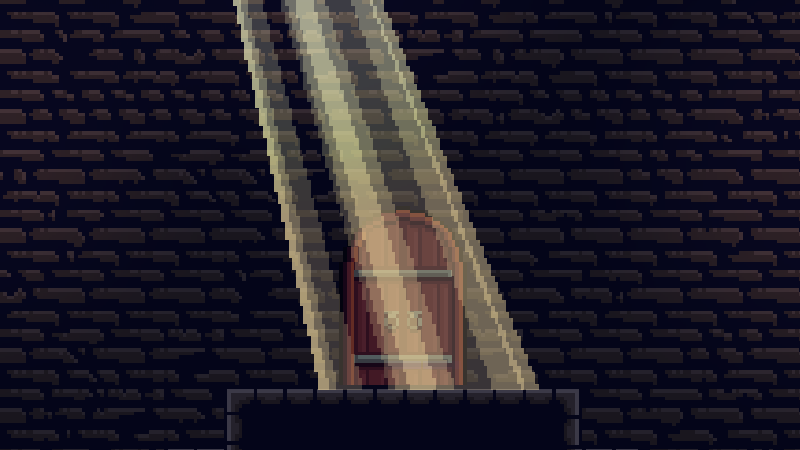
A retro-styled version of the classic god rays effect, perfect for pixel art games and nostalgic atmospheres. This shader adds chunky pixelation and color quantization to create that authentic retro aesthetic while maintaining the beautiful volumetric lighting effect.
Parameters
angle= -0.3 – Rotation angle of the raysposition= -0.2 – Position offset of the ray sourcespread: hint_range(0.0, 1.0) = 0.5 – How much the rays spread outcutoff: hint_range(-1.0, 1.0) = 0.1 – Where to cut off the ray edgesfalloff: hint_range(0.0, 1.0) = 0.2 – How rays fade at the bottomedge_fade: hint_range(0.0, 1.0) = 0.15 – Fade amount at left/right edgesspeed= 1.0 – Animation speed of the raysray1_density= 8.0 – Density of the primary ray patternray2_density= 30.0 – Density of the secondary ray patternray2_intensity: hint_range(0.0, 1.0) = 0.3 – Intensity of secondary raysray_color: source_color = vec4(1.0, 0.9, 0.65, 0.8) – Color and alpha of the rayshdr= false – Enable HDR mode (allows values above 1.0)seed= 5.0 – Random seed for ray patterns
Pixelation Parameters
pixelation: hint_range(1.0, 100.0) = 8.0 – Size of pixels (higher = chunkier)quantize_colors= true – Enable color level reductioncolor_levels: hint_range(2, 16) = 4 – Number of discrete color stepsdither= false – Enable dithering patterndither_strength: hint_range(0.0, 1.0) = 0.5 – Strength of dithering effectopacity: hint_range(0.0, 1.0) = 1.0 – Overall opacity (applied after quantization)
Credits
Based on the excellent God Rays shader – huge thanks to the original creator for the fantastic foundation! This version adds pixelation effects while preserving all the great functionality of the original.
Shader code
/*
Pixelated God Rays Shader
Modified from Godot Shaders - godotshaders.com/shader/god-rays
Added pixelation effects for retro/pixel art aesthetic
*/
shader_type canvas_item;

uniform float angle = -0.3;
uniform float position = -0.2;
uniform float spread : hint_range(0.0, 1.0) = 0.5;
uniform float cutoff : hint_range(-1.0, 1.0) = 0.1;
uniform float falloff : hint_range(0.0, 1.0) = 0.2;
uniform float edge_fade : hint_range(0.0, 1.0) = 0.15;
uniform float speed = 1.0;
uniform float ray1_density = 8.0;
uniform float ray2_density = 30.0;
uniform float ray2_intensity : hint_range(0.0, 1.0) = 0.3;
uniform vec4 ray_color : source_color = vec4(1.0, 0.9, 0.65, 0.8);
uniform bool hdr = false;
uniform float seed = 5.0;

// Pixelation parameters
uniform float pixelation : hint_range(1.0, 100.0) = 8.0;
uniform bool quantize_colors = true;
uniform int color_levels : hint_range(2, 16) = 4;
uniform bool dither = false;
uniform float dither_strength : hint_range(0.0, 1.0) = 0.5;
uniform float opacity : hint_range(0.0, 1.0) = 1.0;

// Backward compatibility
uniform sampler2D SCREEN_TEXTURE : hint_screen_texture, filter_linear_mipmap;

// Random and noise functions from Book of Shader's chapter on Noise.
float random(vec2 _uv) {
    return fract(sin(dot(_uv.xy, vec2(12.9898, 78.233))) * 43758.5453123);
}

float noise (in vec2 uv) {
    vec2 i = floor(uv);
    vec2 f = fract(uv);

    // Four corners in 2D of a tile
    float a = random(i);
    float b = random(i + vec2(1.0, 0.0));
    float c = random(i + vec2(0.0, 1.0));
    float d = random(i + vec2(1.0, 1.0));

    // Smooth Interpolation
    // Cubic Hermine Curve. Same as SmoothStep()
    vec2 u = f * f * (3.0-2.0 * f);

    // Mix 4 corners percentages
    return mix(a, b, u.x) + (c - a)* u.y * (1.0 - u.x) + (d - b) * u.x * u.y;
}

mat2 rotate(float _angle){
    return mat2(vec2(cos(_angle), -sin(_angle)), vec2(sin(_angle), cos(_angle)));
}

vec4 screen(vec4 base, vec4 blend){
    return 1.0 - (1.0 - base) * (1.0 - blend);
}

// Pixelation function
vec2 pixelate_uv(vec2 uv, float pixelation_amount) {
    vec2 pixel_uv = floor(uv * pixelation_amount) / pixelation_amount;
    return pixel_uv;
}

// Color quantization function
vec3 quantize_color(vec3 input_color, int levels) {
    return floor(input_color * float(levels)) / float(levels);
}

// Simple dithering pattern
float dither_pattern(vec2 uv) {
    vec2 grid = floor(uv * 4.0);
    return mod(grid.x + grid.y, 2.0);
}

void fragment()
{
    // Pixelate the UV coordinates
    vec2 pixelated_uv = pixelate_uv(UV, pixelation);
    vec2 screen_pixelated_uv = pixelate_uv(SCREEN_UV, pixelation);

    // Use pixelated UVs for the god rays calculation
    vec2 transformed_uv = (rotate(angle) * (pixelated_uv - position)) / ((pixelated_uv.y + spread) - (pixelated_uv.y * spread));

    // Animate the ray according to the new transformed UVs
    vec2 ray1 = vec2(transformed_uv.x * ray1_density + sin(TIME * 0.1 * speed) * (ray1_density * 0.2) + seed, 1.0);
    vec2 ray2 = vec2(transformed_uv.x * ray2_density + sin(TIME * 0.2 * speed) * (ray1_density * 0.2) + seed, 1.0);

    // Cut off the ray's edges
    float cut = step(cutoff, transformed_uv.x) * step(cutoff, 1.0 - transformed_uv.x);
    ray1 *= cut;
    ray2 *= cut;

    // Apply the noise pattern (i.e. create the rays)
    float rays;
    if (hdr){
        // This is not really HDR, but check this to not clamp the two merged rays making
        // their values go over 1.0. Can make for some nice effect
        rays = noise(ray1) + (noise(ray2) * ray2_intensity);
    }
    else{
        rays = clamp(noise(ray1) + (noise(ray2) * ray2_intensity), 0., 1.);
    }

    // Fade out edges using pixelated UV
    rays *= smoothstep(0.0, falloff, (1.0 - pixelated_uv.y)); // Bottom
    rays *= smoothstep(0.0 + cutoff, edge_fade + cutoff, transformed_uv.x); // Left
    rays *= smoothstep(0.0 + cutoff, edge_fade + cutoff, 1.0 - transformed_uv.x); // Right

    // Apply dithering if enabled
    if (dither) {
        float dither_noise = dither_pattern(UV * pixelation) * dither_strength;
        rays += (dither_noise - 0.5) * 0.1;
        rays = clamp(rays, 0.0, 1.0);
    }

    // Color to the rays
    vec3 shine = vec3(rays) * ray_color.rgb;

    // Quantize colors if enabled
    if (quantize_colors) {
        shine = quantize_color(shine, color_levels);
    }

    // Try different blending modes for a nicer effect. "Screen" is included in the code,
    // but take a look at https://godotshaders.com/snippet/blending-modes/ for more.
    // With "Screen" blend mode using pixelated screen texture:
    vec4 screen_color = texture(SCREEN_TEXTURE, screen_pixelated_uv);
    if (quantize_colors) {
        screen_color.rgb = quantize_color(screen_color.rgb, color_levels);
    }
    shine = screen(screen_color, vec4(ray_color)).rgb;

    float final_alpha = rays * ray_color.a;
    if (quantize_colors) {
        final_alpha = floor(final_alpha * float(color_levels)) / float(color_levels);
    }
    final_alpha *= opacity;

    COLOR = vec4(shine, final_alpha);
}