
Procedural Sky Blended Cover, Wind, and Clouds

Made on Godot 4.4
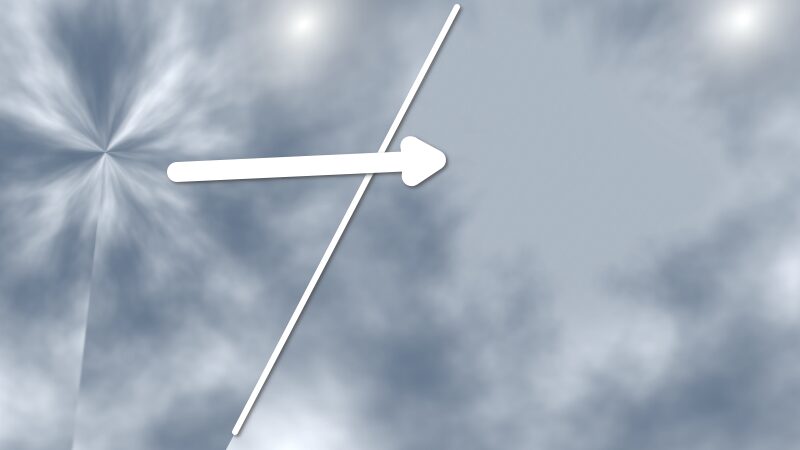
This is a modified version of the default procedural sky shader in Godot. I think the base one is great for clouds using Simplex or Perlin noise, except for how the ‘Cover’ is pinched at the poles putting an irregular point in the sky and clouds.
This shader will use the same noise you use feed it for Cover to do some extra features.
It will patch the pinched poles with a cloudy noise shape, which you can control the size and blending with.
It has wind direction and speed features, as well as cloud “churning” where the same cover noise flipped will be used to slowly change the clouds in the sky over time, as if the cloud formations were changing over time. It’s not the most performant, lots of per-pixel changes, etc.
USAGE:
The easist way to get the fastest results:
- Add a World Environment Node
- Add a new Environemnt to Environment
- Background mode: Sky
- Sky Material: New ProdeduralSky
- Feel free to adjust settings to the defaults as you normally would, and add a Noise to Cover
- Click on the ProceduralSky material and select “Convert to ShaderMaterial”
- Click on the Shader script and paste in this new code
- The new features will be added to the look you already tweaked.
Adjust the pole blends, horizon blends wind speeds, and cloud formation changing to your needs.
Is it perfect? No, but it hides generally well enough the persed sky, as well as blends into the horizon color better, and addes some simple atmospoheric effects without too much overhead. It’s easy/familar to use, doesn’t require any external textures, or fancy skybox image building, or anything.
Shader code
shader_type sky;
render_mode use_debanding;

uniform vec4 sky_top_color : source_color = vec4(0.385, 0.454, 0.55, 1.0);
uniform vec4 sky_horizon_color : source_color = vec4(0.646, 0.656, 0.67, 1.0);
uniform float sky_curve : hint_range(0, 1) = 0.15;
uniform float sky_energy = 1.0; // In Lux.
uniform sampler2D sky_cover : filter_linear, source_color, hint_default_black;
uniform vec4 sky_cover_modulate : source_color = vec4(1.0, 1.0, 1.0, 1.0);
uniform vec4 ground_bottom_color : source_color = vec4(0.2, 0.169, 0.133, 1.0);
uniform vec4 ground_horizon_color : source_color = vec4(0.646, 0.656, 0.67, 1.0);
uniform float ground_curve : hint_range(0, 1) = 0.02;
uniform float ground_energy = 1.0;
uniform float sun_angle_max = 30.0;
uniform float sun_curve : hint_range(0, 1) = 0.15;
uniform float exposure : hint_range(0, 128) = 1.0;

// Wind offset direction (x and y only)
uniform vec2 wind_offset_direction = vec2(0.5, 0.1); // Control direction of offset (x, y)
uniform float wind_speed : hint_range(0.0, 25.0) = 1.0; // Speed of the noise movement over time

// Cloud change settings
uniform bool clouds_change = true; // Whether to change the cloud layer or not
uniform float cloud_change_rate : hint_range(0.0, 5.0) = .40; // Rate at which the cloud effect changes

// Pole blending parameters
uniform float pole_blend_shape : hint_range(0.0, 2.0) = 0.05; // How much the noise affects the blend shape
uniform float pole_blend_strength : hint_range(0, 1) = 0.05; // Control blending intensity at poles
uniform float pole_blend_brightness : hint_range(0.0, 1.0) = .3;

// Horizon blending parameters - similar to pole blending
uniform float horizon_blend_shape : hint_range(0.0, 2.0) = 0.05; // How much the noise affects the horizon blend shape
uniform float horizon_blend_strength : hint_range(0, 1) = 0.05; // Control blending intensity at horizon
uniform float horizon_blend_brightness : hint_range(0.0, 1.0) = .3;
uniform float horizon_blend_width : hint_range(0.0, 0.5) = 0.1; // Width of the horizon blend region

void sky() {
    float v_angle = acos(clamp(EYEDIR.y, -1.0, 1.0));
    float c = (1.0 - v_angle / (PI * 0.5));
    vec3 sky = mix(sky_horizon_color.rgb, sky_top_color.rgb, clamp(1.0 - pow(1.0 - c, 1.0 / sky_curve), 0.0, 1.0));
    sky *= sky_energy;

    if (LIGHT0_ENABLED) {
        float sun_angle = acos(dot(LIGHT0_DIRECTION, EYEDIR));
        if (sun_angle < LIGHT0_SIZE) {
            sky = LIGHT0_COLOR * LIGHT0_ENERGY;
        } else if (sun_angle < sun_angle_max) {
            float c2 = (sun_angle - LIGHT0_SIZE) / (sun_angle_max - LIGHT0_SIZE);
            sky = mix(LIGHT0_COLOR * LIGHT0_ENERGY, sky, clamp(1.0 - pow(1.0 - c2, 1.0 / sun_curve), 0.0, 1.0));
        }
    }

    if (LIGHT1_ENABLED) {
        float sun_angle = acos(dot(LIGHT1_DIRECTION, EYEDIR));
        if (sun_angle < LIGHT1_SIZE) {
            sky = LIGHT1_COLOR * LIGHT1_ENERGY;
        } else if (sun_angle < sun_angle_max) {
            float c2 = (sun_angle - LIGHT1_SIZE) / (sun_angle_max - LIGHT1_SIZE);
            sky = mix(LIGHT1_COLOR * LIGHT1_ENERGY, sky, clamp(1.0 - pow(1.0 - c2, 1.0 / sun_curve), 0.0, 1.0));
        }
    }

    if (LIGHT2_ENABLED) {
        float sun_angle = acos(dot(LIGHT2_DIRECTION, EYEDIR));
        if (sun_angle < LIGHT2_SIZE) {
            sky = LIGHT2_COLOR * LIGHT2_ENERGY;
        } else if (sun_angle < sun_angle_max) {
            float c2 = (sun_angle - LIGHT2_SIZE) / (sun_angle_max - LIGHT2_SIZE);
            sky = mix(LIGHT2_COLOR * LIGHT2_ENERGY, sky, clamp(1.0 - pow(1.0 - c2, 1.0 / sun_curve), 0.0, 1.0));
        }
    }

    if (LIGHT3_ENABLED) {
        float sun_angle = acos(dot(LIGHT3_DIRECTION, EYEDIR));
        if (sun_angle < LIGHT3_SIZE) {
            sky = LIGHT3_COLOR * LIGHT3_ENERGY;
        } else if (sun_angle < sun_angle_max) {
            float c2 = (sun_angle - LIGHT3_SIZE) / (sun_angle_max - LIGHT3_SIZE);
            sky = mix(LIGHT3_COLOR * LIGHT3_ENERGY, sky, clamp(1.0 - pow(1.0 - c2, 1.0 / sun_curve), 0.0, 1.0));
        }
    }

    // Sample the sky cover texture with dynamic offset (only x and y direction)
    vec2 noise_coords = SKY_COORDS.xy + wind_offset_direction * wind_speed * TIME * 0.01;

    // Wrap UVs to keep tiling seamless
    noise_coords = mod(noise_coords, 1.0);

    // Sample the original noise texture
    vec4 sky_cover_texture = texture(sky_cover, noise_coords);

    // Sample flipped noise for Z-offset effect
    vec4 flipped_noise = texture(sky_cover, vec2(noise_coords.x, 1.0 - noise_coords.y));

    // Z blending (cloud change) logic
    float cloud_blend_factor = 0.0;
    if (clouds_change) {
        // Use a sine wave to blend clouds smoothly over time based on the cloud_change_rate
        cloud_blend_factor = 0.5 + 0.5 * sin(TIME * cloud_change_rate);
    }

    // Blend between the original and flipped noise using cloud_blend_factor
    vec4 blended_noise_texture = mix(sky_cover_texture, flipped_noise, cloud_blend_factor);

    // Pole blending
    float base_pole_blend_factor = abs(EYEDIR.y);  // Original blend factor (circular)
    float noise_pole_blend = blended_noise_texture.r * pole_blend_shape;
    float pole_blend_factor = smoothstep(1.0 - pole_blend_strength, 1.0, base_pole_blend_factor + noise_pole_blend);

    // Horizon blending - detect when we're near the horizon
    float horizon_distance = abs(EYEDIR.y);  // This will be close to 0 near the horizon
    float horizon_factor = 1.0 - smoothstep(0.0, horizon_blend_width, horizon_distance);
    float noise_horizon_blend = blended_noise_texture.g * horizon_blend_shape;
    float horizon_blend_factor = smoothstep(1.0 - horizon_blend_strength, 1.0, horizon_factor + noise_horizon_blend);

    // Combine both blend factors (poles and horizon)
    float combined_blend_factor = max(pole_blend_factor, horizon_blend_factor);

    // Blend noise with brightness value based on the combined factor
    vec3 blended_noise = mix(blended_noise_texture.rgb, vec3(pole_blend_brightness), pole_blend_factor);
    blended_noise = mix(blended_noise, vec3(horizon_blend_brightness), horizon_blend_factor);

    sky += (blended_noise * sky_cover_modulate.rgb) * blended_noise_texture.a * sky_cover_modulate.a * sky_energy;

    // Ground blending
    c = (v_angle - (PI * 0.5)) / (PI * 0.5);
    vec3 ground = mix(ground_horizon_color.rgb, ground_bottom_color.rgb, clamp(1.0 - pow(1.0 - c, 1.0 / ground_curve), 0.0, 1.0));
    ground *= ground_energy;

    COLOR = mix(ground, sky, step(0.0, EYEDIR.y)) * exposure;
}

Great Job! Thank You!
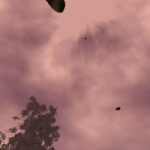
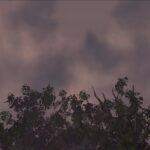
The way to have a fairly easy sky with clouds is appreciated. Even so, following the instructions, no matter how much I modify my noise cover, I still see a separating line.
I share an image to show you the problem
What could this be due to?
In case it happens to anyone else, just activate the seamless setting of the NoiseTexture2D.