
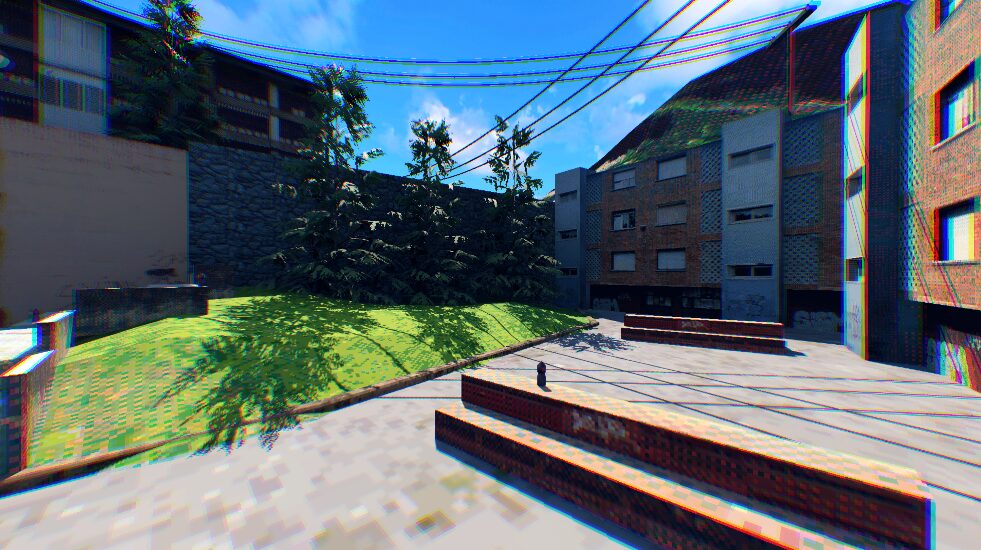
Radial Chromatic Aberration

Chromatic aberration shader that distorts from the center of the image outwards.
uniform sampler2D distance_curve; should be a curve texture, it indicates the intensity of the aberration as a function of the distance from the center of the image.
uniform float intensity = 1.0; indicates the overall intensity of the effect, if it’s zero, no matter distance curve, no aberration will be applied.
This code distorts the image by streching it outwards from the center. A way to look a it is that the shifted color shifted channels, red and blue, are those closest and furthest from the center while the green channel, the one that’s ‘unshifted’ is displaced half way to sit between the color shifted channels.
If this outward distortion is undesireable, replace the code under //Channel Shifting with the following code which distorts one channel inwards, one is kept still and one is shifted outwards.
	float green_channel = texture(TEXTURE, UV).g;
	float red_channel = texture(TEXTURE, UV - centered_uv * curve_distance_intensity * SCREEN_PIXEL_SIZE * intensity).r;
	float blue_channel = texture(TEXTURE, UV - centered_uv * curve_distance_intensity * SCREEN_PIXEL_SIZE * -intensity).b;
	COLOR.rgb = vec3(red_channel,green_channel,blue_channel);
Feel free to add any questions/correction on the comments! I’m not too experienced with shaders, any insight is appreciated 🙂
Shader code
shader_type canvas_item;

uniform sampler2D distance_curve;
uniform float intensity = 1.0;


void fragment() {
	vec2 centered_uv = UV - vec2(0.5,0.5);
	//centered_uv.x = pow(centered_uv.x, 3);
	//centered_uv.y = pow(centered_uv.y, 3);

	// Since offsetting the channels by the UVs will create no-information areas in the edges
	// all the color shifting will be done outwards rather than doing part of it inwards
	// thus, the shifted channels will be the one kept still and the one shifted the most
	float distance_from_center = abs(distance(vec2(0.0,0.0),centered_uv));
	float curve_distance_intensity = texture(distance_curve, vec2(distance_from_center)).r;

	// Channel Shifting
	float blue_channel = texture(TEXTURE, UV).b;
	float red_channel = texture(TEXTURE, UV - centered_uv * curve_distance_intensity * SCREEN_PIXEL_SIZE * intensity).r;
	float green_channel = texture(TEXTURE, UV - centered_uv * curve_distance_intensity * SCREEN_PIXEL_SIZE * intensity / 2.0).g;
	COLOR.rgb = vec3(red_channel,green_channel,blue_channel);
}
Live Preview

wait so i added this to a ColorRect node that stretches over the screen, added the CurveTexture and a Curve to that object from values 0.0 to 1.0, and it only appears white no matter the intensity. what’s happening?
I’ve tried it with subviewport containers and texture rects and it works just fine so I’m not too sure. What are you trying to use the ColorRect for? We might be able to sort it out without color rects if that’s the issue.
Also, make sure the intensity value is really high, something like 100-150, the changes can be quite subtle and hard to see under that. Feel free to reach out for any more doubts 🙂
I don’t know how to use it
Im a little confused on where the shader code goes. Do we put it on the camera a color rect?