
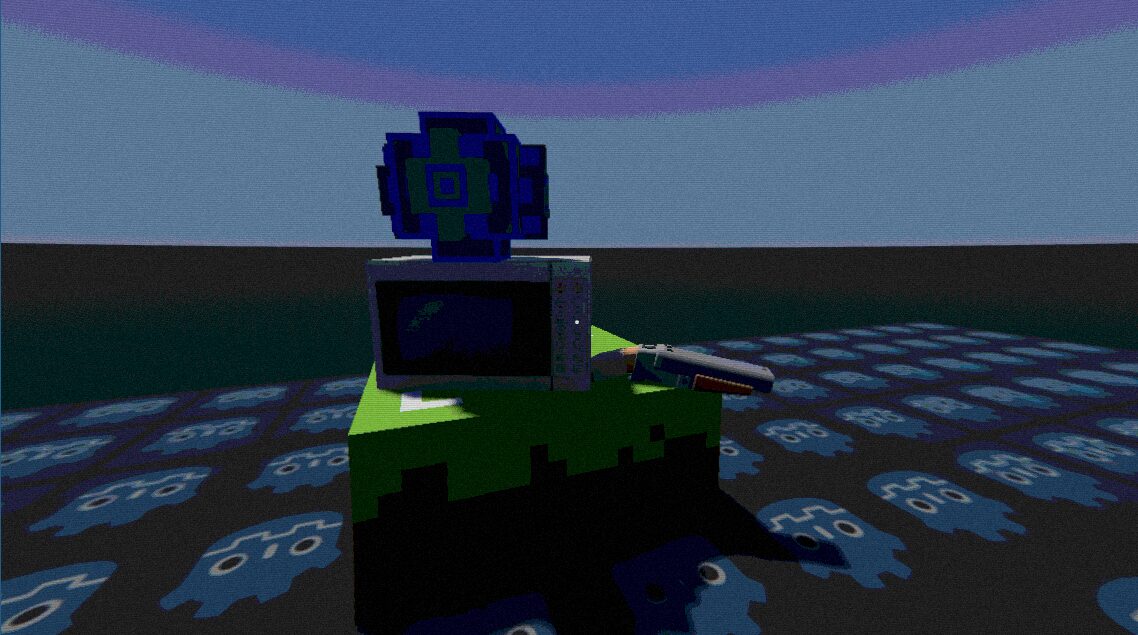
Soft Retro with Blur

A gentle PS2 type shader with blur and noise. Made with ChatGPT
Instructions:
Add a ColorRect to your scene, go to materials, make a shader, and paste this code in. Make sure to set the mouse Filter to Pass.
Add this script to your ColorRect:
extends ColorRect
func _process(_delta):
if material and material is ShaderMaterial:
material.set_shader_parameter(“screen_size”, get_viewport().get_visible_rect().size)
Shader code
shader_type canvas_item;

uniform sampler2D SCREEN_TEXTURE : hint_screen_texture, filter_linear_mipmap;
uniform vec2 screen_size = vec2(1280.0, 720.0);

// Final soft PS2-style settings
uniform float pixel_size : hint_range(0.5, 8.0) = 0.8;
uniform float color_levels : hint_range(4.0, 64.0) = 48.0;
uniform float dither_strength : hint_range(0.0, 1.0) = 0.03;
uniform float scanline_strength : hint_range(0.0, 1.0) = 0.015;
uniform float chroma_amount : hint_range(0.0, 2.0) = 0.2;
uniform float noise_amount : hint_range(0.0, 0.2) = 0.008;
uniform float warp_strength : hint_range(0.0, 1.0) = 0.04;
uniform float vignette : hint_range(0.0, 1.0) = 0.06;
uniform float blur_strength : hint_range(0.0, 2.0) = 0.5;

float rand(vec2 co) {
	return fract(sin(dot(co.xy, vec2(12.9898,78.233))) * 43758.5453);
}

vec3 blur_texture(sampler2D tex, vec2 uv, vec2 size, float radius) {
	vec2 pixel = vec2(1.0) / size;
	vec3 col = texture(tex, uv).rgb * 0.36;
	col += texture(tex, uv + pixel * vec2(radius, 0.0)).rgb * 0.16;
	col += texture(tex, uv - pixel * vec2(radius, 0.0)).rgb * 0.16;
	col += texture(tex, uv + pixel * vec2(0.0, radius)).rgb * 0.16;
	col += texture(tex, uv - pixel * vec2(0.0, radius)).rgb * 0.16;
	return col;
}

void fragment() {
	vec2 uv = FRAGCOORD.xy / screen_size;

	// Light CRT-style warp
	vec2 center = vec2(0.5);
	vec2 warp = uv - center;
	uv -= warp * warp_strength * dot(warp, warp);

	// Slight chromatic aberration
	vec2 chroma_offset = warp * chroma_amount * 0.001;
	vec4 col;
	col.r = texture(SCREEN_TEXTURE, uv + chroma_offset).r;
	col.g = texture(SCREEN_TEXTURE, uv).g;
	col.b = texture(SCREEN_TEXTURE, uv - chroma_offset).b;
	col.a = 1.0;

	// Gentle soft blur (like PS2’s bilinear texture filtering)
	col.rgb = mix(col.rgb, blur_texture(SCREEN_TEXTURE, uv, screen_size, 1.0), blur_strength * 0.4);

	// Slightly reduce color precision
	col.rgb = floor(col.rgb * color_levels) / color_levels;

	// Minimal dithering
	col.rgb += (rand(uv * screen_size) - 0.5) * (1.0 / color_levels) * dither_strength;

	// Barely-visible scanlines
	col.rgb *= 1.0 - scanline_strength * (sin(uv.y * screen_size.y * 3.1415) * 0.5 + 0.5);

	// Tiny film noise
	col.rgb += (rand(uv * screen_size * 0.5) - 0.5) * noise_amount;

	// Very soft vignette
	float vign = smoothstep(1.0, 0.5, length(uv - 0.5) * vignette * 3.0);
	col.rgb *= vign;

	COLOR = col;
}
Live Preview


Very nice, although you can access screen_size in the fragment shader, its: 1.0/SCREEN_PIXEL_SIZE.
This means it works in the editor aswell (without using @tool scripts)