
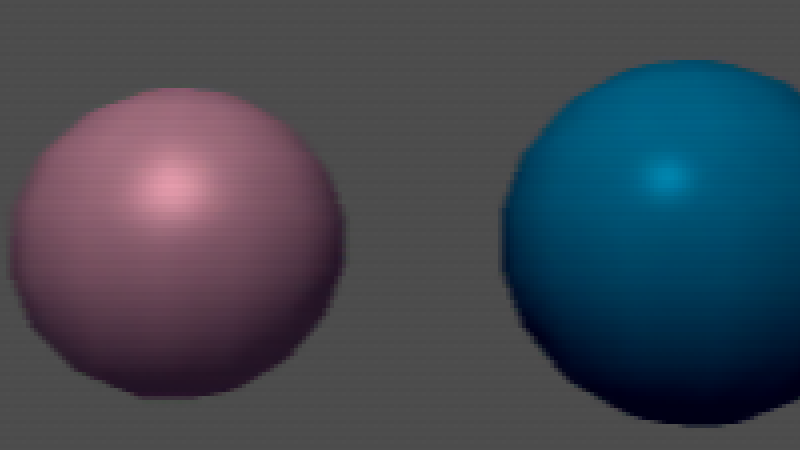
Purp’s N64 Soft/Blurry Post Process Effect

JUNE 25 UPDATE – COMPLETE OVERHAUL
The shader has been re-written to be more performant! tho at the cost of some functionality.
“Blur radius X/Y, Blur Quality, Blur Strenght, Blur Enable” has been removed for a simple toggle “enable_480i_upscale” and “scanline_intensity” which uses already pre-calculated blur weights. Not as customizable but good for my personal uses.
Made this shader to mimic the Soft/Blurry look of the Nintendo 64, Dithering Matrix Pattern was taken from the AngrylionRDP-Plus.
This shader is meant to be used on the SubViewportContainer node.
Shader code
shader_type canvas_item;

// Purp's N64 Soft/Blurry Post-Process V2

// ============================================================================
// SHADER UNIFORMS - User-configurable parameters
// ============================================================================

/** The resolution of your subviewport */
uniform vec2 virtual_resolution = vec2(320.0, 240.0);

/** You can set the bitdepth value for all 3 color components. (Ex: 555 = 15 BitRGB) */
uniform int color_bitdepth : hint_range(1, 8) = 5;

/** Controls the strength of the dithering effect */
uniform float dither_strength : hint_range(0.0, 1.0) = 1.0;

/** Toggle between standard Bayer matrix and magic matrix */
uniform bool use_magic_matrix = false;

/** Enable/disable dedithering effect */
uniform bool enable_dedithering = false;

/** Controls the strength of the dedithering effect */
uniform float dedither_strength : hint_range(0.0, 1.0) = 1.0;

/** Enables the a quick "480i upscale" to add an horizontal blur */
uniform bool enable_480i_upscale = true;

/** Simple Scanline */
uniform float scanline_intensity : hint_range(0.0, 1.0) = 0.1;

// ============================================================================
// DITHERING MATRICES - Predefined patterns for dithering
// ============================================================================

// Standard 4x4 Bayer matrix - creates ordered dithering pattern
const mat4 bayer_matrix = mat4(
    vec4( 0.0,  4.0,  1.0,  5.0),
    vec4( 4.0,  0.0,  5.0,  1.0),
    vec4( 3.0,  7.0,  2.0,  6.0),
    vec4( 7.0,  3.0,  6.0,  2.0)
);

// Alternative "magic" 4x4 matrix - creates different dithering pattern
const mat4 magic_matrix = mat4(
    vec4( 0.0,  6.0,  1.0,  7.0),
    vec4( 4.0,  2.0,  5.0,  3.0),
    vec4( 3.0,  5.0,  2.0,  4.0),
    vec4( 7.0,  1.0,  6.0,  0.0)
);


// ============================================================================
// CORE DITHERING / DE-DITHERING FUNCTIONS
// ============================================================================

float get_bayer_threshold(vec2 screen_pos) {
    int x = int(floor(screen_pos.x)) % 4;
    int y = int(floor(screen_pos.y)) % 4;

    mat4 selected_matrix = use_magic_matrix ? magic_matrix : bayer_matrix;

    return selected_matrix[y][x] / 7.0;
}

float quantize_channel(float value, int bits, float threshold) {
    if (bits <= 0) return 0.0;
    if (bits >= 8) return value;

    float max_value = float((1 << bits) - 1);
    float dither_amount = (threshold - 0.5) * dither_strength / max_value;
    float dithered_value = clamp(value + dither_amount, 0.0, 1.0);

    return round(dithered_value * max_value) / max_value;
}

vec3 get_dithered_color_at_uv(sampler2D tex, vec2 uv) {
    vec4 color = texture(tex, uv);

    vec2 virtual_pixel_coords = uv * virtual_resolution;
    float bayer_threshold = get_bayer_threshold(virtual_pixel_coords);

    vec3 quantized_color;
    quantized_color.r = quantize_channel(color.r, color_bitdepth, bayer_threshold);
    quantized_color.g = quantize_channel(color.g, color_bitdepth, bayer_threshold);
    quantized_color.b = quantize_channel(color.b, color_bitdepth, bayer_threshold);

    return quantized_color;
}

vec3 reconstruct_color_optimized(vec3 center_color, vec3 neighbors[8], int bits, float strength) {
    float max_value = float((1 << bits) - 1);
    vec3 reconstructed = vec3(0.0);

    float level_tolerance = mix(0.5, 2.0, strength);

    for (int channel = 0; channel < 3; channel++) {
        // Extract current channel value
        float center_val = (channel == 0) ? center_color.r :
                          (channel == 1) ? center_color.g : center_color.b;

        float sum = center_val;
        float count = 1.0;

        for (int i = 0; i < 8; i++) {
            float neighbor_val = (channel == 0) ? neighbors[i].r :
                                (channel == 1) ? neighbors[i].g : neighbors[i].b;

            // Calculate quantization levels
            float center_level = floor(center_val * max_value);
            float neighbor_level = floor(neighbor_val * max_value);

            if (abs(center_level - neighbor_level) <= level_tolerance) {
                sum += neighbor_val * strength;
                count += strength;
            }
        }

        float averaged = sum / count;

        if (channel == 0) reconstructed.r = averaged;
        else if (channel == 1) reconstructed.g = averaged;
        else reconstructed.b = averaged;
    }

    return mix(center_color, reconstructed, strength);
}

vec3 get_processed_color_at_uv_optimized(sampler2D tex, vec2 uv, vec2 texel_size) {

    vec3 dithered_color = get_dithered_color_at_uv(tex, uv);

    if (!enable_dedithering) {
        return dithered_color;
    }

    vec2 neighbor_offsets[8] = vec2[](
        vec2(-1.0, -1.0), vec2(0.0, -1.0), vec2(1.0, -1.0),
        vec2(-1.0,  0.0),                   vec2(1.0,  0.0),
        vec2(-1.0,  1.0), vec2(0.0,  1.0), vec2(1.0,  1.0)
    );

    vec3 neighbors[8];
    for (int i = 0; i < 8; i++) {
        vec2 neighbor_uv = uv + neighbor_offsets[i] * texel_size;

        if (all(greaterThanEqual(neighbor_uv, vec2(0.0))) && all(lessThanEqual(neighbor_uv, vec2(1.0)))) {
            neighbors[i] = get_dithered_color_at_uv(tex, neighbor_uv);
        } else {
            neighbors[i] = dithered_color;
        }
    }

    vec3 dedithered_color = reconstruct_color_optimized(dithered_color, neighbors, color_bitdepth, dedither_strength);
    return clamp(dedithered_color, 0.0, 1.0);
}

// ============================================================================
// 480i Upscale
// ============================================================================

// Fast 3-tap horizontal blur using precalculated weights
// Precalculate blur weights and offsets

const vec3 blur_weights = vec3(0.27901, 0.44198, 0.27901);

vec3 apply_n64_upscale(sampler2D tex, vec3 color, vec2 uv, vec2 texel_size) {
	if (!enable_480i_upscale) return color;
		float pixel_y = uv.y * virtual_resolution.y;

		vec3 blur_color = color * blur_weights.y;

		vec2 offset = vec2(texel_size.x, 0.0);

		if (uv.x >= texel_size.x && uv.x <= 1.0 - texel_size.x) {
    		blur_color += get_processed_color_at_uv_optimized(tex, uv - offset, texel_size) * blur_weights.x + get_processed_color_at_uv_optimized(tex, uv + offset, texel_size) * blur_weights.z;
		}
		else {
    		blur_color += color * (blur_weights.x + blur_weights.z);
		}

	float scanline_darkening = 1.0 - (0.2 * scanline_intensity * float(int(pixel_y) & 1));

	return blur_color * scanline_darkening;
}

// ============================================================================
// MAIN FRAGMENT SHADER
// ============================================================================

void fragment() {
    vec4 original_color = texture(TEXTURE, UV);
    vec2 texel_size = 1.0 / virtual_resolution;

    vec3 final_color = get_processed_color_at_uv_optimized(TEXTURE, UV, texel_size);

    // Apply N64 upscaling effects with texture parameter
    final_color = apply_n64_upscale(TEXTURE, final_color, UV, texel_size);

    COLOR = vec4(final_color, original_color.a);
}
Live Preview
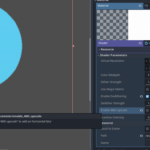

This is grey for me when I try it. What am I doing wrong?
Oh, hm
Could you show how it looks like? use imgur to send pictures? and did you follow the guide i left in the post? “This shader is meant to be used on the SubViewportContainer node.”
Preciso de instruções de como usar 👀🙏🏾!!!
SubViewPortContainer -> SubViewPort -> Camera3D – is the scene hierarchy that you want, then add a shader material to the SubViewPortContainer and add this shader to that material. Then adjust to your liking.