
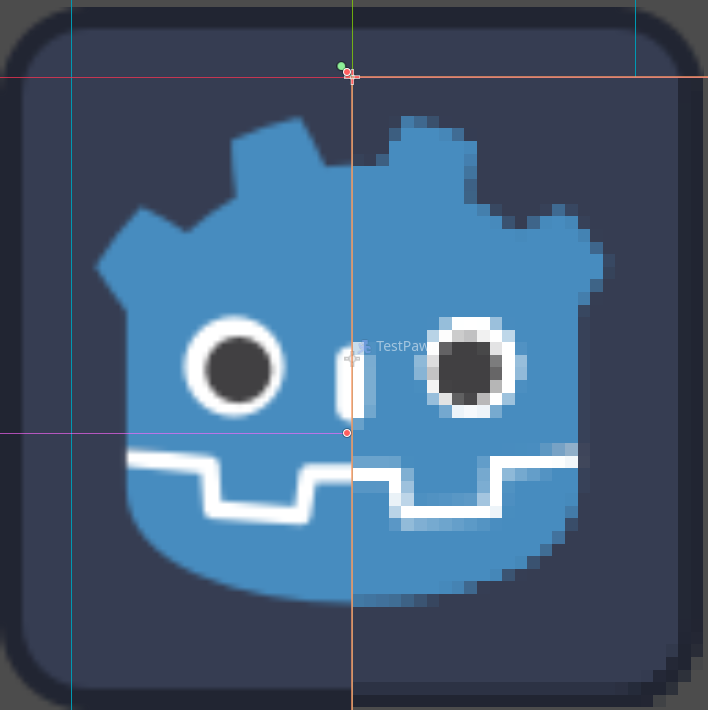
2D – Post Process – Pixelate

Pixelates everything behind the ColorRect.
Add a CanvasLayer.
Add a ColorRect to the CanvasLayer.
Set Anchor Preset to FullRect.
Set the Material to your Shader Material.
(Inspired by this shader (https://godotshaders.com/shader/pixelate-postprocess/) but the code there didn’t work, so I adapted this spatial shader (https://godotshaders.com/shader/spatial-pixelation/) to make it work.)
Shader code
shader_type canvas_item;

uniform float pixelation : hint_range(0.001, 0.1) = 0.01;
uniform sampler2D SCREEN_TEXTURE : hint_screen_texture, filter_linear_mipmap;
uniform float opacity : hint_range(0.0, 1.0) = 1.0;

void fragment() {
    // Calculate pixel dimensions with screen aspect correction
    vec2 viewport_size = vec2(1.0 / SCREEN_PIXEL_SIZE.x, 1.0 / SCREEN_PIXEL_SIZE.y);
    float aspect = float(viewport_size.x) / float(viewport_size.y);
	vec2 pixel_size = vec2(pixelation / aspect, pixelation);

    // Calculate grid aligned UV coordinates
    vec2 coord = SCREEN_UV;

    // Round to nearest pixel boundary to prevent edge shimmer
    coord = (floor(coord / pixel_size) + 0.5) * pixel_size;

    // Add small edge tolerance
    float edge_tolerance = 0.001;
    coord = clamp(coord, pixel_size * 0.5 + edge_tolerance, 1.0 - pixel_size * 0.5 - edge_tolerance);

    // Sample with explicit LOD to prevent mipmap shimmer
    vec4 color = textureLod(SCREEN_TEXTURE, coord, 0.0);

    // Apply anti-alias at edges
    vec2 uv_delta = fwidth(SCREEN_UV);
    vec2 edge_dist = smoothstep(vec2(0.0), uv_delta * 2.0, SCREEN_UV) *
                     smoothstep(vec2(0.0), uv_delta * 2.0, vec2(1.0) - SCREEN_UV);
    float edge_factor = edge_dist.x * edge_dist.y;
	color.a = opacity * edge_factor;
    COLOR = color;
}

A very useful shader for those who want to pixelate without changing their viewport settings. I was able to use this shader on a CanvasGroup by replacing the last anti-aliasing snippet with the default CanvasGroup shader. That way you can just pixelate the stuff in the canvas group and not the whole screen.
if (color.a > 0.0001) {
	color.rgb /= color.a;
}
COLOR *= color;
I also found that the default shader works on other canvas items such as a Line2D which could be used as a cool glitch effect