

SPOM with horizon detection + self shading (Silhouette clipping Parallax Occlusion Mapping + Self shading + Horizon trimming / erosion)

!NOTE! This shader is a mishmash of some shaders so the credit for the respective code used goes to the original authors (namely: Self-Shadowing POM. In the future i’m considering of integrating Contact-Refinment POM too but i’m not onfident enough right now.)
NOTE: I updated this shader with an experimental way of reducing the artifacts caused by steep angles on flat surfaces here
WARNING: I am BY NO MEANS a professional graphic engineer and therefore i might have used unoptimized and/or potentially bugged logic which i haven’t had the time to test out thoroughly. PLEASE before using this header in any professional / commercial context, make sure it fits all your requirements and test it out by yourself first.
I’ve been inspired by THIS video about the rendering technique used in Crimson Desert and how much more performant it is with respect to tessellation / vertex displacement.
This shader adds on top of the S-S POM also the ability to trim the edges of the displayed texture using both:
- A) Silhouette clipping (the borders outside the specified clipping regions will be trimmed, allowing for a smooth, homogeneous and continuous border which follows the heightmap
- B) Curved surface horizon clipping (The borders near the edge of the mesh, which correspond with the lower values of the height map get trimmed using the parameters in the export)
Making this shader, tecnically, a Self-Shadowing Silhouette clipping Parallax Occlusion Mapping shader (what a mouthful lol. Also SESHSilPOM isn’t any better).
NOTES:
- I made sure to document most of the shader parameters so chances are that if you’re unsure about what does a parameter do, it could easily be explained by hovering on it.
- When this shader is applied on a flat plane (Wall, plane, face of a cube, etc…) it’s suggested to turn OFF curved silhouette and ON silhouette clipping. While on the contrary, if applied on a curved (closed) surface (sphere / capsule / cylinder, etc) It’s suggested to turn ON curved silhouette and OFF silhouette clipping.
Consider the fact that this shader has its limitations: When you watch a solid with a flat face or nearly-parallel (to the camera view) AND silhouette curvature is ON, it can cause artifacts and incorrect clipping. (see HERE for additional screenshots, including the artifacts i was talking about, and a screenshot of the configuration of a shader material)
In the screenshot section you can see:
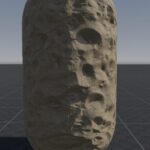
- In screenshot 1 the mesh with curved silhouette enabled, self shadowing enabled
- In screenshot 2 the mesh with curved silhouette disabled, self shadowing enabled
- In screenshot 3 A plane with silhouette clipping enabled (and curved silhouette DISabled)
Shader code
shader_type spatial;
render_mode blend_mix,depth_draw_opaque,cull_back,diffuse_burley,specular_schlick_ggx;


group_uniforms albedo;
uniform vec4 albedo : source_color = vec4(1.0);
/**
The albedo texture (AKA Color texture).
*/
uniform sampler2D texture_albedo : source_color,filter_linear_mipmap,repeat_enable;

group_uniforms metallic;
uniform float metallic : hint_range(0.0, 1.0, 0.01) = 0;
/**
The metallic texture (Used for reflection computations).
*/
uniform sampler2D texture_metallic : hint_default_white,filter_linear_mipmap,repeat_enable;
uniform float specular : hint_range(0.0, 1.0, 0.01) = 0.5;

group_uniforms roughness;
uniform float roughness : hint_range(0,1) = 0.5;
/**
The roughness texture.
*/
uniform sampler2D texture_roughness : hint_roughness_r,filter_linear_mipmap,repeat_enable;

group_uniforms ambient_occlusion;
/**
The ambient occlusion texture (Used for adding extra details in places where light has a hard time reaching).
*/
uniform sampler2D texture_ao : hint_default_white,filter_linear_mipmap,repeat_enable;
uniform float ao_effect : hint_range(0.0, 1.0, 0.1) = 0.0;

group_uniforms normal_map;
/**
The normal texture (Used to add detail on the shadows of the texture depending on the direction of the light source).
*/
uniform sampler2D texture_normal : hint_roughness_normal,filter_linear_mipmap,repeat_enable;
uniform float normal_scale : hint_range(-16,16) = 1;

group_uniforms height;
/**
The heighmap (or displacement) texture (It's used to simulate a fake dispalcement. Also useful to add extra details such as self shadowing, silhouette clipping and curved silhouette clipping).
*/
uniform sampler2D texture_heightmap : hint_default_black,filter_linear_mipmap,repeat_enable;
/**
How deep the fake displacement will be
*/
uniform float heightmap_scale = 5;
/**
The minimum amount of layers (planes) stacked on top of eachother to simulate mesh depth (high values yield better results but can cause slowdown on lower end systems)
*/
uniform int heightmap_min_layers : hint_range(8, 64, 1) = 8;
/**
The maximum amount of layers (planes) stacked on top of eachother to simulate mesh depth (high values yield better results but can cause slowdown on lower end systems)
*/
uniform int heightmap_max_layers : hint_range(8, 64, 1) = 32;
/**
The minimum amount of layers (planes) stacked on top of eachother to simulate shadows (high values yield better results but can cause slowdown on lower end systems)
*/
uniform int shadow_min_layers : hint_range(8, 64, 1) = 8;
/**
The maximum amount of layers (planes) stacked on top of eachother to simulate shadows (high values yield better results but can cause slowdown on lower end systems)
*/
uniform int shadow_max_layers : hint_range(8, 64, 1) = 32;
uniform vec2 heightmap_flip = vec2(1.0);
/**
If use_self_shadow is on, the shader will try to compute how shadows casted from higher regions of the height map will cast the shadow onto other, lower regions. This increases graphical fidelity.
*/
uniform bool use_self_shadow = true;

group_uniforms silhouette_clipping;
/**
If use_silhouette_clipping is on, the shader will clip everything that exceeds the UV coordinates (Doesn't allow tiling if this is on obviously). This is helpful to make a plane, or any flat surface have a more realistic, heightmap aligned, edge when viewed from a reasonable angle.bool
*/
uniform bool use_silhouette_clipping = true;
/**
This defines the minimum clipping point of the UV space. Anything below will be clipped. Defaults to Vector2(0,0)
*/
uniform vec2 clip_uv_min = vec2(0.0, 0.0);
/**
This defines the minimum clipping point of the UV space. Anything above will be clipped. Defaults to Vector2(1,1)
*/
uniform vec2 clip_uv_max = vec2(1.0, 1.0);

group_uniforms curved_silhouette;
/**
If use_curved_silhouette is enabled, the shader will try to detect an edge (near the edges of the fragment), which is above the safe threshold, to clip that region and make it transparent.
This is used to simulate displacement on curved surfaces without resorting to tessellation nor vertex displacement. The results are way worse (graphically) than true displacement but it's both greatly better than a normal flat edge AND it's cheaper (computationally) to run with respect to a true displacement shader.
*/
uniform bool use_curved_silhouette = true;
/**
This defines how strong the horizon clipping is. Greater values = greater "erosion" of the edge
*/
uniform float horizon_clip_strength : hint_range(0.0, 4.0, 0.01) = 1.0;
/**
This defines the bias towards horizon height. Increase if the horizon is too flat, decrease if holes appear in the texture
*/
uniform float horizon_height_bias : hint_range(0.0, 1.0, 0.01) = 0.0;
/**
This marks the safe threshold (as if it was an internal region of the fragment which increases with bigger values) that won't clip ANYTHING.
Increase if there's internal holes, decrease if the border is flat.
*/
uniform float horizon_safe_threshold : hint_range(0.0, 0.95, 0.01) = 0.3;
/**
Falloff power.
Higher = flatter, more smooth edge.
Smaller = more harsh, jagged falloff.
*/
uniform float horizon_falloff_power : hint_range(0.5, 8.0, 0.1) = 2.0;

group_uniforms uv;
uniform vec2 uv1_scale = vec2(1.0);
uniform vec2 uv1_offset = vec2(0);

varying vec2 base_uv;
varying mat3 tbn;
varying vec3 model_pos;

void vertex() {
    UV = UV * uv1_scale + uv1_offset;
    model_pos = VERTEX;
}

float D_GGX(float cos_theta_m, float alpha) {
    float a = cos_theta_m * alpha;
    float k = alpha / (1.0 - cos_theta_m * cos_theta_m + a * a);
    return k * k * (1.0 / PI);
}

float V_GGX(float NdotL, float NdotV, float alpha) {
    return 0.5 / mix(2.0 * NdotL * NdotV, NdotL + NdotV, alpha);
}

float SchlickFresnel(float u) {
    float m = 1.0 - u;
    float m2 = m * m;
    return m2 * m2 * m;
}

vec3 F0(float mt, float spc, vec3 cl) {
    float dielectric = 0.16 * spc * spc;
    return mix(vec3(dielectric), cl.rgb, vec3(mt));
}

float GetParallaxShadow(vec2 texCoord, vec3 lightDir) {
    if (lightDir.z >= 0.0)
        return 0.0;

    float numLayers = mix(float(shadow_max_layers), float(shadow_min_layers),
        abs(dot(vec3(0.0, 0.0, 1.0), lightDir)));

    vec2 currentTexCoords = texCoord;
    float currentDepthMapValue = 1.0 - texture(texture_heightmap, currentTexCoords).r;
    float currentLayerDepth = currentDepthMapValue;
    float layerDepth = 1.0 / numLayers;
    vec2 P = lightDir.xy / lightDir.z * heightmap_scale * 0.01;
    vec2 deltaTexCoords = P / numLayers;

    while (currentLayerDepth <= currentDepthMapValue && currentLayerDepth > 0.0) {
        currentTexCoords += deltaTexCoords;
        currentDepthMapValue = 1.0 - texture(texture_heightmap, currentTexCoords).r;
        currentLayerDepth -= layerDepth;
    }

    return currentLayerDepth > currentDepthMapValue ? 0.0 : 1.0;
}

void fragment() {
	base_uv = UV;

	// Parallax Occlusion Mapping (POM) -----
	vec3 view_dir = normalize(normalize(-VERTEX + EYE_OFFSET) *
	mat3(TANGENT * heightmap_flip.x, -BINORMAL * heightmap_flip.y, NORMAL));
	float num_layers = mix(float(heightmap_max_layers), float(heightmap_min_layers),
	abs(dot(vec3(0.0, 0.0, 1.0), view_dir)));
	float layer_depth = 1.0 / num_layers;
	vec2 P = view_dir.xy / view_dir.z * heightmap_scale * 0.01;
	vec2 delta = P / num_layers;
	vec2 ofs = base_uv;
	float depth = 1.0 - texture(texture_heightmap, ofs).r;
	float current_depth = 0.0;

	while (current_depth < depth) {
	    ofs -= delta;
	    depth = 1.0 - texture(texture_heightmap, ofs).r;
	    current_depth += layer_depth;
	}

	vec2 prev_ofs = ofs + delta;
	float after_depth  = depth - current_depth;
	float before_depth = (1.0 - texture(texture_heightmap, prev_ofs).r)
	    - current_depth + layer_depth;
	float weight = after_depth / (after_depth - before_depth);
	ofs = mix(ofs, prev_ofs, weight);
	base_uv = ofs;
	// -------------------------------------

	// Silhouette Clipping UV (discard when below and above thresholds) ---
	if (use_silhouette_clipping) {
		if (base_uv.x < clip_uv_min.x || base_uv.x > clip_uv_max.x ||
			base_uv.y < clip_uv_min.y || base_uv.y > clip_uv_max.y) {
			discard;
		}
	}
	// --------------------------------------------------------------------

	// CURVED SURFACE HORIZON CLIPPING ------------------------
	//
	// Use posiiton in model space to compute how much the fragment is far from the view axis passing through the center of the mesh. NOTE: This is monotonous from the center of the edge.
	//
	// This works by:
	// 1. Transforming view direction in model space
	// 2. Project model_pos the plane perpendicular to the view
	// 3. the distance of this projection is equal to "distance from silhouette center": 0 when in the middle and mesh_radius on the border
	if (use_curved_silhouette) {
		float NdotV = abs(dot(NORMAL, VIEW));
		// horizon_factor = 0 if NdotV >= safe_threshold (central part, no discard).
		// It grows towards 1 when NdotV tends to 0 (horizon, discard).
		float t = clamp(1.0 - NdotV / max(horizon_safe_threshold, 0.001), 0.0, 1.0);
		float horizon_factor = pow(t, horizon_falloff_power);

		float height_threshold = clamp(horizon_factor * horizon_clip_strength, 0.0, 1.0);
		float surface_height = texture(texture_heightmap, base_uv).r - horizon_height_bias;

		if (surface_height < height_threshold) {
			discard;
		}
	}
	// -------------------------------------------------------

	vec4 albedo_tex = texture(texture_albedo, base_uv);
	ALBEDO = albedo.rgb * albedo_tex.rgb;

	float metallic_tex = texture(texture_metallic, base_uv).r;
	METALLIC = metallic_tex * metallic;

	vec4 roughness_texture_channel = vec4(1.0, 0.0, 0.0, 0.0);
	float roughness_tex = dot(texture(texture_roughness, base_uv), roughness_texture_channel);
	ROUGHNESS = roughness_tex * roughness;

	SPECULAR = specular;
	AO = texture(texture_ao, base_uv).r;
	AO_LIGHT_AFFECT = ao_effect;
	NORMAL_MAP = texture(texture_normal, base_uv).rgb;
	NORMAL_MAP_DEPTH = normal_scale;
	tbn = mat3(TANGENT, -BINORMAL, NORMAL);
}

void light() {
	vec3 L = normalize(LIGHT);
	vec3 N = normalize(NORMAL);
	vec3 V = normalize(VIEW);
	vec3 light_dir = -L * tbn;

	float NdotL = min(dot(N, L), 1.0);
	float cNdotL = max(NdotL, 0.0);
	float NdotV = dot(N, V);
	float cNdotV = max(NdotV, 1e-4);

	vec3 H = normalize(V + L);
	float cLdotH = clamp(dot(L, H), 0.0, 1.0);
	float cNdotH = clamp(dot(N, H), 0.0, 1.0);
	float cLdotH5 = SchlickFresnel(cLdotH);

	float shadow = GetParallaxShadow(base_uv, light_dir);

	float diffuse_brdf_NL = cNdotL * (1.0 / PI);
	float D = D_GGX(cNdotH, ROUGHNESS);
	float G = V_GGX(cNdotL, cNdotV, ROUGHNESS);
	vec3 f0 = F0(METALLIC, specular, ALBEDO);
	float f90 = clamp(dot(f0, vec3(50.0 * 0.33)), METALLIC, 1.0);
	vec3 F = f0 + (f90 - f0) * cLdotH5;
	vec3 specular_brdf_NL = cNdotL * D * F * G;

	if (use_self_shadow)
		DIFFUSE_LIGHT += diffuse_brdf_NL * shadow * LIGHT_COLOR * ATTENUATION;
	else
		DIFFUSE_LIGHT += diffuse_brdf_NL * LIGHT_COLOR;

	SPECULAR_LIGHT += specular_brdf_NL * LIGHT_COLOR * SPECULAR_AMOUNT * ATTENUATION;
}
Live Preview



Looks like my dream of SPOM in Godot finally come true
Happy to hear someone finds this useful.
I, however, am still not quite fully satisfied and i’m always striving to get an even better result with more consistent and less artifact prone techniques, while being able to amp up the effect even more without coming across visual issues.
Let me know if you have any suggestions / feedback!
Oh man, this is SO incredible. I love that Crimson Desert’s use of SilPOM is giving this technique new life. it looks so well done here too. thank you for sharing this!!!
It’s still not perfect and i’m still trying to find ways to improve the shader as it’s still imperfect in some ways.
If anyone wants to contribute to this, please leave and let’s have some contructive debates to improve this further more!
You could add pixel depth offset (PDO) to this shader: https://youtu.be/4gBAOB7b5Mg?si=T6svUracXwL-KJ61&t=1754
Done! In the new version linked in this post there’s a toggle for “write to depth” which basically enables PBO, making interaciton with other SPOM surfaces and meshes FAR better.