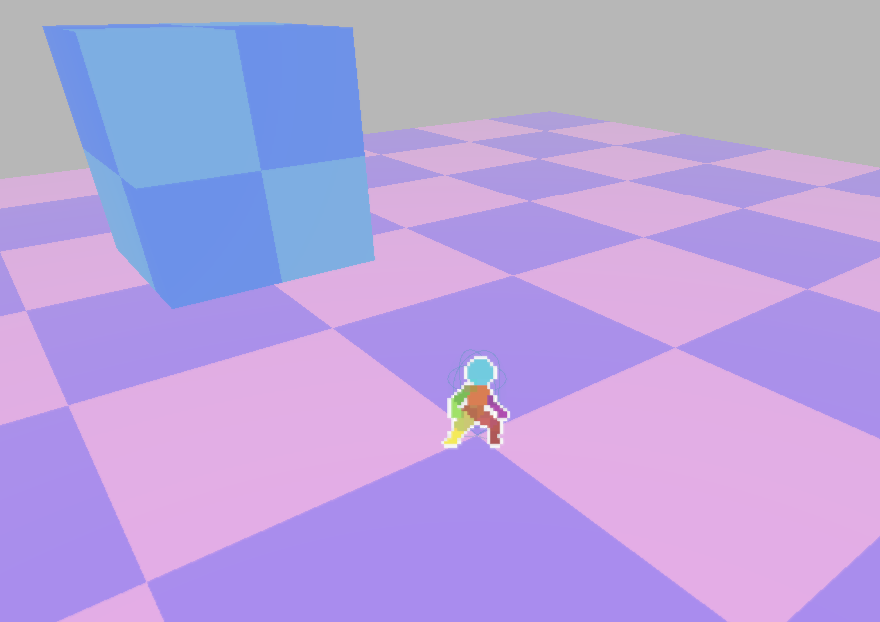
Sprite3d outline working billboard

———-Add a shader to sprite3d and then add the script in the shader3d description. The texture will always work with the shader, even if the entire graphic is replaced.————-
@tool
# This class extends Sprite3D to automatically synchronize its texture
# with a shader parameter named “sprite_texture”. This is essential for shaders
# that perform effects based on the sprite’s content, like outlines.
class_name Sprite3dOutlineShader
extends Sprite3D
# Caches the last known material to detect when the entire material has been changed.
# The underscore prefix `_` indicates it’s an internal variable, not meant to be
# modified from outside this script.
var _last_material: ShaderMaterial
# Called when the node enters the scene tree for the first time.
func _ready() -> void:
# — The core of the solution for flicker-free updates —
# Connect to the ‘texture_changed’ signal. This signal is automatically emitted
# by the Sprite3D node whenever its ‘texture’ property is modified.
# By connecting our function to it, we ensure the shader is updated *immediately*
# in the same frame the texture changes, which prevents flickering.
# This is much more efficient than checking for changes every frame in _process().
texture_changed.connect(_update_shader_texture)
# Enable per-frame processing. We still need this to handle the less frequent
# case where the entire ‘material_override’ is swapped out.
set_process(true)
# Perform an initial synchronization when the scene starts.
# This ensures the shader has the correct texture and material references
# from the very first frame.
_update_shader_material()
# Called every frame.
func _process(_delta: float) -> void:
# Check if the material assigned to ‘material_override’ has changed since the last frame.
# This can happen if you change it in the editor or via code.
if material_override != _last_material:
_update_shader_material()
# This function is called when the material itself is swapped out.
func _update_shader_material() -> void:
# Update our internal cache with the new material reference.
_last_material = material_override as ShaderMaterial
# After a new material is assigned, we must immediately update its
# texture parameter to match the sprite’s current texture.
_update_shader_texture()
# This function is the central point for updating the shader’s texture.
# It’s called either by the ‘texture_changed’ signal or when the material is swapped.
func _update_shader_texture() -> void:
# Safely get the material. The ‘as ShaderMaterial’ will result in `null`
# if the material is not a ShaderMaterial, preventing crashes.
var mat := material_override as ShaderMaterial
# Only proceed if we have a valid shader material AND a valid texture assigned.
# This prevents errors if either property is unassigned.
if mat and texture:
mat.set_shader_parameter(“sprite_texture”, texture)
# — Public API —
# A helper function to allow other scripts or animations to easily change the line color.
func set_line_color(color: Color) -> void:
var mat := material_override as ShaderMaterial
if mat:
mat.set_shader_parameter(“line_color”, color)
else:
# Provide a helpful warning if the user tries to set a color
# without a valid material assigned.
push_warning(“Missing ShaderMaterial in material_override – can’t set line_color.”)
func enable_outline(enable: bool) -> void:
var mat := material_override as ShaderMaterial
if mat:
mat.set_shader_parameter(“enable_outline”, enable)
else:
# Provide a helpful warning if the user tries to set outline
# without a valid material assigned.
push_warning(“Missing ShaderMaterial in material_override – can’t set enable_outline.”)
Shader code
shader_type spatial;
render_mode unshaded, blend_mix, depth_prepass_alpha, cull_disabled, specular_disabled;

uniform sampler2D sprite_texture : source_color, filter_nearest;
uniform bool enable_billboard = true;
uniform bool enable_outline = true;

uniform vec4 line_color : source_color = vec4(1.0,1.0,1.0,1.0);
uniform float glowSize: hint_range(0.0, 300) = 15.0;
uniform int glowDensity: hint_range(0, 30) = 3;
uniform int glowRadialCoverage: hint_range(0, 32) = 4;
uniform float glowAngle: hint_range(0.0, 6.28) = 1.57;
uniform float glowSharpness: hint_range(0.0, 5.0) = 1.0;
uniform float alphaThreshold: hint_range(0.0, 1.0) =  0.2;

void vertex() {
    if (enable_billboard) {
        vec3 world_origin = (MODEL_MATRIX * vec4(0.0, 0.0, 0.0, 1.0)).xyz;
        float scale_x = length(MODEL_MATRIX[0].xyz);
        float scale_y = length(MODEL_MATRIX[1].xyz);
        vec3 cam_right = normalize(INV_VIEW_MATRIX[0].xyz);
        vec3 cam_up    = normalize(INV_VIEW_MATRIX[1].xyz);
        vec2 local = VERTEX.xy;
        vec3 world_billboard = world_origin
            + cam_right * local.x * scale_x
            + cam_up    * local.y * scale_y;
        POSITION = PROJECTION_MATRIX * VIEW_MATRIX * vec4(world_billboard, 1.0);
    } else {
        POSITION = PROJECTION_MATRIX * VIEW_MATRIX * (MODEL_MATRIX * vec4(VERTEX, 1.0));
    }
}

void fragment() {
    vec4 col = texture(sprite_texture, UV);

    ALBEDO = col.rgb;
    ALPHA = col.a;

    if (enable_outline) {
        vec2 pixel_size = 1.0 / vec2(textureSize(sprite_texture, 0));
        float alph = 0.0;
        for (int i = 0; i < glowRadialCoverage; i++) {
            for (int j = 0; j < glowDensity; j++) {
                float radians360 = 6.28;
                float angle = (radians360 / float(glowRadialCoverage)) * float(i+1) + glowAngle;
                float dist = glowSize * float(j + 1) / float(glowDensity);
                vec2 pixel_coor = vec2(sin(angle), cos(angle));
                vec4 tex = texture(sprite_texture, UV + pixel_coor * pixel_size * dist);

                float distFrom = float(glowDensity - j) / float(glowDensity);
                float sharpness = mix(0.0, 1.0, pow(distFrom, glowSharpness));
                alph += (tex.a * line_color.a) * sharpness;
            }
        }

        if (ALPHA < alphaThreshold) {
            ALBEDO = line_color.rgb;
            ALPHA = alph;
        }
    }
}
Live Preview