
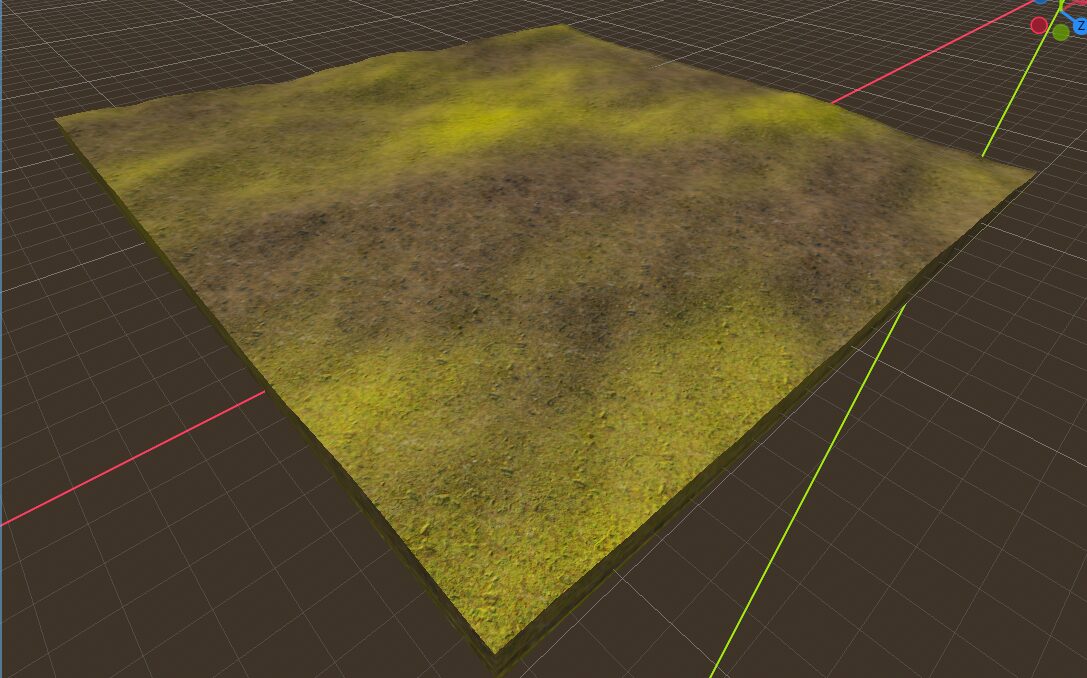
Dual texture blender

An improvised version combining the knowledge from this videos:
It includes multiple methods for the combination of normal maps in which some are more optimal in terms of performance and others have better results.
- Unity blending (Provides the best visual results in most cases. but it is the most costly of the four methods)
- Whiteout blending (often better than the simple method, especially to prevent detail from flattening)
- UDN (Very similar to simple blending in cost, as it does not use the z component of the second normal map, which simplifies calculations)
- Simple (the most performant, may produce unwanted visual effects (such as seams or hard edges)
By default this shader uses the Whiteout method.
Features
- Optional UV triplanar option
- Mixing of two textures using NoiseTexture2D as blend.
- Normal map support
- Change surface detail roughness, metallic, specular.
Setup
-
To set up this texture blending system, follow these steps:
-
Configure Blend Noise:
- Assign a new
NoiseTexture2Dto theblend_noiseparameter. - Within the
NoiseTexture2D, create a newColor Rampand aFastNoiseLite. - Adjust the parameters of the noise to control how the secondary texture blends. The
Color Rampdetermines the blending amount of the secondary texture based on the distance between its points.
- Assign a new
-
Select Main Texture:
- Choose a primary texture for your material.
- You can adjust its
UV scale,offset, andblend sharpness. - Consider using the
triplanar UVoption for better results if you notice significant texture tiling.
-
Select Secondary Texture:
- Choose a secondary texture for your material.
- Apply the same parameter adjustments as you did for the main texture.
-
Attach Normal Maps:
- If available, attach the respective normal maps for both the main and secondary textures in their designated sections.
-
Modify Surface Details (Optional):
- You can optionally adjust the surface details such as roughness, metallic, and specular values as well the normal scale to achieve the desired visual effect.
-
Shader code
shader_type spatial;
render_mode  blend_mix, depth_draw_opaque, cull_back, diffuse_burley, specular_schlick_ggx;

uniform sampler2D blend_noise : source_color;

group_uniforms Surface_detail;
uniform float normal_scale : hint_range(-16.0, 16.0) = 1.0;
uniform float specular : hint_range(0.0, 1.0, 0.01);
uniform float metallic : hint_range(0.0, 1.0, 0.01);
uniform float roughness : hint_range(0.0, 1.0);

group_uniforms MainTexture;
uniform sampler2D main_texture : source_color, repeat_enable, filter_linear_mipmap;
uniform vec4 main_texture_color : source_color = vec4(1.0);

uniform float main_uv_scale = 1.0;
uniform vec3 main_uv_offset;
uniform bool main_uv_triplanar = false;
uniform float main_uv_blend_sharpness: hint_range(0.0, 150.0, 0.001) = 1.0;
uniform sampler2D main_normal: hint_roughness_normal, filter_linear_mipmap, repeat_enable;

group_uniforms SecondaryTexture;
uniform sampler2D secondary_texture : source_color, repeat_enable, filter_linear_mipmap;
uniform vec4 secondary_texture_color : source_color = vec4(1.0);
uniform float secondary_uv_scale = 1.0;
uniform vec3 secondary_uv_offset;
uniform bool secondary_uv_triplanar = false;
uniform float secondary_uv_blend_sharpness : hint_range(0.0, 150.0, 0.001) = 1.0;
uniform sampler2D secondary_normal: hint_roughness_normal, filter_linear_mipmap, repeat_enable;

varying vec3 main_uv_power_normal;
varying vec3 main_uv_triplanar_pos;
varying vec3 secondary_uv_power_normal;
varying vec3 secondary_uv_triplanar_pos;

varying vec3 world_position;


vec4 triplanar_texture(sampler2D p_sampler, vec3 p_weights, vec3 p_triplanar_pos) {
	vec4 sampler = vec4(0.0);

	sampler += texture(p_sampler, p_triplanar_pos.xy) * p_weights.z;
	sampler += texture(p_sampler, p_triplanar_pos.xz) * p_weights.y;
	sampler += texture(p_sampler, p_triplanar_pos.zy * vec2(-1.0, 1.0)) * p_weights.x;

	return sampler;
}

// Cheapest method, better performance and good results.
vec3 simple_blending(vec3 a, vec3 b) {
	a = a * 2.0 - 1.0;
	b = b * 2.0 - 1.0;

	vec3 result = vec3(a.xy + b.xy, 1.0);

	return result * 0.5 + 0.5;
}

// Better results but more performant cost
vec3 unity_blending(vec3 a, vec3 b) {
	a = a * 2.0 - 1.0;
	b = b * 2.0 - 1.0;

	mat3 basis = mat3(
		vec3(a.z, a.y, -a.x),
		vec3(a.x, a.z, -a.y),
		a
	);

	vec3 result = normalize(basis * b);

	return result * 0.5 + 0.5;
}

// Performance friendly, good results
vec3 whiteout_blending(vec3 a, vec3 b) {
	a = a * 2.0 - 1.0;
	b = b * 2.0 - 1.0;

	vec3 result = normalize(vec3(a.xy + b.xy, a.z * b.z));

	return result * 0.5 + 0.5;
}

vec3 udm_blending(vec3 a, vec3 b) {
	a = a * 2.0 - 1.0;
	b = b * 2.0 - 1.0;

	vec3 result = normalize(vec3(a.xy + b.xy, a.z));

	return result * 0.5 + 0.5;
}


void vertex() {
	world_position = (MODEL_MATRIX * vec4(VERTEX, 1.0)).xyz;
	vec3 normal = NORMAL;

	TANGENT = vec3(0.0, 0.0, -1.0) * abs(normal.x);
	TANGENT += vec3(1.0, 0.0, 0.0) * abs(normal.y);
	TANGENT += vec3(1.0, 0.0, 0.0) * abs(normal.z);
	TANGENT = normalize(TANGENT);

	BINORMAL = vec3(0.0, 1.0, 0.0) * abs(normal.x);
	BINORMAL += vec3(0.0, 0.0, -1.0) * abs(normal.y);
	BINORMAL += vec3(0.0, 1.0, 0.0) * abs(normal.z);
	BINORMAL = normalize(BINORMAL);

	// Main UV Triplanar: Enabled
	if (main_uv_triplanar) {
		main_uv_power_normal = pow(abs(NORMAL), vec3(main_uv_blend_sharpness));
		main_uv_triplanar_pos = VERTEX * main_uv_scale + main_uv_offset;
		main_uv_power_normal /= dot(main_uv_power_normal, vec3(1.0));
		main_uv_triplanar_pos *= vec3(1.0, -1.0, 1.0);
	}
	// Secondary UV Triplanar: Enabled
	if (secondary_uv_triplanar) {
		secondary_uv_power_normal = pow(abs(NORMAL), vec3(secondary_uv_blend_sharpness));
		secondary_uv_triplanar_pos = VERTEX * secondary_uv_scale + secondary_uv_offset;
		secondary_uv_power_normal /= dot(secondary_uv_power_normal, vec3(1.0));
		secondary_uv_triplanar_pos *= vec3(1.0, -1.0, 1.0);
	}

}

void fragment() {
	vec4 main_albedo;
	vec4 m_normal;
	vec4 s_normal;

	if (main_uv_triplanar) {
		main_albedo = triplanar_texture(main_texture, main_uv_power_normal, main_uv_triplanar_pos);
		m_normal = triplanar_texture(main_normal, main_uv_power_normal, main_uv_triplanar_pos);

	} else {
		main_albedo = texture(main_texture, UV * vec2(main_uv_scale));
		m_normal = texture(main_normal, UV * vec2(main_uv_scale));
	}

	main_albedo *= main_texture_color;

	vec4 secondary_albedo;

	if (secondary_uv_triplanar) {
		secondary_albedo = triplanar_texture(secondary_texture, secondary_uv_power_normal, secondary_uv_triplanar_pos);
		s_normal = triplanar_texture(secondary_normal, secondary_uv_power_normal, secondary_uv_triplanar_pos);
	} else {
		secondary_albedo = texture(secondary_texture, UV * vec2(secondary_uv_scale));
		s_normal = texture(secondary_normal, UV * vec2(secondary_uv_scale));
	}

	secondary_albedo *= secondary_texture_color;

	vec4 blend_noise_texture = texture(blend_noise, UV);
	vec3 blended_albedo = mix(vec3(main_albedo.xyz), vec3(secondary_albedo.xyz), vec3(blend_noise_texture.xyz));

	vec3 combined_normal = whiteout_blending(m_normal.rgb, s_normal.rgb);

	// Makes the final texture uniform decomposing & composing the rgb channels
	vec3 albedo_rgb_to_hsv;

	{
		vec3 c = blended_albedo;
		vec4 K = vec4(0.0, -1.0 / 3.0, 2.0 / 3.0, -1.0);
		vec4 p = mix(vec4(c.bg, K.wz), vec4(c.gb, K.xy), step(c.b, c.g));
		vec4 q = mix(vec4(p.xyw, c.r), vec4(c.r, p.yzx), step(p.x, c.r));
		float d = q.x - min(q.w, q.y);
		float e = 1.0e-10;

		albedo_rgb_to_hsv = vec3(abs(q.z + (q.w - q.y) / (6.0 * d + e)), d / (q.x + e), q.x);
	}

	// VectorDecompose
	float rgb_x = albedo_rgb_to_hsv.x;
	float rgb_y = albedo_rgb_to_hsv.y;
	float rgb_z = albedo_rgb_to_hsv.z;

	// VectorCompose:
	vec3 rgb_composed = vec3(rgb_x, rgb_y, rgb_z);

	vec3 final_rgb_albedo;
	{
		vec3 c = rgb_composed;
		vec4 K = vec4(1.0, 2.0 / 3.0, 1.0 / 3.0, 3.0);
		vec3 p = abs(fract(c.xxx + K.xyz) * 6.0 - K.www);
		final_rgb_albedo = c.z * mix(K.xxx, clamp(p - K.xxx, 0.0, 1.0), c.y);
	}

	ALBEDO = final_rgb_albedo;
	NORMAL_MAP = combined_normal;
	NORMAL_MAP_DEPTH = normal_scale;
	ROUGHNESS = roughness;
	METALLIC = metallic;
	SPECULAR = specular;
}
Live Preview

Good one. Thank you !