
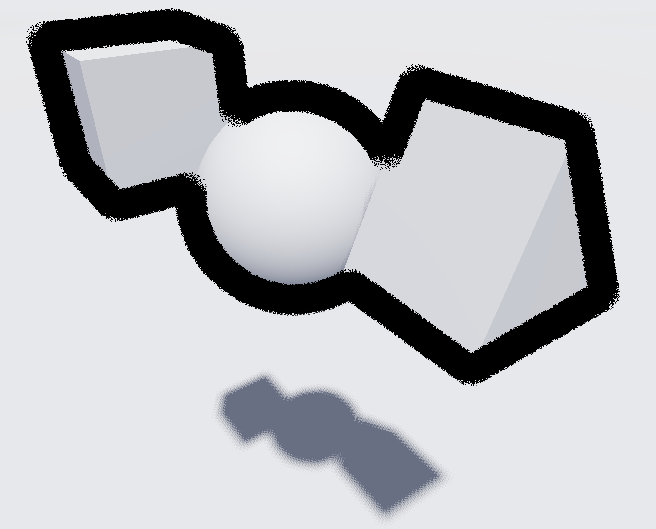
Thick outline post process shader

Random experiment.
Each step takes 2 samples diametricly opposed around the center, equally distributed in a circle.
with dithering, this allows a fuzzy, but thick outline with only 6 samples, even for a 16 pixel radius.
probably room for improvement with better depth/normal checking/thresholding.
Shader code
shader_type spatial;
render_mode blend_premul_alpha, unshaded, ambient_light_disabled;

uniform sampler2D depth_texture : hint_depth_texture;
uniform int step_count : hint_range(3, 15, 2) = 3; // 2 samples per step
uniform float thickness : hint_range(1.0, 16.0, 0.1) = 3.0;
uniform vec3 edge_color : source_color = vec3(0.);
uniform float fade_start : hint_range(1.0, 1000.0, 0.1) = 100.0;
uniform float fade_length : hint_range(1.0, 1000.0, 0.1) = 200.0;

void fragment() {
	// Setup step parameters
	vec2 step_length = 1.0 / VIEWPORT_SIZE * thickness;
	float step_angle = TAU / float(step_count);
	// Per-pixel jitter to reduce patterning
	float start_angle = fract(sin(dot(SCREEN_UV, vec2(12.9898, 78.233))) * 43758.5453) * TAU;
	vec2 dir = vec2(cos(start_angle), sin(start_angle));
	// step rotation matrix
	mat2 rot = mat2(
		vec2(cos(step_angle), -sin(step_angle)),
		vec2(sin(step_angle),  cos(step_angle)));
	vec3 avg_dx = vec3(0.0);
	vec3 avg_dy = vec3(0.0);
	// save closest pixel to uniformly fade line.
	float min_z = 1e6;
	// Sample and average derivatives for all pairs
	for (int i = 0; i < step_count; i++) {
		vec2 uv1 = SCREEN_UV + dir * step_length;
		vec2 uv2 = SCREEN_UV - dir * step_length;
		float d1 = texture(depth_texture, uv1).r;
		float d2 = texture(depth_texture, uv2).r;
		vec4 up1 = INV_PROJECTION_MATRIX * vec4(uv1 * 2.0 - 1.0, d1, 1.0);
		vec4 up2 = INV_PROJECTION_MATRIX * vec4(uv2 * 2.0 - 1.0, d2, 1.0);
		vec3 p1 = up1.xyz / up1.w;
		vec3 p2 = up2.xyz / up2.w;
		min_z = min(min_z, min(-p1.z, -p2.z));
		vec3 diff = p1 - p2;
		avg_dx += diff * dir.x;
		avg_dy += diff * dir.y;

		dir = rot * dir; // rotate direction for next step
	}
	// fade outline width with distance
	float distance_fade = 1e-4 + smoothstep(fade_start + fade_length, fade_start, min_z);

	// Edge mask
	float edge = 1.0 - smoothstep(0.1, 0.15, dot(normalize(cross(avg_dy, avg_dx)), VIEW));

	// Small vignette at screen edges
	edge *= smoothstep(0.00, 0.015 * thickness,
		1.0 - max(abs(SCREEN_UV.x - 0.5), abs(SCREEN_UV.y - 0.5)) * 2.0);

	// blend_premul_alpha avoids need to sample screentexture.
	ALBEDO = edge_color * edge;
	ALPHA = edge * distance_fade;
}
I really like this shader, but I have a question, can it only work on specific characters or objects without affecting other objects?
Try applying this shader to “Geometry” -> “Material Overlay” instead of as a post process on the whole screen.