
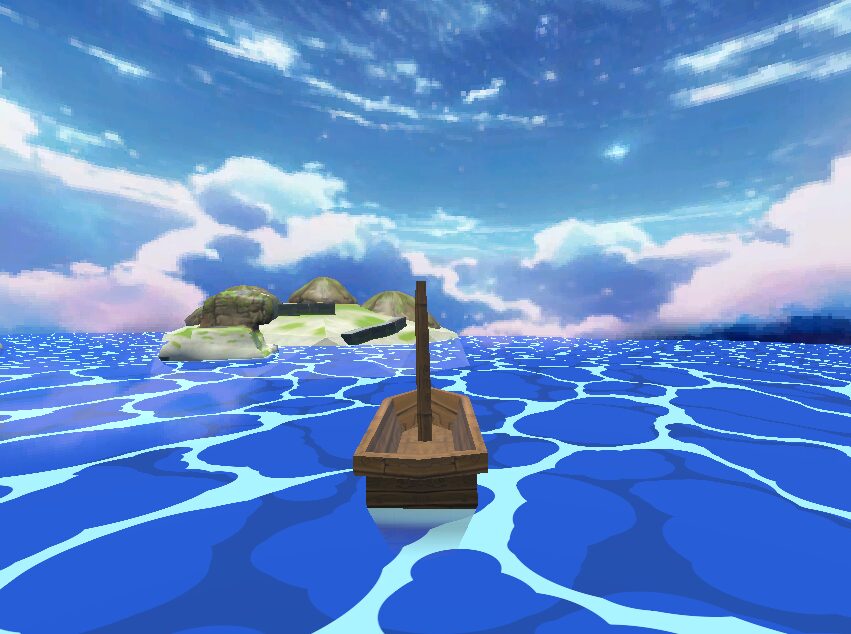
Toon Style 3D Water Shader – No textures needed
1. Create a MeshInstance3D and in the inspector create it as a PlaneMesh. Subdivide the PlaneMesh 32×32 and set the size of the PlaneMesh to 128 x 128
2. Add a shaderMaterial and apply this shader.
Many thanks to NektoArts and the core of this shader which can be found here:
https://godotshaders.com/shader/wind-waker-water-no-textures-needed/
Shader code
// 3D Water Shader similar to Zelda Windwaker - tested on Godot 4.3
// Based on NekotoArts and modified for Godot 4.3 with enhancements
// We are using a vertex shader to create wave motion by adjusting the height of vertices
// the fragment shader generates the water surface appearance
// by combining multiple layers of circular patterns to simulate the water & foam
// and distortion with color mixing to achieve a toon water-like effect


shader_type spatial;

// Water color and foam color
uniform vec4 WATER_COL : source_color = vec4(0.04, 0.38, 0.88, 1.0);
uniform vec4 WATER2_COL : source_color = vec4(0.04, 0.35, 0.78, 1.0);
uniform vec4 FOAM_COL : source_color = vec4(0.8125, 0.9609, 0.9648, 1.0);

// Water animation and appearance
uniform float distortion_speed = 2.0;
uniform vec2 tile = vec2(5.0, 5.0);
uniform float wave_speed = 2;
uniform float wave_amplitude = 0.5;
uniform float wave_frequency = 1.5;
uniform float time_offset = 0.0;
uniform vec2 water_size = vec2(128.0, 128.0);

// Uniforms for transparency and depth effects

uniform sampler2D DEPTH_TEXTURE : hint_depth_texture, filter_linear_mipmap;
uniform sampler2D SCREEN_TEXTURE : hint_screen_texture, filter_linear_mipmap;
uniform float water_transparency = 0.8; // Adjust this to control overall water transparency
uniform float water_depth_factor = 0.1; // Adjust this to control how quickly water becomes opaque with depth

// Foam uniforms for where the mesh intersects the water mesh
uniform float foam_width = 0.5;
uniform float foam_edge_softness = 0.05;
uniform float foam_smoothness = 0.03;
uniform float foam_distortion_speed = 0.5;
uniform float foam_distortion_amount = 0.1;


// Math constants
const float TWOPI = 6.283185307;
const float SIXPI = 18.84955592;


 // Noise function for foam distortion
float noise(vec2 uv) {
    return fract(sin(dot(uv, vec2(12.9898, 78.233))) * 43758.5453);
}

//  noise function for smoother distortion
float smooth_noise(vec2 uv) {
    vec2 id = floor(uv);
    vec2 f = fract(uv);

    float a = noise(id);
    float b = noise(id + vec2(1.0, 0.0));
    float c = noise(id + vec2(0.0, 1.0));
    float d = noise(id + vec2(1.0, 1.0));

    vec2 u = f * f * (3.0 - 2.0 * f);
    return mix(a, b, u.x) + (c - a) * u.y * (1.0 - u.x) + (d - b) * u.x * u.y;
}
// Function to calculate foam
float calculate_foam(vec2 uv, float depth_diff, float time) {
    // Add distortion to UV based on time and noise
    vec2 distorted_uv = uv + vec2(
        smooth_noise(uv * 5.0 + time * foam_distortion_speed) * foam_distortion_amount,
        smooth_noise(uv * 5.0 + 100.0 + time * foam_distortion_speed) * foam_distortion_amount
    );

    // Calculate foam based on depth difference and distorted UV
    float foam_shape = smoothstep(0.0, foam_width, abs(depth_diff));
    foam_shape = smoothstep(foam_edge_softness, 0.0, foam_shape);
    foam_shape *= smooth_noise(distorted_uv * 10.0);

    return foam_shape;
}


// Wave height calculation (unchanged)
float calculate_wave_height(vec2 position, float time) {
    float wave_x = sin(position.x * wave_frequency + time * wave_speed);
    float wave_y = cos(position.y * wave_frequency + time * wave_speed);
    return (wave_x + wave_y) * 0.5 * wave_amplitude;
}

// Vertex shader (unchanged)
void vertex() {
    vec4 world_position = MODEL_MATRIX * vec4(VERTEX, 1.0);
    float wave = calculate_wave_height(world_position.xz, TIME + time_offset);
    VERTEX.y += wave;
}

// Circle function for water effects
float circ(vec2 pos, vec2 c, float s) {
    c = abs(pos - c);
    c = min(c, 1.0 - c);
    return smoothstep(0.0, 0.002, sqrt(s) - sqrt(dot(c, c))) * -1.0;
}

// Water layer function
// use the circles to draw the toon water design
float waterlayer(vec2 uv) {
     uv = mod(uv, 1.0); // Clamp to [0..1]

    float ret = 1.0;

    ret += circ(uv, vec2(0.37378, 0.277169), 0.0268181);

    ret += circ(uv, vec2(0.0317477, 0.540372), 0.0193742);

    ret += circ(uv, vec2(0.430044, 0.882218), 0.0232337);

    ret += circ(uv, vec2(0.641033, 0.695106), 0.0117864);

    ret += circ(uv, vec2(0.0146398, 0.0791346), 0.0299458);

    ret += circ(uv, vec2(0.43871, 0.394445), 0.0289087);

    ret += circ(uv, vec2(0.909446, 0.878141), 0.028466);

    ret += circ(uv, vec2(0.310149, 0.686637), 0.0128496);

    ret += circ(uv, vec2(0.928617, 0.195986), 0.0152041);

    ret += circ(uv, vec2(0.0438506, 0.868153), 0.0268601);

    ret += circ(uv, vec2(0.308619, 0.194937), 0.00806102);

    ret += circ(uv, vec2(0.349922, 0.449714), 0.00928667);

    ret += circ(uv, vec2(0.0449556, 0.953415), 0.023126);

    ret += circ(uv, vec2(0.117761, 0.503309), 0.0151272);

    ret += circ(uv, vec2(0.563517, 0.244991), 0.0292322);

    ret += circ(uv, vec2(0.566936, 0.954457), 0.00981141);

    ret += circ(uv, vec2(0.0489944, 0.200931), 0.0178746);

    ret += circ(uv, vec2(0.569297, 0.624893), 0.0132408);

    ret += circ(uv, vec2(0.298347, 0.710972), 0.0114426);

    ret += circ(uv, vec2(0.878141, 0.771279), 0.00322719);

    ret += circ(uv, vec2(0.150995, 0.376221), 0.00216157);

    ret += circ(uv, vec2(0.119673, 0.541984), 0.0124621);

    ret += circ(uv, vec2(0.629598, 0.295629), 0.0198736);

    ret += circ(uv, vec2(0.334357, 0.266278), 0.0187145);

    ret += circ(uv, vec2(0.918044, 0.968163), 0.0182928);

    ret += circ(uv, vec2(0.965445, 0.505026), 0.006348);

    ret += circ(uv, vec2(0.514847, 0.865444), 0.00623523);

    ret += circ(uv, vec2(0.710575, 0.0415131), 0.00322689);

    ret += circ(uv, vec2(0.71403, 0.576945), 0.0215641);

    ret += circ(uv, vec2(0.748873, 0.413325), 0.0110795);

    ret += circ(uv, vec2(0.0623365, 0.896713), 0.0236203);

    ret += circ(uv, vec2(0.980482, 0.473849), 0.00573439);

    ret += circ(uv, vec2(0.647463, 0.654349), 0.0188713);

    ret += circ(uv, vec2(0.651406, 0.981297), 0.00710875);

    ret += circ(uv, vec2(0.428928, 0.382426), 0.0298806);

    ret += circ(uv, vec2(0.811545, 0.62568), 0.00265539);

    ret += circ(uv, vec2(0.400787, 0.74162), 0.00486609);

    ret += circ(uv, vec2(0.331283, 0.418536), 0.00598028);

    ret += circ(uv, vec2(0.894762, 0.0657997), 0.00760375);

    ret += circ(uv, vec2(0.525104, 0.572233), 0.0141796);

    ret += circ(uv, vec2(0.431526, 0.911372), 0.0213234);

    ret += circ(uv, vec2(0.658212, 0.910553), 0.000741023);

    ret += circ(uv, vec2(0.514523, 0.243263), 0.0270685);

    ret += circ(uv, vec2(0.0249494, 0.252872), 0.00876653);

    ret += circ(uv, vec2(0.502214, 0.47269), 0.0234534);

    ret += circ(uv, vec2(0.693271, 0.431469), 0.0246533);

    ret += circ(uv, vec2(0.415, 0.884418), 0.0271696);

    ret += circ(uv, vec2(0.149073, 0.41204), 0.00497198);

    ret += circ(uv, vec2(0.533816, 0.897634), 0.00650833);

    ret += circ(uv, vec2(0.0409132, 0.83406), 0.0191398);

    ret += circ(uv, vec2(0.638585, 0.646019), 0.0206129);

    ret += circ(uv, vec2(0.660342, 0.966541), 0.0053511);

    ret += circ(uv, vec2(0.513783, 0.142233), 0.00471653);

    ret += circ(uv, vec2(0.124305, 0.644263), 0.00116724);

    ret += circ(uv, vec2(0.99871, 0.583864), 0.0107329);

    ret += circ(uv, vec2(0.894879, 0.233289), 0.00667092);

    ret += circ(uv, vec2(0.246286, 0.682766), 0.00411623);

    ret += circ(uv, vec2(0.0761895, 0.16327), 0.0145935);

    ret += circ(uv, vec2(0.949386, 0.802936), 0.0100873);

    ret += circ(uv, vec2(0.480122, 0.196554), 0.0110185);

    ret += circ(uv, vec2(0.896854, 0.803707), 0.013969);

    ret += circ(uv, vec2(0.292865, 0.762973), 0.00566413);

    ret += circ(uv, vec2(0.0995585, 0.117457), 0.00869407);

    ret += circ(uv, vec2(0.377713, 0.00335442), 0.0063147);

    ret += circ(uv, vec2(0.506365, 0.531118), 0.0144016);

    ret += circ(uv, vec2(0.408806, 0.894771), 0.0243923);

    ret += circ(uv, vec2(0.143579, 0.85138), 0.00418529);

    ret += circ(uv, vec2(0.0902811, 0.181775), 0.0108896);

    ret += circ(uv, vec2(0.780695, 0.394644), 0.00475475);

    ret += circ(uv, vec2(0.298036, 0.625531), 0.00325285);

    ret += circ(uv, vec2(0.218423, 0.714537), 0.00157212);

    ret += circ(uv, vec2(0.658836, 0.159556), 0.00225897);

    ret += circ(uv, vec2(0.987324, 0.146545), 0.0288391);

    ret += circ(uv, vec2(0.222646, 0.251694), 0.00092276);

    ret += circ(uv, vec2(0.159826, 0.528063), 0.00605293);

	return max(ret, 0.0);
}


// Water effect function to return vec4
vec4 water(vec2 uv, vec3 cdir, float iTime) {
    uv *= vec2(0.25);

    vec2 a = 0.025 * cdir.xz / cdir.y;
    float h = sin(uv.x + iTime);
    uv += a * h;
    h = sin(0.841471 * uv.x - 0.540302 * uv.y + iTime);
    uv += a * h;

    float d1 = mod(uv.x + uv.y, TWOPI);
    float d2 = mod((uv.x + uv.y + 0.25) * 1.3, SIXPI);
    d1 = iTime * 0.07 + d1;
    d2 = iTime * 0.5 + d2;
    vec2 dist = vec2(
        sin(d1) * 0.15 + sin(d2) * 0.05,
        cos(d1) * 0.15 + cos(d2) * 0.05
    );

    vec4 ret = mix(WATER_COL, WATER2_COL, waterlayer(uv + dist.xy));
    ret = mix(ret, FOAM_COL, waterlayer(vec2(1.0) - uv - dist.yx));
    return ret;
}

void fragment() {
    // Calculate basic water effect
    vec4 water_color = water(UV * tile, vec3(0, 1, 0), TIME * distortion_speed);

    // Get the depth of the pixel in the scene
    float scene_depth = texture(DEPTH_TEXTURE, SCREEN_UV).r;

    // Convert scene depth to view space
    vec3 ndc = vec3(SCREEN_UV * 2.0 - 1.0, scene_depth);
    vec4 view_coords = INV_PROJECTION_MATRIX * vec4(ndc, 1.0);
    view_coords.xyz /= view_coords.w;
    float linear_scene_depth = -view_coords.z;

    // Calculate the depth of the water surface in view space
    vec4 water_world_pos = INV_VIEW_MATRIX * vec4(VERTEX, 1.0);
    vec4 water_view_pos = VIEW_MATRIX * water_world_pos;
    float linear_water_depth = -water_view_pos.z;

    // Calculate depth difference
    float depth_diff = linear_scene_depth - linear_water_depth;

    // Calculate foam
    float foam = calculate_foam(UV, depth_diff, TIME);

    // Calculate water opacity based on depth
    float water_opacity = clamp(depth_diff * water_depth_factor, 0.0, 1.0);

    // Mix water color with the scene behind it
    vec4 background = texture(SCREEN_TEXTURE, SCREEN_UV);
    vec4 final_color = mix(background, water_color, water_opacity * water_transparency);

    // Add foam
    final_color = mix(final_color, FOAM_COL, foam);

    // Set final color and alpha
    ALBEDO = final_color.rgb;
    ALPHA = final_color.a;
}
Live Preview


please fix this for 4.3+
it only shows grey color and no foam
I’m currently using it in 4.3 and it’s ok. Check your parameters, environment or something.
The shader works fine on Godot 4.5.1. Thank you !
I mean, it works, but what are we supposed to do with a water plane of 128 in size? The parameter for size is not used anywhere in the code and does nothing, so we are stuck with a small plane of water? or am I missing a secret method to increase the size without increasing the texture size as well?