
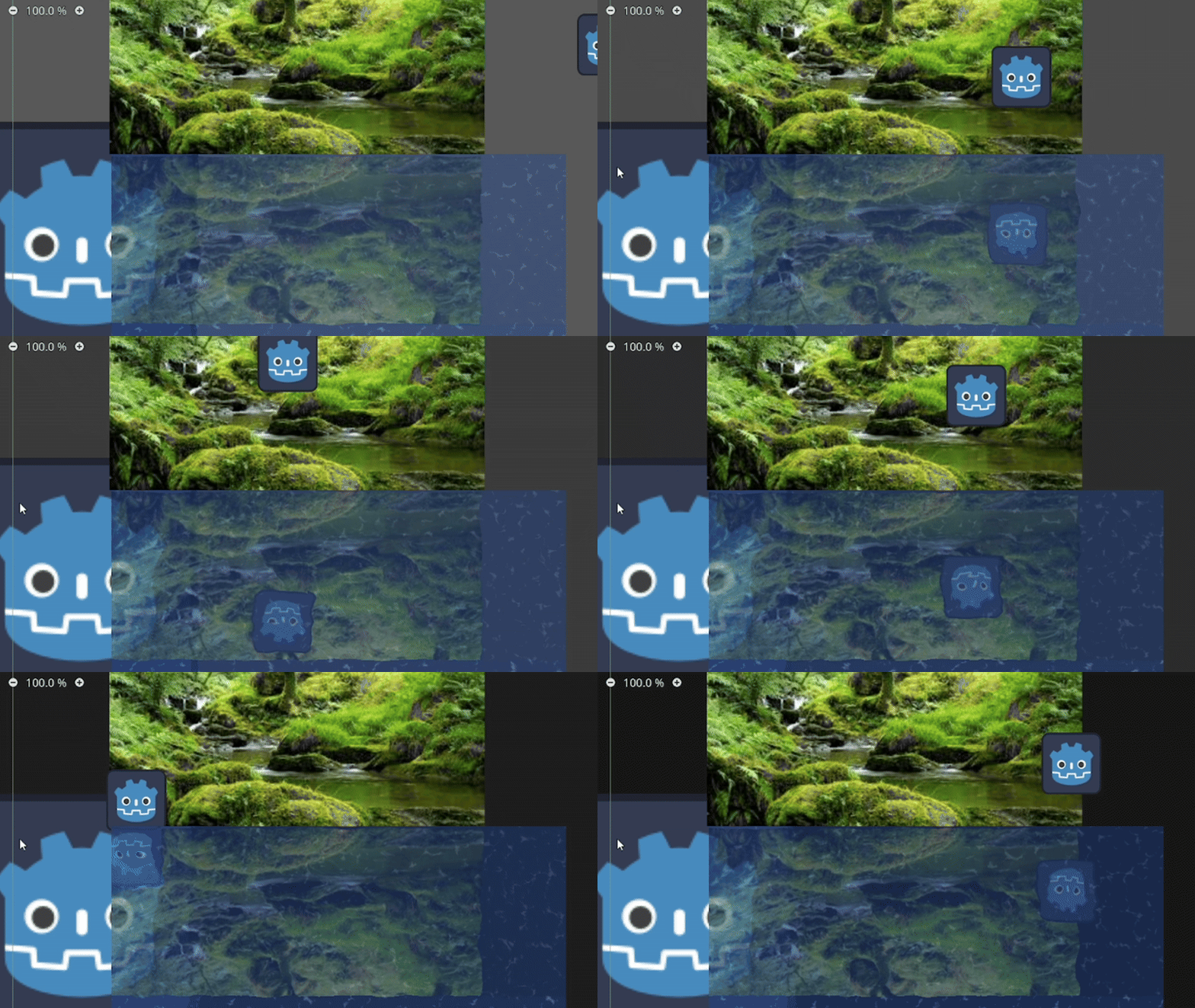
Water 2D + reflection 4.x

If you want a shader without reflection, check out this one: link -> https://godotshaders.com/shader/water-2d-distortion-4-x/
How to Use:
1. Add the shader to a node with a texture, such as a ColorRect, Sprite2D…
2. Assign two TextureNoise resources to the water_noise and water_distortion variables.
3. Adjust the variables to achieve the look you want.
4. Important: The water only reflects what has already been drawn and only distorts the background of what is already rendered. Adjust the Z Index accordingly to get the desired effect.
Credits / What Helped Me Create This:
I modified this shader a lot to get it to this state, but I based it on an existing shader from this site. So, here are the credits and a thank you, because I wouldn’t have been able to create the reflection effect on my own:
🔗 A Simple Reflection Shader: https://godotshaders.com/shader/a-simple-reflection-shader/
My second thank you goes to this video, which helped me create the water distortion effect:
🎥 Water Distortion Tutorial: https://www.youtube.com/watch?v=N9ilhL8JFes&ab_channel=onetupthree
PS: There is a small visual bug I couldn’t fix. Occasionally, a transition line appears across the image when the water is moving. I believe it’s caused by the edge of the noise texture. If anyone figures out how to fix it, I’d really appreciate it!
Shader code
shader_type canvas_item;

uniform sampler2D SCREEN_TEXTURE : hint_screen_texture, repeat_enable, filter_nearest;

group_uniforms reflection;
uniform float offSet = 0;
uniform float YDistortion: hint_range(0.05, 1.0, 0.05) = 1.0;

group_uniforms water;
uniform sampler2D waterNoise : repeat_enable;
uniform sampler2D waterDistortionNoise : repeat_enable, filter_nearest;
uniform vec4 waterColor : source_color = vec4(0.117, 0.27, 0.58, 1);
uniform float colorCorection : hint_range(0.0, 1.0, 0.01) = 0.35;

group_uniforms water_waves;
uniform float distortionForce : hint_range(0.00, .1, 0.001) = .01;
uniform float WDBrightness : hint_range(0, 3, 0.05) = 1.5;
uniform float WDFreq : hint_range(0.2, .9, 0.05) = 0.6;
uniform float WDSize : hint_range(0.6, 1.2, 0.05) = .9;
uniform float WDSpeed : hint_range(1, 20, 0.05) = 4;
uniform vec2 tiling = vec2(1);
uniform vec2 offSetSpeed = vec2(.1);

group_uniforms BG_distortion;
uniform float backGroundDirX : hint_range(-0.1, 0.1) = 0.01;
uniform float backGroundDirY : hint_range(-0.1, 0.1) = 0.01;


varying float screen_baseY;
varying float screen_bottomY;

void vertex() {
	mat4 t = mat4(vec4(2.0, 0, 0, 0), vec4(0, 2.0, 0, 0), vec4(0, 0, 1.0, 0), vec4(-1.0, -1.0, 0, 1.0));
	mat4 t2 = mat4(vec4(1.0/TEXTURE_PIXEL_SIZE.x/2.0, 0, 0, 0), vec4(0, 1.0/TEXTURE_PIXEL_SIZE.y/2.0, 0, 0), vec4(0), vec4(0,0,0, 1.0));

	vec4 zero_world = (MODEL_MATRIX*t2*(t))*vec4(0, 0.0, 0, 1.0);
	vec4 zero_screen = SCREEN_MATRIX*CANVAS_MATRIX *  zero_world;
	vec2 zero_screen_uv = (inverse(t) * zero_screen).xy;
	screen_baseY = zero_screen_uv.y;


	vec4 bottom_screen = SCREEN_MATRIX * CANVAS_MATRIX * MODEL_MATRIX * vec4(0, 1, 0, 1);
	screen_bottomY = bottom_screen.y;
}

void fragment() {
	vec2 uv = SCREEN_UV;

	uv.y -= screen_baseY;
	uv.y /= (screen_bottomY - screen_baseY);
	uv.y = uv.y * 2.0 - 1.0;
	uv.y *= YDistortion;
	uv.y = uv.y / 2.0 + 0.5;
	uv.y -= 0.5 - YDistortion / 2.0;
	uv.y *= (screen_bottomY - screen_baseY);
	uv.y += screen_baseY;


	vec4 color = vec4(waterColor.rgb , 1);


	vec2 reflected_uv = vec2(uv.x, (screen_baseY * 2.0 - (uv.y - offSet)));
	vec2 noiseUV = UV * tiling + offSetSpeed * TIME;
	float noiseValue = texture(waterDistortionNoise, noiseUV).r;
	reflected_uv = reflected_uv + noiseValue * distortionForce;

	vec2 waterUV = UV * tiling;
	waterUV.x += offSetSpeed.x * TIME;
	waterUV.y += cos(TIME * min(1., offSetSpeed.y)) * 0.01;
	waterUV = waterUV + noiseValue * distortionForce * WDSpeed;


	vec4 noiseColor = texture(waterNoise, waterUV);
	float intensity = smoothstep(WDFreq, WDSize, noiseColor.r);
	color.rgb += intensity * vec3(WDBrightness);

	vec2 backGroundUV = SCREEN_UV;
	backGroundUV.x += noiseValue * backGroundDirX;
	backGroundUV.y += noiseValue * backGroundDirY;


	color = mix(texture(SCREEN_TEXTURE, backGroundUV),color, 0.2);
	if (reflected_uv.y > 0.0) {
		color = mix(texture(SCREEN_TEXTURE, reflected_uv), color,0.5);
	}
	COLOR = mix(color, waterColor, colorCorection);

}
Live Preview

Hello! I think you can fix the tearing by simply turning on the “seamless” option in the wave distortion noise. Many thanks for creating this!
Nice Work!