
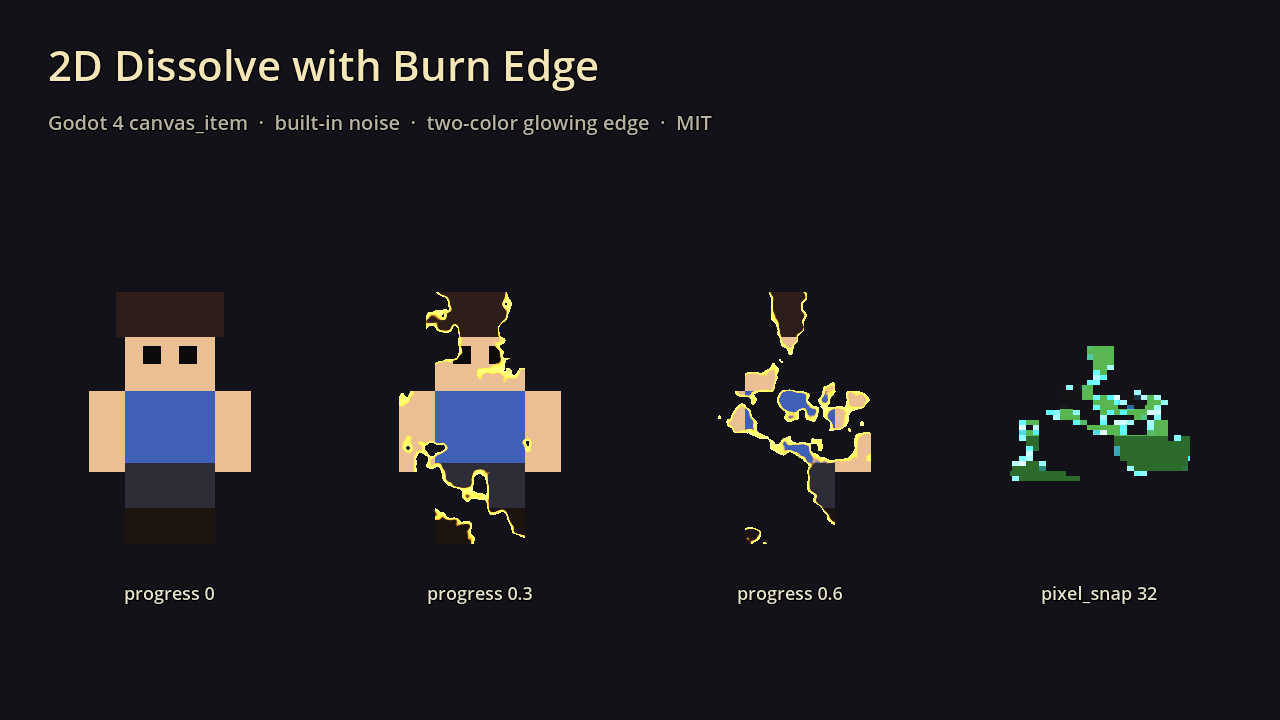
2D Dissolve with Burn Edge (no texture needed)

A drop-in canvas_item dissolve for sprites, UI and TextureRects. Animate `progress` from 0 to 1 and the sprite burns away with a glowing two-color edge. It makes its own fractal noise, so you don’t need a texture. You can plug in your own noise if you want a specific pattern. Optional pixel snapping keeps the edge crisp on pixel art. Transparent pixels stay transparent.
USAGE:
Add a ShaderMaterial to a Sprite2D / TextureRect / AnimatedSprite2D, assign this shader, and tune in the Inspector:
progress — 0 = fully visible, 1 = fully dissolved (the edge is included in the range, so 1 is really gone)
noise_scale — size of the built-in noise blobs (higher = finer, more fragments)
use_noise_texture / noise_texture — turn on to use your own grayscale noise (e.g. a NoiseTexture2D) instead of the built-in one
edge_width — thickness of the burning edge (0 = hard cut)
edge_color — inner edge color, next to the sprite (default orange)
edge_color_outer — outer edge color, next to the hole (default yellow)
edge_glow — multiplies the edge color. Values above 1 look great with a WorldEnvironment glow or in HDR 2D
pixel_snap — 0 = smooth. Set it to your sprite’s pixel size (e.g. 32) for blocky pixel-art dissolves
Example (enemy death):
var mat := sprite.material as ShaderMaterial
var tw := create_tween()
tw.tween_method(func(v): mat.set_shader_parameter(“progress”, v), 0.0, 1.0, 0.6)
tw.tween_callback(queue_free)
Tip: run it in reverse (1 → 0) for a spawn / teleport-in effect, and set the edge colors to cyan for a sci-fi look.
Works in Godot 4.3+ (Compatibility, Forward+, Mobile).
AI-assisted (code + text)
Need a whoosh or fire crackle for the burn? Fantasy RPG SFX Bundle: https://assetsmithpixels.itch.io/fantasy-rpg-sfx-bundle
Shader code
// 2D Dissolve with burn edge — Godot 4 canvas_item shader
// MIT License. Copyright (c) 2026 Assetsmith
// Permission is hereby granted, free of charge, to any person obtaining a copy of this
// software, to deal in it without restriction, including the rights to use, copy, modify,
// merge, publish, distribute, sublicense, and/or sell copies. Provided "as is", without warranty.
shader_type canvas_item;

uniform float progress : hint_range(0.0, 1.0) = 0.0;
uniform float noise_scale : hint_range(1.0, 64.0) = 12.0;
uniform sampler2D noise_texture : filter_linear, repeat_enable;
uniform bool use_noise_texture = false;
uniform float edge_width : hint_range(0.0, 0.3) = 0.06;
uniform vec4 edge_color : source_color = vec4(1.0, 0.55, 0.1, 1.0);
uniform vec4 edge_color_outer : source_color = vec4(1.0, 0.95, 0.4, 1.0);
uniform float edge_glow : hint_range(1.0, 4.0) = 1.5;
uniform float pixel_snap : hint_range(0.0, 256.0) = 0.0;

float hash(vec2 p) {
	p = fract(p * vec2(123.34, 456.21));
	p += dot(p, p + 45.32);
	return fract(p.x * p.y);
}

float value_noise(vec2 p) {
	vec2 i = floor(p);
	vec2 f = fract(p);
	vec2 u = f * f * (3.0 - 2.0 * f);
	float a = hash(i);
	float b = hash(i + vec2(1.0, 0.0));
	float c = hash(i + vec2(0.0, 1.0));
	float d = hash(i + vec2(1.0, 1.0));
	return mix(mix(a, b, u.x), mix(c, d, u.x), u.y);
}

float fbm(vec2 p) {
	float v = 0.0;
	float amp = 0.5;
	for (int k = 0; k < 4; k++) {
		v += amp * value_noise(p);
		p *= 2.0;
		amp *= 0.5;
	}
	v /= 0.9375;
	// Stretch contrast so progress feels linear (fbm clusters around 0.5).
	return clamp((v - 0.5) * 1.8 + 0.5, 0.0, 1.0);
}

void fragment() {
	vec4 col = texture(TEXTURE, UV);
	vec2 uv = UV;
	if (pixel_snap > 0.0) {
		uv = floor(uv * pixel_snap) / pixel_snap;
	}
	float n = use_noise_texture ? texture(noise_texture, uv).r : fbm(uv * noise_scale);
	// Remap so progress 0 = fully visible and 1 = fully gone, edge included.
	float t = progress * (1.0 + edge_width);
	float cut = n - t;
	if (cut < 0.0) {
		col.a = 0.0;
	} else if (cut < edge_width && progress > 0.0) {
		float e = cut / max(edge_width, 0.0001);
		vec3 burn = mix(edge_color_outer.rgb, edge_color.rgb, e) * edge_glow;
		col.rgb = mix(burn, col.rgb, smoothstep(0.6, 1.0, e));
	}
	COLOR = col;
}
Comments 0
No comments yet.