
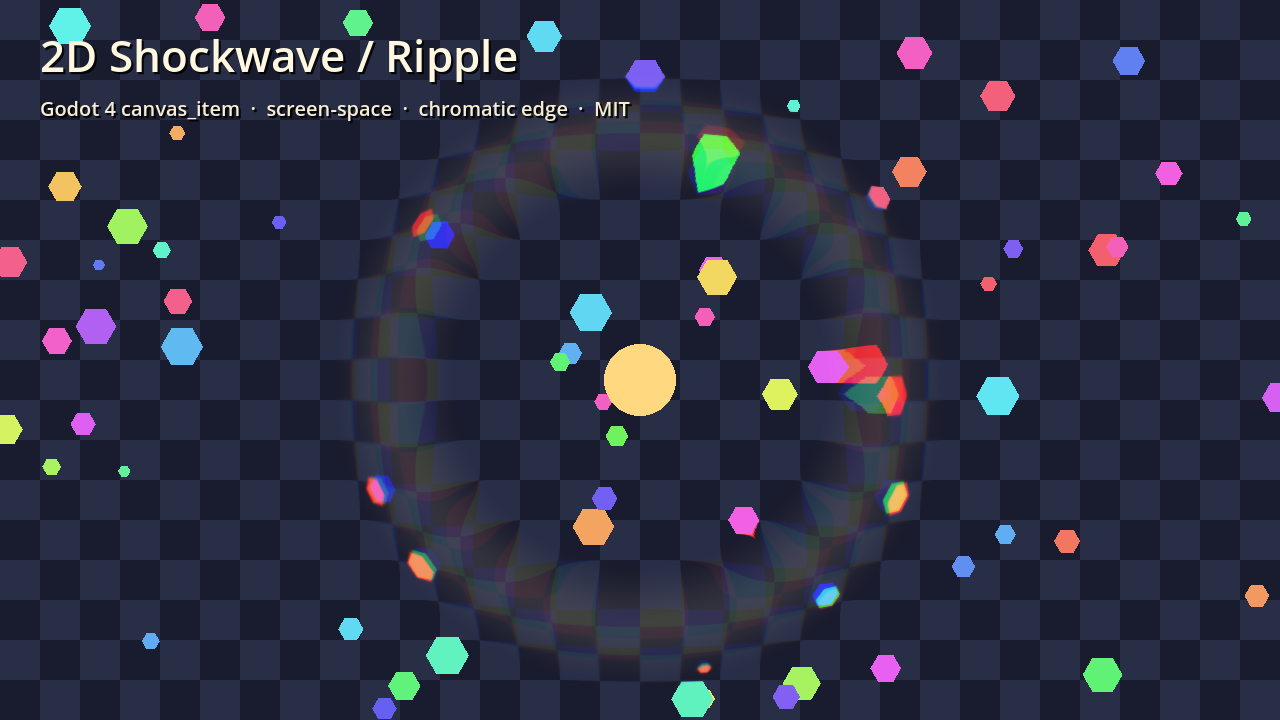
2D Shockwave / Ripple Distortion (Screen-Space, Chromatic Edge)

A small screen-space shockwave for explosions, boss slams, dash impacts or “level up” bursts. A ring expands from any point on screen and bends everything behind it, with an optional RGB split on the ring edge and an optional glow tint. Aspect-corrected, so the ring stays round at any resolution. One canvas_item shader, no textures needed.
USAGE:
Add a CanvasLayer with a ColorRect set to Full Rect and give it a ShaderMaterial with this shader. Everything drawn below that layer gets distorted. To fire a wave from code:
var mat: ShaderMaterial = $CanvasLayer/Shockwave.material
mat.set_shader_parameter(“center”, world_pos_on_screen / get_viewport_rect().size)
var t := create_tween()
t.tween_method(func(v): mat.set_shader_parameter(“progress”, v), 0.0, 1.0, 0.6)
Hide the ColorRect (or set strength to 0) when no wave is playing.
Uniforms:
center — wave origin in screen UV (0..1). Divide a screen position by the viewport size
progress — 0 = ring at the center, 1 = ring at max_radius. Tween this to animate
max_radius — how far the ring travels, in screen-height units (1.0 = one screen height)
thickness — ring width in screen-height units
strength — how hard pixels are pushed outward (negative values pull inward for an implosion)
chromatic — RGB split along the ring (0 = off)
fade_out — fades the wave as it expands
ring_tint — optional colour added on the ring; alpha is the amount (0 = no glow)
Works in Godot 4.3+ (Compatibility, Forward+, Mobile).
AI-assisted (code + text)
Pair it with a punchy impact sound: free Combat SFX sampler: https://crtforge.pages.dev/combat-sfx-sampler/ and the full Fantasy RPG Combat SFX pack: https://assetsmithpixels.itch.io/fantasy-rpg-combat-sfx
Shader code
// 2D Shockwave / Ripple Distortion (screen-space) — Godot 4.3+
// MIT License. Put on a full-screen ColorRect (or any Control/Sprite) above what you want distorted.
shader_type canvas_item;

uniform sampler2D screen_texture : hint_screen_texture, filter_linear_mipmap;
// Center of the wave in screen UV (0..1). Set it from code: pos / viewport_size.
uniform vec2 center = vec2(0.5, 0.5);
// 0 = wave at the center, 1 = wave fully expanded. Tween this 0 -> 1.
uniform float progress : hint_range(0.0, 1.0) = 0.35;
// Radius (in screen-height units) the ring reaches at progress = 1.
uniform float max_radius : hint_range(0.05, 2.0) = 0.8;
// Ring thickness (screen-height units).
uniform float thickness : hint_range(0.005, 0.5) = 0.08;
// Distortion strength (pushes pixels outward; negative pulls inward).
uniform float strength : hint_range(-0.2, 0.2) = 0.04;
// Splits R/G/B along the ring for a chromatic edge (0 = off).
uniform float chromatic : hint_range(0.0, 1.0) = 0.3;
// Fades the wave as it expands.
uniform bool fade_out = true;
// Optional glow tint on the ring (alpha = amount).
uniform vec4 ring_tint : source_color = vec4(1.0, 1.0, 1.0, 0.0);

void fragment() {
	vec2 suv = SCREEN_UV;
	float aspect = SCREEN_PIXEL_SIZE.y / SCREEN_PIXEL_SIZE.x; // width / height
	vec2 d = suv - center;
	d.x *= aspect;
	float dist = length(d);
	float radius = progress * max_radius;
	float x = (dist - radius) / max(thickness, 0.0001);
	// smooth ring profile: 1 at the ring, 0 outside +-1
	float ring = 1.0 - smoothstep(0.0, 1.0, abs(x));
	float fade = fade_out ? (1.0 - progress) : 1.0;
	float amount = ring * strength * fade;
	vec2 dir = dist > 0.0001 ? d / dist : vec2(0.0);
	dir.x /= aspect;
	vec2 off = -dir * amount;
	vec3 col;
	if (chromatic > 0.0) {
		vec2 ca = off * chromatic;
		col.r = texture(screen_texture, suv + off + ca).r;
		col.g = texture(screen_texture, suv + off).g;
		col.b = texture(screen_texture, suv + off - ca).b;
	} else {
		col = texture(screen_texture, suv + off).rgb;
	}
	col = mix(col, ring_tint.rgb, ring * ring_tint.a * fade);
	COLOR = vec4(col, 1.0);
}

Comments 0
No comments yet.