
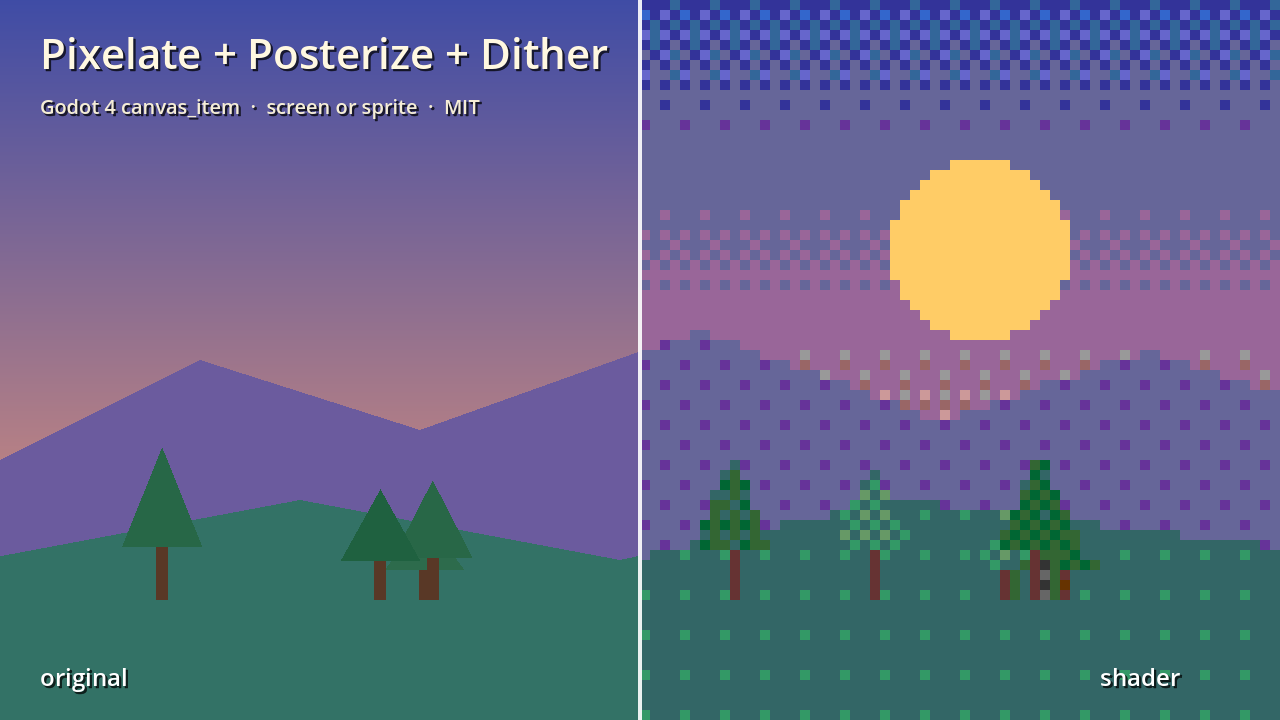
Pixelate + Posterize with Dither (Screen or Sprite)

One small canvas_item shader that gives a scene or a single sprite a chunky low-res retro look: snaps to big pixels, cuts the colour count with posterize, and smooths the colour bands with a 4×4 ordered (Bayer) dither. It works in two modes: put it on a full-screen ColorRect to pixelate everything behind it, or on a sprite to pixelate only that sprite. Good for retro filters, scene transitions (animate pixel_size), “low HP” effects or quick fake pixel art from hi-res art.
USAGE:
Screen mode: add a CanvasLayer with a ColorRect set to Full Rect, give it a ShaderMaterial with this shader and keep use_screen on. Everything drawn below that layer gets pixelated. To pixelate only the right half, size the ColorRect to that half.
Sprite mode: put the shader on a Sprite2D / TextureRect and turn use_screen off. Pixel size is then in texture pixels and alpha is hard-cut so edges stay crisp.
Uniforms:
- use_screen — on = pixelate what is behind the node (screen texture), off = pixelate the node’s own texture
- pixel_size — size of one big pixel (in screen pixels or texture pixels). Animate it from 1 to 32 for a pixel-dissolve transition
- color_steps — colour levels per channel (0 = keep full colour, 4–8 = retro look)
- dither_amount — strength of the ordered dither that breaks up colour bands (0 = flat bands)
- saturation — 0 = greyscale, 1 = unchanged, above 1 = punchier
- tint — multiplies the result (e.g. green for a Game Boy feel)
- effect_mix — blends between the original (0) and the full effect (1)
Works in Godot 4.3+ (Compatibility, Forward+, Mobile).
AI-assisted (code + text)
Making a retro action game? Free Combat SFX sampler: https://crtforge.pages.dev/combat-sfx-sampler/ and the full Fantasy RPG Combat SFX pack: https://assetsmithpixels.itch.io/fantasy-rpg-combat-sfx
Shader code
// Pixelate + Posterize (screen or sprite) — Godot 4 canvas_item
// MIT License. AI-assisted (code + text).
shader_type canvas_item;

uniform sampler2D screen_tex : hint_screen_texture, filter_nearest;
// true = pixelate everything behind this node (ColorRect over the screen)
// false = pixelate this sprite's own texture
uniform bool use_screen = true;
uniform float pixel_size : hint_range(1.0, 64.0, 1.0) = 6.0;
uniform float color_steps : hint_range(0.0, 32.0, 1.0) = 6.0; // 0 = no posterize
uniform float dither_amount : hint_range(0.0, 1.0) = 0.35;
uniform float saturation : hint_range(0.0, 2.0) = 1.1;
uniform vec4 tint : source_color = vec4(1.0);
uniform float effect_mix : hint_range(0.0, 1.0) = 1.0;

float bayer4(vec2 p) {
	ivec2 i = ivec2(mod(p, 4.0));
	int idx = i.x + i.y * 4;
	const float m[16] = float[16](0.0, 8.0, 2.0, 10.0, 12.0, 4.0, 14.0, 6.0,
		3.0, 11.0, 1.0, 9.0, 15.0, 7.0, 13.0, 5.0);
	return m[idx] / 16.0 - 0.5;
}

void fragment() {
	vec2 px_size = use_screen ? SCREEN_PIXEL_SIZE : TEXTURE_PIXEL_SIZE;
	vec2 uv = use_screen ? SCREEN_UV : UV;
	vec2 cell = floor(uv / (px_size * pixel_size));
	vec2 snapped_uv = (cell + 0.5) * px_size * pixel_size;
	vec4 src = use_screen ? texture(screen_tex, uv) : texture(TEXTURE, uv);
	vec4 col = use_screen ? texture(screen_tex, snapped_uv) : texture(TEXTURE, snapped_uv);
	if (!use_screen) { col *= COLOR; src *= COLOR; }

	float grey = dot(col.rgb, vec3(0.299, 0.587, 0.114));
	col.rgb = mix(vec3(grey), col.rgb, saturation);
	if (color_steps > 0.0) {
		float d = bayer4(cell) * dither_amount / color_steps;
		col.rgb = floor((col.rgb + d) * color_steps + 0.5) / color_steps;
	}
	col.rgb = clamp(col.rgb * tint.rgb, 0.0, 1.0);
	if (!use_screen) { col.a = step(0.5, col.a); }
	COLOR = mix(src, col, effect_mix);
}

Comments 0
No comments yet.