
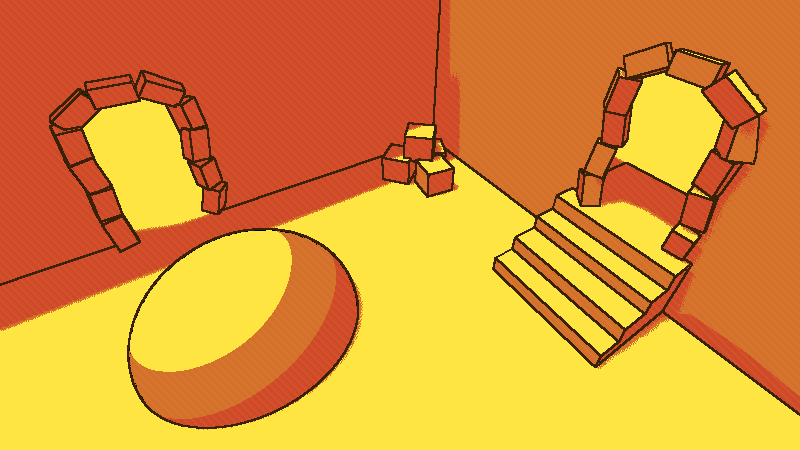
Chants of Sennaar Style Shader

Aug 13, 2026 Update: A demo project is available from Github, linked Here.
This is a shader that simulates the style of the game Chants of Sennar. I really loved the style of the game so I made a shader that somewhat closely replicates the games visual style. While there are some differences (listed below) I find that the shader has a very similar feeling to the original game. If you decide that the style fits feel free edit this shader to make it closer or further to the original.
Usage:
The shader is a spatial shader that is applied to a mesh plane that is held over the camera. The holding is done automatically and the plane does not need to be manually placed over the camera. This shader has three primary components that are designed to mostly replicate the style of the game. Each part has its own uniforms, the explanation of how to use them is written below
Section 1: Edge Detection
This shader uses Sobel Edge Detection with normal and depth to find edges for geometry. The shaders are both modified versions of shaders from Nuzcraft (credit in description).
Uniforms:
- Edge Colour: Colour = This is the colour of the detected edge.
- Edge Width: int = This is the width of the edges
- Depth Edge Threshold: float = This is a threshold value for the Depth Edge Detection, the depth edge detection shader can occasionally detect false edges at very low angles. If you make a very large plane and a large part of it is the colour of the edge, this is the issue that is occurring. Increase the threshold or Max Distance when this occurs.
- Max Distance: float = This is a modifier that increases the depth threshold when the distance is above this value. This helps with the false edge issue listed above.
Section 2: Colour Swapping/Correction
In order to match the colour scheme(s) from the game, the shader uses a toon shader to select for only a limited subset of colours. In the Uniforms there are two lists of colours. The first list is a list of all colours that are desired (not including edge colour). The second list is a list of colours that can be optionally swapped to (explained below). A boolean controls whether this is active
The colour is chosen for each pixel based on the closest colour in terms of r, g, and b. If you want to swap the colours for another set, then if “Use converted colours” is ticked the colours will be moved via the index from one to another. ColourList1[0] will become ColourList2[0]. This was added so that the colour palette could be swapped without affecting the lighting, as otherwise different colours will be closer to different RGB values.
Uniforms:
- Colour Pallet: Array(Colours) = This is a list of colours that are matched with the raw RGB values, changing the colour to the closest one.
- Use Converted Pallet: Boolean = If true, will swap the colours of the colour pallet with the second pallet.
- Converted Pallet: Array(Colours) = This is another list of colours that will be swapped in place, by index, if Use Converted Pallet is true. Intended for using different colours without lighting changes. MUST BE THE SAME LENGTH AS COLOUR PALLET.
Section 3: Shadow Pattern.
This is the diagonal pattern that appears in the shadows. When the sum of a colour’s RGB values (after the colour pallet) is applied, depending on how far below the threshold the value is the more apparent a diagonal line pattern will appear.
Uniforms:
- Shadow Edge: int = This is the width of the diagonal edge lines.
- Minimum Darkness: float = The shadow pattern when the sum of the normalized RBG values are below this value.
Flaws/Differences from the game:
The colour selection is a pure toon shader, which is not the case in chants of sennar. Chants of Sennar is mostly toon shaded, but has some shadows that have a gradient which is not possible currently within this shader. I might update this shader at a later date to fix this.
At very low angles and at far distances the depth portion of the edge detection shader can cause low flat surfaces to appear as edges when they are not. Adjusting the Max distance and Edge Threshold to remove extra edges, but setting these too high may remove true edges.
The shaded lines in the shadows are a bit brighter rather than darker than the background colour, but I personally find that the effect is very similar.
External Credits:
Depth and Normal Edge Detection Shaders by Nuzcraft: Normal Shader, Depth Shader
If any clarification is required leave a comment down below!
(Live Preview does not work with my Shader)
Shader code
shader_type spatial;
render_mode unshaded, fog_disabled;

group_uniforms EdgeStyling;
uniform vec3 edge_colour: source_color;
uniform float edge_width: hint_range(2.0, 10.0, 2) = 2.0;
uniform float depth_edge_threshold: hint_range(0, 10, 0.01) = 0.86;
uniform float max_dist: hint_range(1.0, 1000.0, 1) = 171;

uniform sampler2D depth_texture: hint_depth_texture, filter_nearest;
uniform sampler2D screen_texture: hint_screen_texture, filter_nearest;
uniform sampler2D normal_texture: hint_normal_roughness_texture, filter_nearest;

group_uniforms ColourModes;
uniform vec4 colour_pallet[5]: source_color;
uniform bool use_converted_pallet = false;
uniform vec4 converted_pallet[5]: source_color;

group_uniforms ShadowPattern;
uniform float shadow_edge_width: hint_range(2.0, 100.0, 2) = 4;
uniform float miniumum_darkness: hint_range(0.0, 3.0) = 2.352;

void vertex() {
	POSITION = vec4(VERTEX.x, VERTEX.y,1.0,1.0);
}

const mat3 sobel_y = mat3(
	vec3(1.0, 0.0, -1.0),
	vec3(2.0, 0.0, -2.0),
	vec3(1.0, 0.0, -1.0)
);

const mat3 sobel_x = mat3(
	vec3(1.0, 2.0, 1.0),
	vec3(0.0, 0.0, 0.0),
	vec3(-1.0, -2.0, -1.0)
);

float get_linear_depth(vec2 uv, mat4 inv_proj_matrix){
	float depth = texture(depth_texture, uv).x;
	vec3 ndc = vec3(uv * 2.0 - 1.0, depth);
	vec4 view = inv_proj_matrix * vec4(ndc, 1.0);
	view.xyz /= view.w;
	float linear_depth = -view.z;
	linear_depth = clamp(linear_depth, 0.0, max_dist);
	return linear_depth;
}

vec3 get_normal(vec2 uv){
	vec3 normal = texture(normal_texture, uv).rgb;
 	normal = normal * 2.0 - 1.0;
	return normal;
}


float get_sobel_edge(mat3 sobel_pixels){
	float edge_x = dot(sobel_x[0], sobel_pixels[0]) + dot(sobel_x[1], sobel_pixels[1]) + dot(sobel_x[2], sobel_pixels[2]);
	float edge_y = dot(sobel_y[0], sobel_pixels[0]) + dot(sobel_y[1], sobel_pixels[1]) + dot(sobel_y[2], sobel_pixels[2]);

	return sqrt(pow(edge_x, 2.0)+pow(edge_y, 2.0));
}

float get_depth_edge(vec2 local_uv, mat4 inverse_proj_matrix, vec2 offset){
	vec2 uv = local_uv;

	float depth = get_linear_depth(uv + vec2(0.0, 0.0), inverse_proj_matrix);
	float n = get_linear_depth(uv + vec2(0.0, -offset.y), inverse_proj_matrix);
	float s = get_linear_depth(uv + vec2(0.0, offset.y), inverse_proj_matrix);
	float e = get_linear_depth(uv + vec2(offset.x, 0.0), inverse_proj_matrix);
	float w = get_linear_depth(uv + vec2(-offset.x, 0.0), inverse_proj_matrix);
	float nw = get_linear_depth(uv + vec2(-offset.x, -offset.y), inverse_proj_matrix);
	float ne = get_linear_depth(uv + vec2(offset.x, -offset.y), inverse_proj_matrix);
	float sw = get_linear_depth(uv + vec2(-offset.x, offset.y), inverse_proj_matrix);
	float se = get_linear_depth(uv + vec2(offset.x, offset.y), inverse_proj_matrix);

	mat3 surrounding_pixels = mat3(
		vec3(nw, n, ne),
		vec3(w, depth, e),
		vec3(sw, s, se)
	);

	float edge = get_sobel_edge(surrounding_pixels);

	float final_threshold = depth_edge_threshold * sqrt(depth) * max(1.0, depth-max_dist/2.);
	if (edge  > final_threshold) {
		return edge;
	} else {
		return 0.0;
	}

}

float get_normal_edge(vec2 local_uv, vec2 offset){
	vec3 normal = get_normal(local_uv);

	vec3 n = get_normal(local_uv + vec2(0.0, -offset.y));
	vec3 s = get_normal(local_uv + vec2(0.0, offset.y));
	vec3 e = get_normal(local_uv + vec2(offset.x, 0.0));
	vec3 w = get_normal(local_uv + vec2(-offset.x, 0.0));
	vec3 nw = get_normal(local_uv + vec2(-offset.x, -offset.y));
	vec3 ne = get_normal(local_uv + vec2(offset.x, -offset.y));
	vec3 sw = get_normal(local_uv + vec2(-offset.x, offset.y));
	vec3 se = get_normal(local_uv + vec2(offset.x, offset.y));

	mat3 surrounding_pixels = mat3(
		vec3(length(nw-normal), length(n-normal), length(ne-normal)),
		vec3(length(w-normal), length(normal-normal), length(e-normal)),
		vec3(length(sw-normal), length(s-normal), length(se-normal))
	);

	float edge = get_sobel_edge(surrounding_pixels);

	return smoothstep(0.1, 0.4, edge);
}

vec3 closest_colour(vec3 current_col) {
	float min_dist = 99999.;
	int current_min = 0;
	for(int i = 0;i < colour_pallet.length(); i++){
		float cur_dist = distance(current_col, colour_pallet[i].rgb);
		if (cur_dist < min_dist){
			min_dist = cur_dist;
			current_min = i;
		}
	}
	if (use_converted_pallet){
		return converted_pallet[current_min].rgb;
	}
	else{
		return colour_pallet[current_min].rgb;
	}


}

vec3 get_final_colour(vec2 fragcoord, vec3 background_colour){
	float shadow_level = smoothstep(mod((-fragcoord.x+fragcoord.y)/shadow_edge_width, 2.0), 0.5, 2.0);;

	vec3 colour_mins = vec3(1.0 - background_colour.r, 1.0 - background_colour.g, 1.0 - background_colour.b);

	float brightness_level = max(1.0 - (miniumum_darkness - (colour_mins.r + colour_mins.g + colour_mins.b)),1.0);
	vec3 shadow_area = background_colour * shadow_level * brightness_level;
	vec3 no_shadow_area = background_colour * (1. - shadow_level);

	return shadow_area + no_shadow_area;
}


void fragment() {
	vec2 texel_size = edge_width / VIEWPORT_SIZE.xy;
	vec2 local_uv = vec2(UV.x, 1.0 - UV.y);

	vec3 raw_colour = texture(screen_texture, local_uv).rgb;
	vec3 depth_colour = texture(depth_texture, local_uv).rgb;

	vec2 offset = edge_width / 2. / VIEWPORT_SIZE;

	float depth_edge = get_depth_edge(local_uv, INV_PROJECTION_MATRIX, offset);
	float normal_edge = get_normal_edge(local_uv, offset);

	float line_level = min(1.0 , normal_edge + depth_edge);
	if(line_level > 0.0){
		ALBEDO.rgb = edge_colour * line_level;
	}else {
		vec3 closest_colour_value = closest_colour(raw_colour.rgb) * (1.0 - line_level);

		ALBEDO.rgb = get_final_colour(FRAGCOORD.xy, closest_colour_value);
	}

}
Live Preview
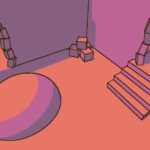
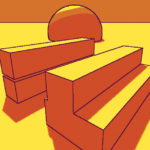

This shader looks appealing but I’m having trouble getting it to work. Can we please get a demo repository link in the description? Thank you
I have now added and linked a demo project for the Shader. Available from here. Thank you for your checking this out!
dsfds