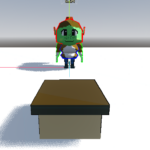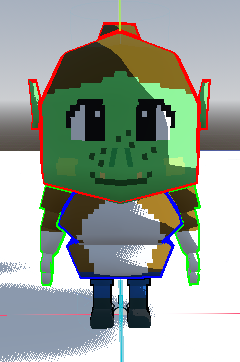
Colorful Sobel Outlines!

Tired of the clipping issues of inverted normal outlines? in utter anguish at sobel shaders being post process, and therefore unable to change colors for different objects?
Swimmer248 has you covered!
With our patented (not really) technologies, we have figured out a way to apply sobel shaders to meshes! Simply place a shader material with the shader into the next pass of your mesh’s material, tinker with the settings, and bam! Instant outlines, with none of the fuss!
Based partially on https://tsukeoni.wordpress.com/2020/11/30/shader-outliner/ (though with extra features added from some linked tutorials)
* Swimmer 248 is not responsible for issues with smooth shading, injuries while using this shader, or shader comments read in a southern accent.
Shader code
shader_type spatial;

render_mode cull_disabled;

uniform sampler2D base_texture: filter_nearest, source_color;
uniform sampler2D normal_texture: filter_nearest, hint_normal;
uniform sampler2D light_ramp: filter_nearest;
uniform float smoothness;
uniform sampler2D specular_ramp: filter_nearest;

void fragment() {
	ALBEDO = texture(base_texture, UV).rgb;
	ALPHA = texture(base_texture, UV).a;
	ALPHA_SCISSOR_THRESHOLD = 0.5;
	NORMAL_MAP = texture(normal_texture, UV).xyz;
}

void light() {
	float light_value = clamp(dot(NORMAL, LIGHT), 0.0, 1.0) * ATTENUATION;
	light_value = clamp(light_value, 0.0, 1.0);
	DIFFUSE_LIGHT += LIGHT_COLOR / PI * texture(light_ramp, vec2(clamp(light_value, 0.0, 1.0), 0.0)).rgb;
	//DIFFUSE_LIGHT += ATTENUATION;
	vec3 normal_average = normalize(VIEW + LIGHT);
	float specular_value = dot(normal_average, NORMAL);
	float smooth_formula = pow(2, smoothness * 10.0 + 1.0);
	specular_value = clamp(specular_value, 0.0, 1.0);
	specular_value = pow(specular_value, smooth_formula) * light_value;
	SPECULAR_LIGHT += LIGHT_COLOR / PI * texture(specular_ramp, vec2(specular_value, 0.0)).rgb;
}
Live Preview