
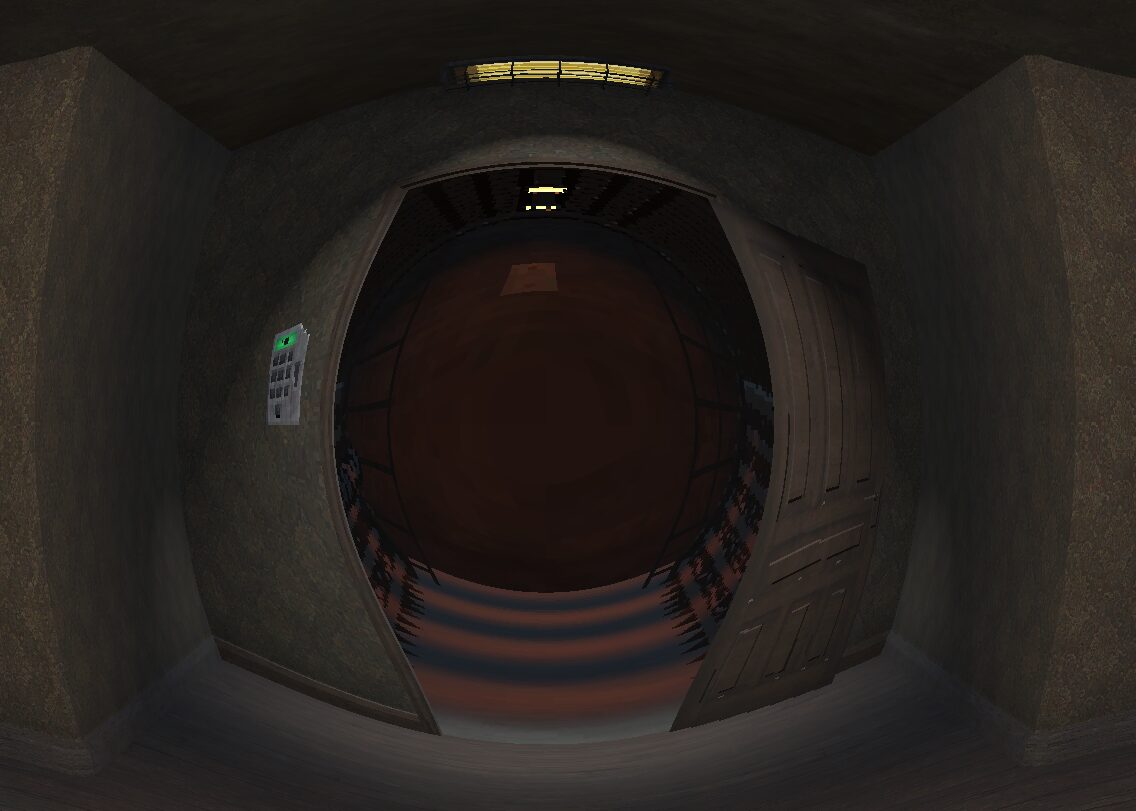
Gaussian screen warp

If you are starting from scratch, create a new 3D scene and add a camera. Create a new MeshInstance3D as a child of the camera, assign it a QuadMesh, then make the size 2×2. Check the box “flip faces”. Move the mesh so it’s in front of the camera very slightly. Then all you need to do is give the QuadMesh a new material -> New ShaderMaterial -> New Shader. Paste the shader code into your new shader.
Shader code
shader_type spatial;
render_mode unshaded;

uniform sampler2D SCREEN_TEXTURE : source_color, hint_screen_texture, repeat_disable, filter_nearest;
uniform float gaussian_sigma : hint_range(0.1, 1.0) = 0.3; // Standard deviation; modifies the area of the effect
uniform float power : hint_range(-2.0, 2.0) = 0.5; // Warp effect strength (negative to warp in, positive to warp out)

void vertex() {
	POSITION = vec4(VERTEX.xy, 1.0, 1.0);
}

void fragment() {
	vec2 uv = SCREEN_UV;
	float aspect = VIEWPORT_SIZE.x / VIEWPORT_SIZE.y;
	vec2 corrected_uv = uv;
	corrected_uv.x *= aspect;

	vec2 center = vec2(0.5 * aspect, 0.5);

	float dist_sq = dot(corrected_uv - center, corrected_uv - center);

	// 2D gaussian function f(x,y) = exp(-(x^2 + y^2) / (2 * sigma^2))
	float gauss = exp(-dist_sq / (2.0 * gaussian_sigma * gaussian_sigma));

	vec2 offset = (uv - vec2(0.5)) * gauss * power;
	vec2 final_uv = uv - offset;
	vec4 col = texture(SCREEN_TEXTURE, final_uv);
	ALBEDO = col.rgb;
	ALPHA = col.a;
}
Live Preview


omg,thank you so much!!!!!Its help !!