
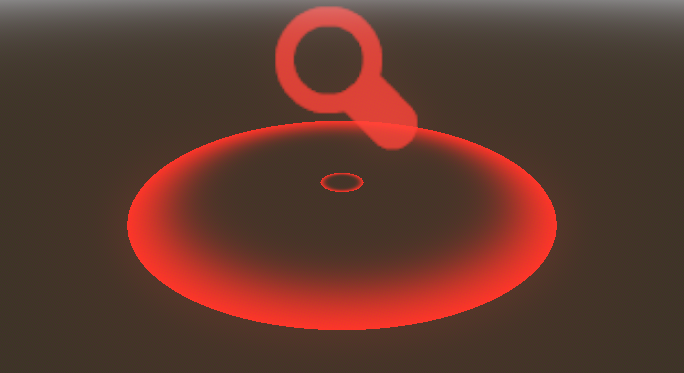
Markers or Pins

First create a MeshInstance3D with a shader material in Material Override. Then create a new shader and paste the code. Choose the values for the parameters that you want.
For the inner marker just duplicate the last one and scale it.
If you want to place an icon, create another MeshInstance3D with a new shader material and paste the code:
shader_type spatial;

uniform sampler2D icon;
uniform vec4 marker_color : source_color;
uniform float color_intensity = 1.0;
render_mode cull_disabled, unshaded, blend_add;

void vertex() {
	MODELVIEW_MATRIX = VIEW_MATRIX * mat4(
			MAIN_CAM_INV_VIEW_MATRIX[0],
			MAIN_CAM_INV_VIEW_MATRIX[1],
			MAIN_CAM_INV_VIEW_MATRIX[2],
			MODEL_MATRIX[3]);
	MODELVIEW_NORMAL_MATRIX = mat3(MODELVIEW_MATRIX);
}

void fragment() {
	vec4 color = texture(icon, UV);
	ALBEDO = marker_color.rgb * color_intensity;
	ALPHA = color.a;
}
Again, set the parameters as needed (including an icon).
Shader code
shader_type spatial;
render_mode blend_mix, depth_draw_opaque, cull_disabled, diffuse_lambert, specular_schlick_ggx, unshaded;

uniform vec4 color : source_color;
uniform float color_intensity = 1000.0;
uniform float transparency_level = 10.0;
uniform float speed = 6.0;
uniform float zoom_amplitude = 0.3;
float circle (vec2 position){
	return 1.0 - float(distance(position, vec2(0.5)) > 0.5);
}

void fragment() {
	ALPHA = pow(length(UV - vec2(0.5)),transparency_level + zoom_amplitude * sin(TIME * speed)) * circle(UV);
	ALBEDO.rgb = color.rgb * color_intensity;
}
