
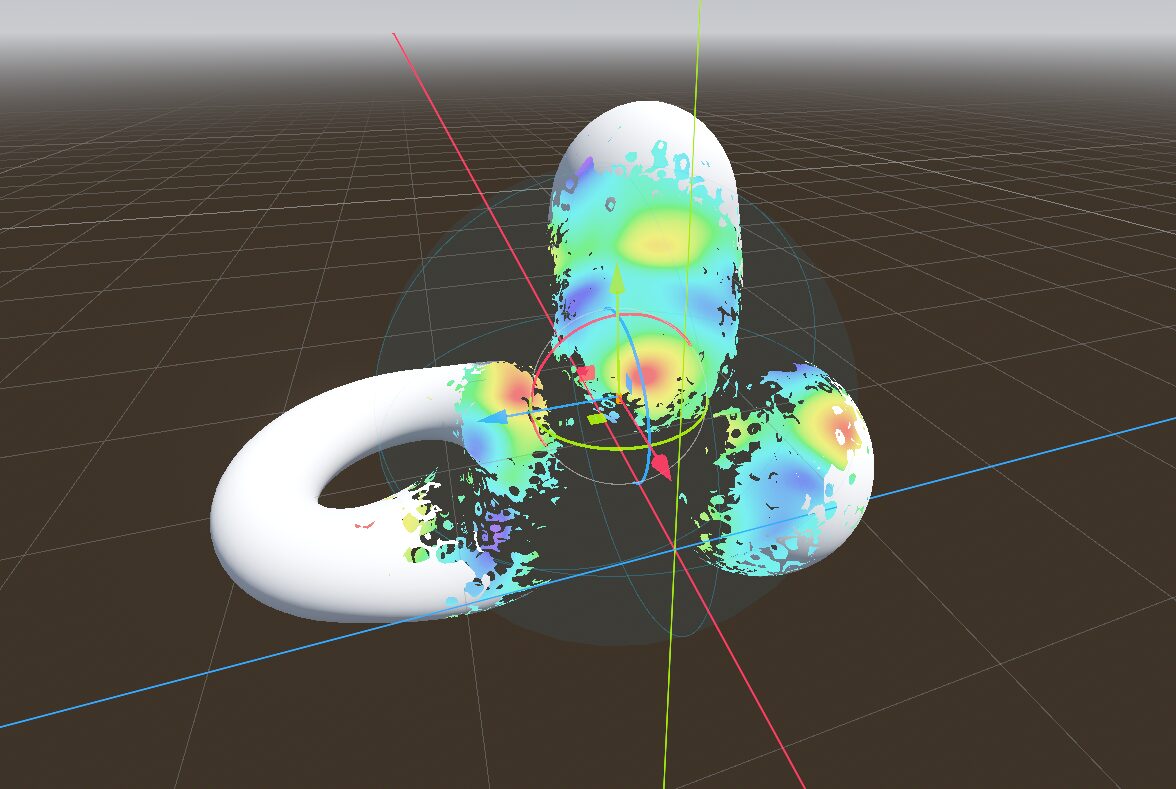
Intersection dissolve

A shader that dissolves as it intersects with a sphere.
The 2 3D textures are created within Godot, in the example picture I used a cellular noise with simplex domain warp of 1 octave for the dissolve and a perlin noise for the hue offset.
The intersection point is driven by the following script:
@tool
extends Node3D

@export var material:ShaderMaterial

func _process(_delta: float) -> void:
	material.set_shader_parameter("intersector_pos", position)
	material.set_shader_parameter("intersector_radius", 0.5 * scale.x)
# References
https://bsky.app/profile/cmzw.bsky.social/post/3luxfr6eac22n
Shader code
shader_type spatial;
render_mode world_vertex_coords;
render_mode cull_disabled;

uniform float expansion_max = 0.2;

uniform float transition_in : hint_range(-1.0, 1.0) = -0.5;
uniform float transition_out : hint_range(-1.0, 1.0) = 0.5;

uniform sampler3D dissolve_noise_texture;
uniform sampler3D hue_noise_texture;

// Variables set by code
uniform vec3 intersector_pos = vec3(0,0,0);
uniform float intersector_radius = 1.0;

// Sphere SDF function from https://iquilezles.org/articles/distfunctions/
float sphereDst(vec3 pos, vec3 centre, float radius) {
	return length(pos - centre) - radius;
}

void vertex() {
	// Use the intersector's distance to scale the vertex displacement along the normal direction
	float dst = sphereDst(VERTEX, intersector_pos, intersector_radius);
	VERTEX = VERTEX + NORMAL * expansion_max * (1.0 - smoothstep(transition_in, transition_out, dst));
}

// Taken from https://stackoverflow.com/questions/15095909/from-rgb-to-hsv-in-opengl-glsl
// All components are in the range [0…1], including hue.
vec3 hsv2rgb(vec3 c)
{
    vec4 K = vec4(1.0, 2.0 / 3.0, 1.0 / 3.0, 3.0);
    vec3 p = abs(fract(c.xxx + K.xyz) * 6.0 - K.www);
    return c.z * mix(K.xxx, clamp(p - K.xxx, 0.0, 1.0), c.y);
}

void fragment() {
	vec4 pos_world = INV_VIEW_MATRIX * vec4(VERTEX, 1.0);
	float dissolve_noise = texture(dissolve_noise_texture, pos_world.xyz).r;

	// Use the intersector distance to transition in the dissolve effect
	float dst = sphereDst(pos_world.xyz, intersector_pos, intersector_radius);
	float cutoff = 1.0 - smoothstep(transition_in, transition_out, dst);
	if (dissolve_noise < cutoff)
	{
		discard;
	}

	// For backfaces change the colour, this could be any colour but I just use a random hue with fixed saturation and value.
	if (FRONT_FACING == false)
	{
		float hue_offset = texture(hue_noise_texture, pos_world.xyz).r;
		vec3 hsv = vec3(hue_offset, 0.85, 0.75);
		vec3 rgb = hsv2rgb(hsv);
		EMISSION = rgb;
		// Set albedo 0 so that it doesn't look affected by light for now
		ALBEDO = vec3(0);
	}
}
Where should I put the code and shader?
In the object that is dissolved or the object that dissolves?