
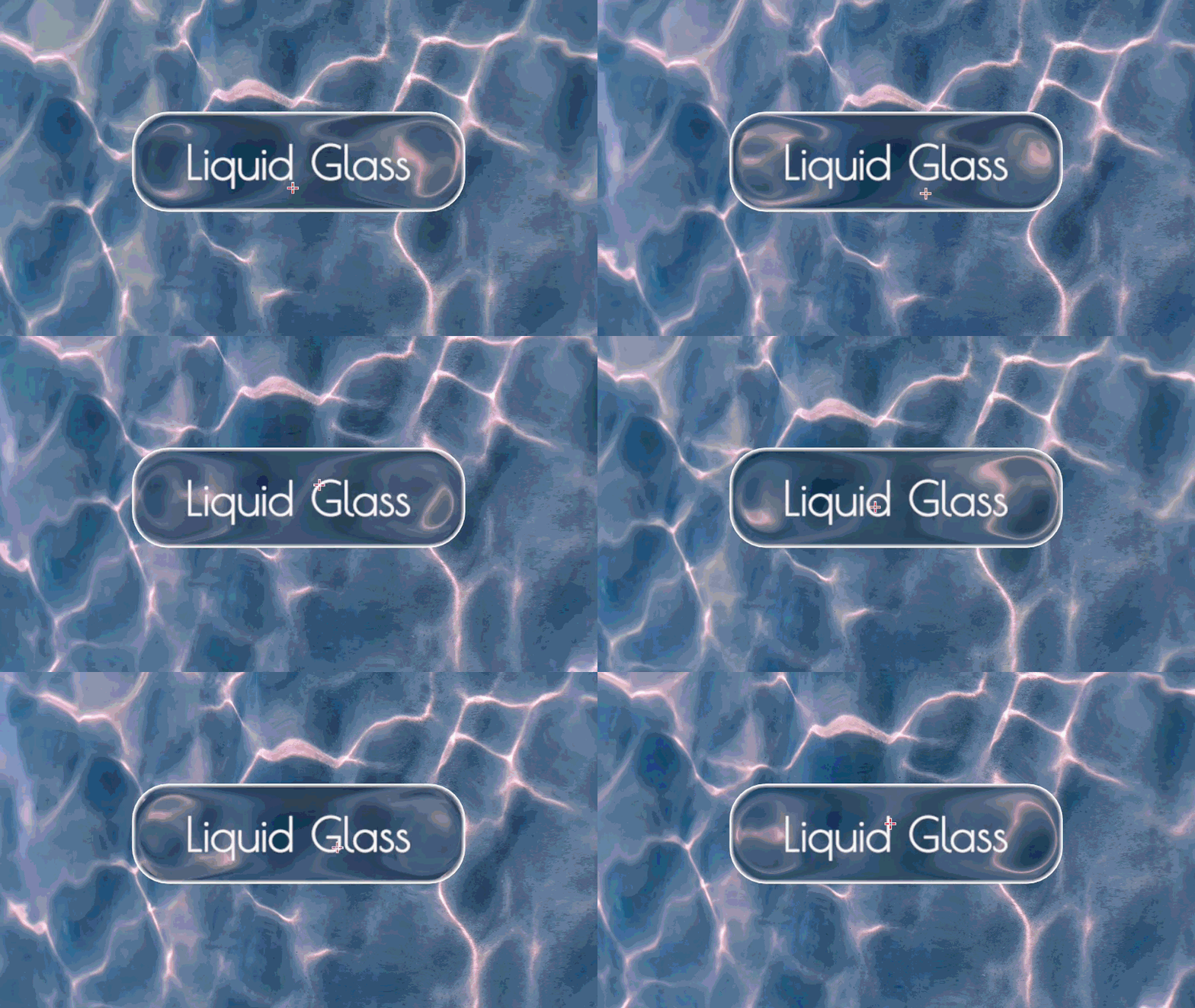
Liquid Glass Frutiger Aero UI – Customizable

A liquid glass shader for UI elements inspired by Apple’s liquid glass style. Works with Control nodes like ColorRect so you can layer it behind buttons and menus.
Note: If you want the ColorRect to appear behind your button UI, set the Z-index to “-1”.
Features:
- Blurs whatever’s behind the UI element
- Refraction effect that warps more at the edges for that liquid/bulgy look
- Auto-detects the node size so corner radius just works like normal
- Tint color and edge highlights
- Subtle top specular
How-to-use:
- Create a Button node with “Flat” enabled
- Go to Theme Overrides > Styles > Focus and set it to a new StyleBoxEmpty (hides the selection outline)
- Add a ColorRect as a child and apply the glass shader as a ShaderMaterial
- On the ColorRect:
- Set Mouse > Filter to “Ignore” so it doesn’t block clicks
- Set Anchors Preset to “Full Rect” so it automatically fills the button
- Set Z-Index to “-1”.
Update:
- Added chromatic abberation
- Adjusted default values to be more friendly.
- Fixed different resolutions causing corner radius to change.
Shader code
shader_type canvas_item;

// Liquid Glass UI Shader v2 - by sentinelcmd

uniform sampler2D screen_texture : hint_screen_texture, filter_linear_mipmap;

uniform float blur : hint_range(0.0, 8.0) = 3.5;
uniform float warp_intensity : hint_range(0.0, 1.0) = 0.4;
uniform float strength_x : hint_range(0.0, 50.0) = 12.0;
uniform float strength_y : hint_range(0.0, 50.0) = 12.0;
uniform float offset_x : hint_range(-1.0, 1.0) = 0.0;
uniform float offset_y : hint_range(-1.0, 1.0) = 0.0;

uniform float corner_radius : hint_range(0.0, 1.0) = 0.3;
uniform float edge_smoothness : hint_range(0.5, 3.0) = 1.0;

uniform vec4 tint : source_color = vec4(0.95, 0.97, 1.0, 0.12);
uniform vec4 edge_highlight : source_color = vec4(1.0, 1.0, 1.0, 0.3);
uniform float edge_width : hint_range(0.0, 10.0) = 1.5;
uniform float chromatic_strength : hint_range(0.0, 5.0) = 5.0;

float rounded_box(vec2 p, vec2 b, float r) {
    vec2 q = abs(p) - b + r;
    return min(max(q.x, q.y), 0.0) + length(max(q, 0.0)) - r;
}

void fragment() {
    float dx = dFdx(UV.x);
    float dy = dFdy(UV.y);

    dx = sign(dx) * max(abs(dx), 0.0001);
    dy = sign(dy) * max(abs(dy), 0.0001);

    vec2 size = abs(vec2(1.0 / dx, 1.0 / dy));

    size = clamp(size, vec2(1.0), vec2(4096.0));

    vec2 half_size = size * 0.5;
    vec2 pixel = UV * size;
    vec2 centered = pixel - half_size;

    float max_r = min(half_size.x, half_size.y);
    float r = corner_radius * max_r;

    float sdf = rounded_box(centered, half_size, r);
    float alpha = 1.0 - smoothstep(-edge_smoothness, edge_smoothness, sdf);

    if (alpha < 0.001) {
        discard;
    }

    float max_dist = min(half_size.x, half_size.y) * 0.5;
    float w = clamp(-sdf / max_dist, 0.0, 1.0);

    vec2 uv_dir = length(centered) > 0.001 ? normalize(centered) : vec2(0.0, 1.0);

    float exp_x = exp(-strength_x * pow(w + offset_x, 2.0));
    float exp_y = exp(-strength_y * pow(w + offset_y, 2.0));
    vec2 warp_offset = uv_dir * vec2(exp_x, exp_y) * warp_intensity / 10.0;
    vec2 warped_uv = SCREEN_UV - warp_offset;

    float edge_proximity = 1.0 - w;
    vec2 chroma_offset = uv_dir * edge_proximity * chromatic_strength * SCREEN_PIXEL_SIZE;

    float bg_r = textureLod(screen_texture, warped_uv - chroma_offset, blur).r;
    float bg_g = textureLod(screen_texture, warped_uv, blur).g;
    float bg_b = textureLod(screen_texture, warped_uv + chroma_offset, blur).b;
    vec3 bg = vec3(bg_r, bg_g, bg_b);

    vec3 color = mix(bg, tint.rgb, tint.a);

    float edge = 1.0 - smoothstep(0.0, edge_width, -sdf);
    edge *= step(sdf, 0.0);
    color = mix(color, edge_highlight.rgb, edge * edge_highlight.a);

    color += vec3(smoothstep(0.4, 0.0, UV.y) * 0.08 * w);

    COLOR = vec4(color, alpha);
}

I see that you’ve used the formulas I gave on my reddit post, looks nice.
While I wouldn’t call apples ui anywhere near “Frutiger Aero” I do think your replication of the shader is excellent 🙂
its the Godot community that’s why this good of a shader is free, if i was using something different i am sure i couldn’t use this excellent shader