
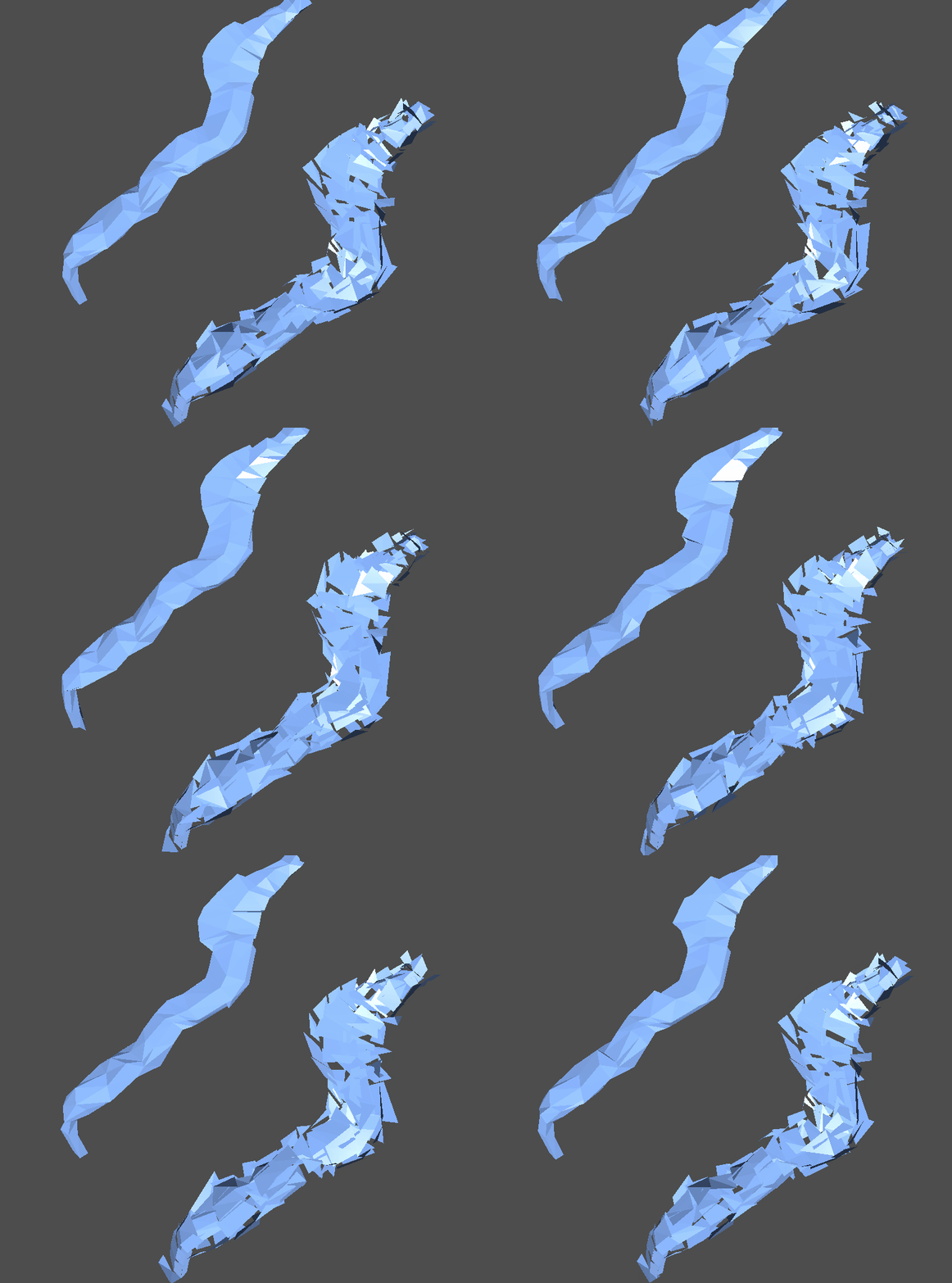
Low Poly Waterfalls

Needed a waterfall that fits the low poly aesthetic. Here it is.
You have a “clean” version and a “messy” version depending on the “bias_direction_strength” slider and whether or not `force_messy` is true.
The “bias_direction” is basically the user defined flow direction for each Y level (the clean version of the waterwall relies on this to work properly, but the messy version doesn’t (it just slides along the downward angle of the surface) ). “force_messy” allows you to have the messy appearence with the bias_directions defined.
Here’s a function to set up the bias_direction_texture programmatically:
extends RefCounted

# Number of samples to take along the height of the mesh
const Y_SAMPLES = 16

func setup(mesh_instance: MeshInstance3D, material: ShaderMaterial) -> void:
	var mesh = mesh_instance.mesh
	if mesh == null:
		push_error("MeshInstance3D has no mesh")
		return

	# Get all vertex positions in world space
	var vertices = []
	var surface_count = mesh.get_surface_count()

	for surface_idx in range(surface_count):
		var arrays = mesh.surface_get_arrays(surface_idx)
		var positions = arrays[Mesh.ARRAY_VERTEX]

		for pos in positions:
			# Transform to world space
			var world_pos = mesh_instance.global_transform * pos
			vertices.append(world_pos)

	if vertices.is_empty():
		push_error("No vertices found in mesh")
		return

	# Find min and max Y values
	var min_y = vertices[0].y
	var max_y = vertices[0].y
	for v in vertices:
		min_y = min(min_y, v.y)
		max_y = max(max_y, v.y)

	var y_range = max_y - min_y
	if y_range < 0.001:
		push_warning("Mesh has negligible height")
		return

	# Calculate bias directions at each Y level
	var bias_directions = []
	var y_levels = []

	for i in range(Y_SAMPLES):
		var t = float(i) / float(Y_SAMPLES - 1) if Y_SAMPLES > 1 else 0.0
		var y_level = min_y + t * y_range
		y_levels.append(y_level)

		# Collect vertices near this Y level
		var threshold = y_range / float(Y_SAMPLES) * 0.6
		var verts_at_level = []

		for v in vertices:
			if abs(v.y - y_level) < threshold:
				verts_at_level.append(v)

		if verts_at_level.is_empty():
			# Fallback: use a downward direction
			bias_directions.append(Vector3.UP)
			continue

		# Calculate average position at this level
		var avg_pos = Vector3.ZERO
		for v in verts_at_level:
			avg_pos += v
		avg_pos /= float(verts_at_level.size())

		# Calculate direction from previous level to this level
		if i == 0:
			# First level: look ahead to next level or use downward
			bias_directions.append(Vector3.UP)
		else:
			var prev_level = min_y + float(i - 1) / float(Y_SAMPLES - 1) * y_range
			var prev_verts = []

			for v in vertices:
				if abs(v.y - prev_level) < threshold:
					prev_verts.append(v)

			if prev_verts.is_empty():
				bias_directions.append(Vector3.UP)
				continue

			var prev_avg = Vector3.ZERO
			for v in prev_verts:
				prev_avg += v
			prev_avg /= float(prev_verts.size())

			# Direction from previous to current
			var dir = (avg_pos - prev_avg).normalized()
			dir.x = -dir.x
			dir.z = -dir.z
			print(dir)
			if dir.length() < 0.001:
				dir = Vector3.UP

			bias_directions.append(dir)

	# Store in shader material
	# We'll pack the data into a texture for efficient lookup
	var img = Image.create(Y_SAMPLES, 1, false, Image.FORMAT_RGBF)

	for i in range(Y_SAMPLES):
		var dir = bias_directions[i]
		#convert from dir to color (colors don't support negative values)
		#make 0.5 origin val
		var color_dir = (dir + Vector3.ONE) /2.0

		img.set_pixel(i, 0, Color(color_dir.x, color_dir.y, color_dir.z))

	var texture = ImageTexture.create_from_image(img)
	material.set_shader_parameter("bias_direction_texture", texture)
	material.set_shader_parameter("bias_min_y", min_y)
	material.set_shader_parameter("bias_max_y", max_y)

	print("Waterfall bias setup complete: ", Y_SAMPLES, " levels from Y=", min_y, " to Y=", max_y)
Make sure the mesh you’re using has enough tris for the effect to look good.
If you want multiple streams branching from the same waterfall, you’ll need to have a seperate mesh for each stream and just clip the meshes together.
The clean version is probably as close as you can get to a flowing mesh in terms of shaderscripting without animations. You could also modify this for rivers, if anyone wants to do that post/link the code below if i don’t get to doing it myself first.
Shader code
shader_type spatial;
render_mode cull_disabled, depth_draw_always;

uniform vec4 albedo : source_color = vec4(0.45, 0.6, 0.85, 1.0);

// controls
uniform vec3 gravity = vec3(0.0, 1.0, 0.0); // local-space down
uniform float flow_speed = 1.5;   // how fast the slide moves (time multiplier)
uniform float flow_scale = 17.0;   // spatial frequency along the flow direction
uniform float amplitude = 35.0;   // max tangential slide magnitude
uniform float thickness = 0.00;   // extra offset along normal (optional sheet thickness)
uniform float duty_cycle = 15.00;  // fraction of the repeating cycle during which vertices move (0..1)
uniform float global_time_offset = 0.0; // per-instance offset to desync

// Bias direction parameters
uniform sampler2D bias_direction_texture : filter_linear;
uniform float bias_min_y = 0.0;
uniform float bias_max_y = 10.0;
uniform float bias_direction_strength : hint_range(0.0, 1.0, 0.1) = 1.0; // 0 = use gravity only, 1 = use bias only

uniform bool force_messy = false;

vec3 get_bias_direction(float world_y) {
    // Normalize Y coordinate to 0..1 range
    float t = clamp((world_y - bias_min_y) / (bias_max_y - bias_min_y), 0.0, 1.0);

    // Sample from texture (texture coordinate is t, 0.5)
    vec3 color_bias_dir = texture(bias_direction_texture, vec2(t, 0.5)).rgb;
	//convert from color back to dir
	vec3 bias_dir = color_bias_dir * 2.0 - 1.0;


    // Ensure it's normalized
    float len = length(bias_dir);

    if (len > 0.001) {
        return bias_dir / len;
    } else {
        return vec3(0.0, 1.0, 0.0);
    }
}

void vertex() {
    // Get world Y position for this vertex
    vec4 world_pos = MODEL_MATRIX * vec4(VERTEX, 1.0);
    float world_y = world_pos.y;

    // normalized local gravity & normal
    vec3 g = normalize(gravity);
    vec3 Nn = normalize(NORMAL);

    // Project gravity onto the tangent plane to get the flow direction
    vec3 proj = g - dot(g, Nn) * Nn;
    float proj_len = length(proj);

    // Fallback tangent if projection is near-zero (flat horizontal case)
    vec3 flow_dir;
    if (proj_len > 1e-5) {
        flow_dir = proj / proj_len;
    } else {
        // pick an arbitrary perpendicular direction
        flow_dir = normalize(cross(Nn, vec3(0.0, 1.0, 0.0)));
        if (length(flow_dir) < 1e-5) {
            flow_dir = normalize(cross(Nn, vec3(1.0, 0.0, 0.0)));
        }
    }


    // Get bias direction and mix with gravity-based flow
    vec3 bias_dir = get_bias_direction(world_y);

    // Project bias direction onto tangent plane as well
    vec3 bias_proj = bias_dir - dot(bias_dir, Nn) * Nn;
    float bias_proj_len = length(bias_proj);

    if (bias_proj_len > 1e-5) {
        bias_proj = bias_proj / bias_proj_len;

		if (force_messy){
			bias_dir = bias_proj;
		}


        // Mix the two directions
        flow_dir = normalize(mix(flow_dir, bias_dir, bias_direction_strength));
    }

    // Spatial coordinate along the flow direction (per-vertex)
    float flow_coord = dot(VERTEX, flow_dir) * flow_scale;

    // time and phase (sawtooth)
    float t = TIME + global_time_offset;
    float phase = fract(flow_coord -t * flow_speed); // repeating 0..1

    phase = clamp(phase, 0.0, 1.0);

    // Only move while phase is in the duty window; otherwise snap back to zero.
    float factor = 0.0;
    if (phase < duty_cycle && duty_cycle > 0.0001) {
        factor = phase / duty_cycle; // ramp 0 -> 1 across the duty window
    } else {
        factor = 0.0;
    }

    // Tangential displacement (along flow_dir) and small normal push for thickness
    vec3 tangential_offset = flow_dir * (factor * amplitude);
    vec3 normal_offset = Nn * (-factor * thickness);

    // Apply displacement
    VERTEX += tangential_offset + normal_offset;
}

void fragment() {
    // same normal vector for every face
    NORMAL = -normalize(cross(dFdx(VERTEX),dFdy(VERTEX)));

    ALBEDO = albedo.rgb;
    ALPHA = albedo.a;

    // simple fresnel-ish edge highlight for gloss
    float facing = clamp(1.0 - dot(NORMAL, VIEW), 0.0, 1.0);
    ALBEDO += vec3(0.08 * pow(facing, 2.0));
    METALLIC = 0.0;
    ROUGHNESS = 0.35;
}
Actually, looks strange. And interesting. Maybe it needs another name, not a woterfall.