
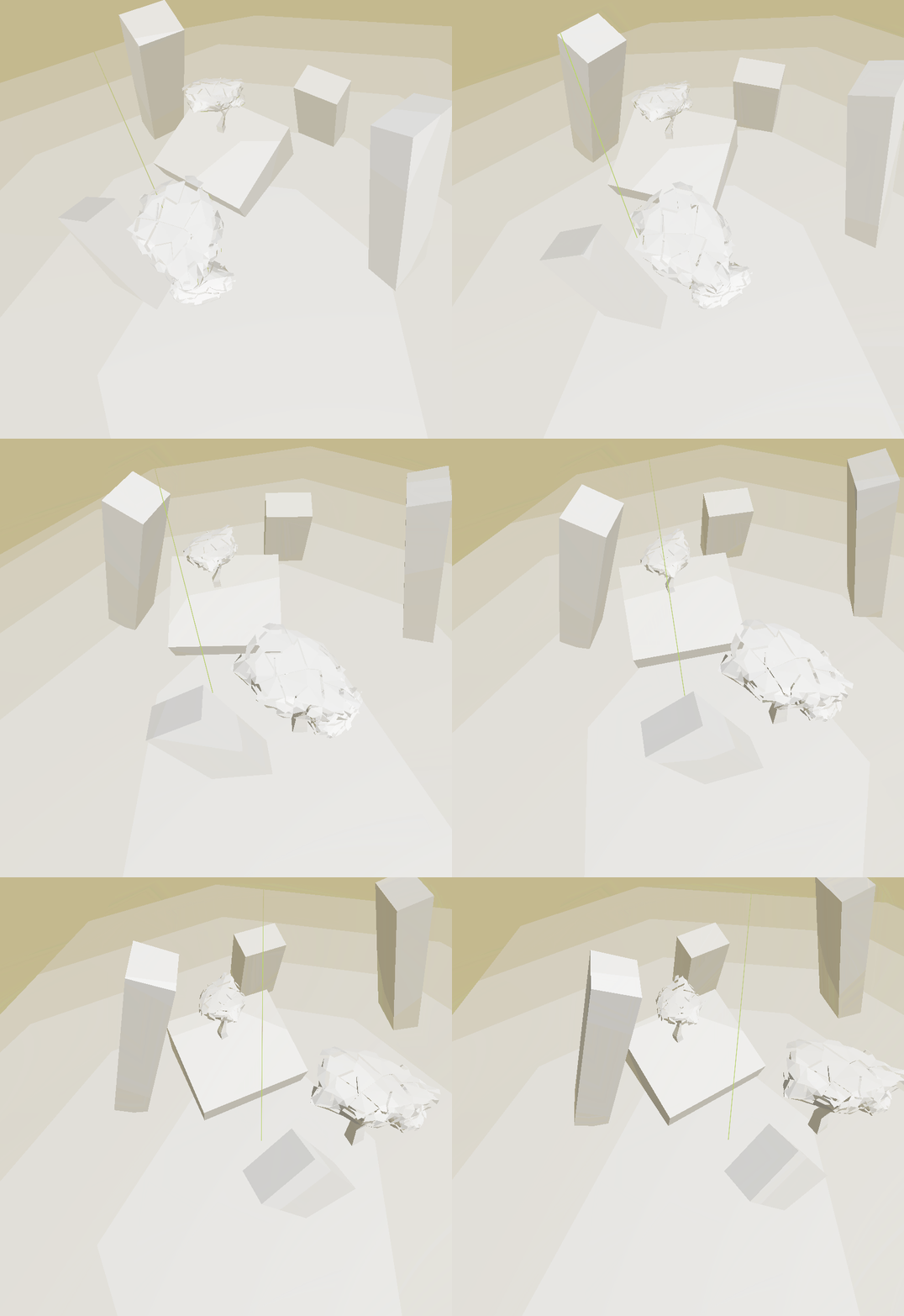
Banded Depth Fog (+ Low Poly Fog)

This is a shader for people who hate gradients and curves for some inexplicable reason.
I made this for “low poly fog”, but you can also use it for regular circular banding if you set the polygon_edges to 2 and polygon_planar_faces to 0. Setting polygon_planar_faces
to 1 makes the bands truly low poly! with no curves.
You can also have polygons with curved edges, giving a cool retro-future vibe.
And you can have the banding be completely linear with no curve if you set fov_curve_strength to 0 and and polygon_planar_faces to 0. (however that looks ugly if you’re not doing a fixed perspective; it may have some use).
Just mess around with the settings and see what works for you.
To use it, apply it to a quad mesh and throw it in front of your camera. (also note the vertex() function)
Rendering After Transperent Meshes:
As with all postprocessing shaders that require hint_depth_texture, you cannot see transperent objects through them due to the render order and there is no easy workaround for this because depth maps aren’t accessible from subviewports , subviewports being the only way to do segmented rendering in 3D.
The more difficult workaround for this was to create a compute shader for this, which I have managed to do: I have posted a comment below on walking you through implementing the compute shader version.
Shader code
shader_type spatial;
render_mode unshaded, cull_disabled, depth_draw_never, depth_prepass_alpha;

// -- Inputs / tuning --
uniform sampler2D DEPTH_TEXTURE : hint_depth_texture;
uniform vec4 fog_color : source_color = vec4(0.6, 0.7, 0.8, 1.0);

//These must be equal to camera settings:
uniform float camera_near : hint_range(0.01, 10.0) = 0.1;
uniform float camera_far = 4000.0;
uniform float camera_fov_deg : hint_range(1.0,179.0) = 75.0;


// Banding / polygon parameters
uniform int   band_count : hint_range(1, 999) = 8;
uniform float band_density   : hint_range(0.0, 100.0) = 15.0;

uniform int  polygon_edges  : hint_range(2, 32) = 6;      // number of straight edges (3..32) (2 = disabled)
uniform float polygon_round  : hint_range(0.0, 1.0) = 0.0;  // 0 = sharp edges, >0 = rounded corners

// Global fog strength
uniform float fog_strength : hint_range(0.0, 1.0) = 1.0;

uniform float fov_curve_strength : hint_range(0.0,1.0) = 1.0;

const int   MAX_EDGES = 32;

// 0 = keep current curved bands; 1 = fully planar faces (no bending on angled surfaces)
uniform float polygon_planar_faces : hint_range(0.0, 1.0) = 1.0;

// How fast bands shrink with distance in planar mode (0 = straight prism, larger = tighter pyramid)
uniform float polygon_aperture_deg : hint_range(0.0, 85.0) = 40.0;

// 0 = rotate with camera (screen-locked), 1 = rotate with world (world-locked)
uniform bool polygon_lock_world = true;

// Extra rotation offset in degrees (applied after locking mode is chosen)
uniform float polygon_rotation_deg : hint_range(-180.0, 180.0) = 0.0;

// -- Helpers --

// 2D rotate
vec2 rot2(vec2 v, float a) {
    float c = cos(a), s = sin(a);
    return vec2(c * v.x - s * v.y, s * v.x + c * v.y);
}

// World-space yaw of the camera (radians), using the camera's right axis projected to XZ.
// Requires _VIEW_MATRIX (available in spatial shaders).
float camera_yaw(mat4 _INV_VIEW_MATRIX) {

    return atan(_INV_VIEW_MATRIX[2].x, -_INV_VIEW_MATRIX[2].z);
}

// World-space distance between adjacent band steps
float band_step_world() {
    return camera_far / max(1.0, band_density * float(band_count));
}

// Smooth max; k=0 => hard max, higher k => rounder corners
float smooth_max(float a, float b, float k) {
    if (k <= 0.0) return max(a, b);
    float h = clamp(0.5 + 0.5 * (a - b) / k, 0.0, 1.0);
    return mix(b, a, h) + k * h * (1.0 - h);
}

// Polygon support with explicit angle offset (for rotation control)
float polygonal_support_rot(vec2 q, int edges, float roundness, float angle_offset) {
    if (edges < 3) {
        return length(q); // fallback: circular
    }
    float step_ang = 2.0 * PI / float(edges);
    float c = cos(PI / float(edges));
    float k = roundness * 0.35; // curved (tan-space) scale

    float m = -1e9;
    for (int i = 0; i < MAX_EDGES; i++) {
        if (i >= edges) break;
        float a = angle_offset + step_ang * float(i);
        vec2 n = vec2(cos(a), sin(a));
        float v = dot(q, n) / c;
        m = (i == 0) ? v : smooth_max(m, v, k);
    }
    return m;
}


// Planar-faced "polyhedral" measure: level sets are unions of planes (no curvature).
// slope = tan(aperture), controls how fast bands shrink with depth (0 = vertical prisms).
float polyhedral_measure_oriented(vec3 view_pos, int edges, float roundness, float slope, float angle_offset) {
    if (edges < 3) {
        return view_pos.z;
    }
    float c = cos(PI / float(edges));
    float step_ang = 2.0 * PI / float(edges);

    // Scale smoothing by band thickness for visibility (planar mode)
    float k = (roundness <= 0.0) ? 0.0 : roundness * band_step_world() / c;

    // Choose 2D coords for polygon orientation
    vec2 q = view_pos.xy;  // camera right/up plane


    float m = -1e9;
    for (int i = 0; i < MAX_EDGES; i++) {
        if (i >= edges) break;
        float a = angle_offset + step_ang * float(i);
        vec2 n = vec2(cos(a), sin(a));
        float v = (dot(q, n) + slope * view_pos.z) / c;
        m = (i == 0) ? v : smooth_max(m, v, k);
    }
    return m;
}


// Compute polygonal "radius" in projection plane.
// q is in projection-plane units (tan-space), as you already use for circular correction.
// edges < 3 falls back to circular.
float polygonal_radius(vec2 q, int edges, float roundness) {
    if (edges < 3) {
        return length(q); // disabled / circular
    }

    // angle between outward normals
    float step_ang = 2.0 * PI / float(edges);
    // cos(pi/N) is the inradius of a unit-circumradius polygon; used to normalize
    float c = cos(PI / float(edges));

    // roundness mapped to a smoothing width; tweak as you like
    // Values ~0.0..0.4 work well for most FOVs
    float k = roundness * 0.35;

    // Accumulate smooth max of dot(q, n_i)/c over all edge normals
    float m = -1e9;
    for (int i = 0; i < MAX_EDGES; i++) {
        if (i >= edges) break;
        float a = step_ang * float(i);
        vec2 n = vec2(cos(a), sin(a));
        float v = dot(q, n) / c;
        m = (i == 0) ? v : smooth_max(m, v, k);
    }
    return m;
}

// Curved (FOV) multiplier with rotation control.
// angle_offset is in radians; for world-lock set it to (user_rot - camera_yaw).
float fov_ray_multiplier_polygon_rot(vec2 uv, float fov_deg, float aspect, int edges, float roundness, float angle_offset) {
    // ndc [-1,1]
    vec2 ndc = uv * 2.0 - vec2(1.0);

    float fov_rad = radians(fov_deg);
    float tan_y = tan(fov_rad * 0.5);
    float tan_x = tan_y * aspect;

    // projection-plane coords (tan-space)
    vec2 q = ndc * vec2(tan_x, tan_y);

    float r = (edges < 3) ? length(q) : polygonal_support_rot(q, edges, roundness, angle_offset);

    // ray_length = view_depth * sqrt(1 + r^2)
    return sqrt(1.0 + r * r);
}


float linearize_depth(float z_sample) {
	float z_ndc = z_sample * 2.0 - 1.0;
	return (2.0 * camera_near * camera_far) / (camera_far + camera_near - z_ndc * (camera_far - camera_near));
}


//You can use this to fill the screen of any camera that approaches the quad automatically
void vertex() { POSITION = vec4(VERTEX.xy, 1.0, 1.0); }

void fragment() {
    vec2 uv = SCREEN_UV;

    vec4 scene = texture(DEPTH_TEXTURE, uv);
    float depth = 1.0 - scene.r;
    float view_depth = linearize_depth(depth);

    float aspect = VIEWPORT_SIZE.x / max(1.0, VIEWPORT_SIZE.y);

    // Rotation controls
    float user_rot = radians(polygon_rotation_deg);

    // 1) Curved (screen/camera plane), with optional world-lock by cancelling camera yaw
    float angle = user_rot;
    if (polygon_lock_world) {


        angle -= camera_yaw(INV_VIEW_MATRIX); // keep polygon aligned to world while camera yaws
    }
    float mult_curved = fov_ray_multiplier_polygon_rot(uv, camera_fov_deg, aspect,
                                                       polygon_edges, polygon_round, angle);
    float curved_measure = mix(view_depth, view_depth * mult_curved, clamp(fov_curve_strength, 0.0, 1.0));

    // 2) Planar-faced (no curvature), with world/camera lock and rotation
    vec2 ndc = uv * 2.0 - vec2(1.0);
    float fov_rad = radians(camera_fov_deg);
    float tan_y = tan(fov_rad * 0.5);
    float tan_x = tan_y * aspect;
    vec3 view_pos = vec3(ndc * vec2(tan_x, tan_y) * view_depth, view_depth);

    float slope = tan(radians(polygon_aperture_deg)); // 0 => prisms, >0 => pyramid
    float planar_measure = polyhedral_measure_oriented(view_pos, polygon_edges, polygon_round, slope, angle);

    // Blend between curved and planar-faced
    float effective_measure = mix(curved_measure, planar_measure, clamp(polygon_planar_faces, 0.0, 1.0));

    // Banding
    float norm_eff = clamp(effective_measure / camera_far, 0.0, 1.0) * band_density;
    float depth_norm = clamp(norm_eff, 0.0, 1.0);
    depth_norm *= float(band_count);
    depth_norm = floor(depth_norm);
    depth_norm /= float(band_count);

    vec3 out_color = fog_color.rgb;
    ALBEDO = out_color;
    ALPHA  = depth_norm * fog_strength;
}
Live Preview
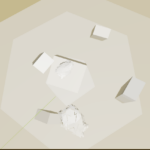
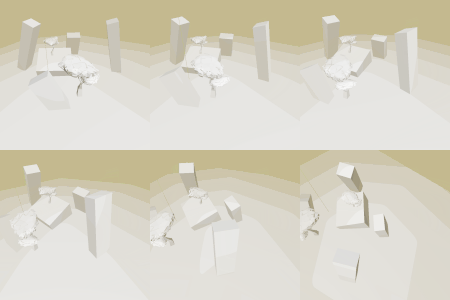
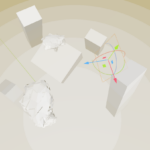

To use the compute shader version create two files in the same folder inside your project:
“Poly Fog.gd” containing this code:
@tool
class_name PolyFog extends CompositorEffect
# ———————–
# Exported parameters (match push-constant layout, split vec2s)
# ———————–
@export var fog_color : Color = Color(0.6, 0.7, 0.8, 1.0)
# split uCameraNearANDFar -> two exports
@export var camera_near : float = 0.1
@export var camera_far : float = 4000.0
@export_range(0.0, 180.0) var camera_fov_deg : float = 75.0
# split uBandCountANDDensity -> two exports
@export var band_count : int = 8
@export var band_density : float = 15.0
@export_range(2, 32) var polygon_edges : int = 6 # 2=disabled, 3..32 = N-gon
@export_range(0.0, 1.0) var polygon_round : float = 0.0 # 0 = sharp
@export_range(0.0, 1.0) var fog_strength : float = 1.0
@export_range(0.0, 1.0) var fov_curve_strength : float = 1.0
@export_range(0.0, 1.0) var polygon_planar_faces : float = 1.0
@export_range(0.0, 80.0) var polygon_aperture_deg : float = 40.0
@export var polygon_lock_world : bool = true # 0 camera-locked, 1 world-locked
@export_range(0.0, 1.0) var polygon_rotation_deg : float = 0.0
# NOTE: the inverse view matrix is per-view and will be appended per-view to push constants
var rd : RenderingDevice
var shader : RID
var pipeline : RID
var linear_sampler: RID
func _init() -> void:
RenderingServer.call_on_render_thread(initialize_compute_shader)
func _notification(what: int) -> void:
if what == NOTIFICATION_PREDELETE:
if shader.is_valid():
RenderingServer.free_rid(shader)
if linear_sampler.is_valid():
RenderingServer.free_rid(linear_sampler)
# pad a PackedFloat32Array so that its byte-size is a multiple of
align_bytesfunc pad_pc_to_alignment(pc: PackedFloat32Array, align_bytes: int) -> void:
var bytes := pc.size() * 4
var remainder := bytes % align_bytes
if remainder == 0:
return
var pad := align_bytes – remainder
# pad must be a multiple of 4 bytes; if not, round up to next 4
if pad % 4 != 0:
pad += 4 – (pad % 4)
var floats_to_append := pad / 4
for i in floats_to_append:
pc.append(0.0)
# Convert a Godot Transform3D (inv_view) to a column-major float list for GLSL mat4
# GLSL expects mat4 as column-major by default. This produces:
# [m00, m10, m20, m30, m01, m11, m21, m31, m02, m12, m22, m32, m03, m13, m23, m33]
func transform3d_to_mat4_column_major_floats(inv_view : Transform3D) -> PackedFloat32Array:
var a := PackedFloat32Array()
# basis.x is the first column’s xyz, basis.y second, basis.z third, origin is translation
# Column 0
a.append(inv_view.basis.x.x)
a.append(inv_view.basis.x.y)
a.append(inv_view.basis.x.z)
a.append(0.0)
# Column 1
a.append(inv_view.basis.y.x)
a.append(inv_view.basis.y.y)
a.append(inv_view.basis.y.z)
a.append(0.0)
# Column 2
a.append(inv_view.basis.z.x)
a.append(inv_view.basis.z.y)
a.append(inv_view.basis.z.z)
a.append(0.0)
# Column 3 (translation)
a.append(inv_view.origin.x)
a.append(inv_view.origin.y)
a.append(inv_view.origin.z)
a.append(1.0)
return a
func align_push_constant_bytes(data: PackedByteArray, align_to: int = 16) -> PackedByteArray:
var remainder := data.size() % align_to
if remainder != 0:
var padding := align_to – remainder
for i in padding:
data.append(0)
return data
# ———————–
# Main rendering callback (adapted from your function)
# ———————–
func _render_callback(effect_callback_type: int, render_data: RenderData) -> void:
if not rd:
return
var scene_buffers : RenderSceneBuffersRD = render_data.get_render_scene_buffers()
var scene_data : RenderSceneDataRD = render_data.get_render_scene_data()
if not scene_buffers or not scene_data:
return
var size : Vector2i = scene_buffers.get_internal_size()
if size.x == 0 or size.y == 0:
return
var x_groups : int = size.x / 16 + 1
var y_groups : int = size.y / 16 + 1
# —- Build base (view-independent) push-constant buffer —-
var base_pc : PackedFloat32Array = PackedFloat32Array()
# uViewportSize
base_pc.append(float(size.x))
base_pc.append(float(size.y))
pad_pc_to_alignment(base_pc,16)
# uFogColor (r,g,b,a)
base_pc.append(fog_color.r)
base_pc.append(fog_color.g)
base_pc.append(fog_color.b)
base_pc.append(fog_color.a)
pad_pc_to_alignment(base_pc,8)
# uCameraNearANDFar (split into two floats)
base_pc.append(float(camera_near))
base_pc.append(float(camera_far))
# uCameraFovDeg
base_pc.append(float(camera_fov_deg))
#pad to 8 bytes
pad_pc_to_alignment(base_pc,8)
# uBandCountANDDensity (split)
base_pc.append(float(band_count))
base_pc.append(float(band_density))
# uPolygonEdges, uPolygonRound
base_pc.append(float(polygon_edges)) # int stored as float in push constants
base_pc.append(float(polygon_round))
# uFogStrength, uFovCurveStrength
base_pc.append(float(fog_strength))
base_pc.append(float(fov_curve_strength))
# uPolygonPlanarFaces, uPolygonApertureDeg
base_pc.append(float(polygon_planar_faces))
base_pc.append(float(polygon_aperture_deg))
# uPolygonLockWorld, uPolygonRotationDeg
base_pc.append(float(1 if polygon_lock_world else 0))
base_pc.append(float(polygon_rotation_deg))
pad_pc_to_alignment(base_pc,8)
# At this point base_pc contains all entries UP TO but NOT INCLUDING the mat4 (per-view)
# Now prepare common RD objects used inside the loop (sampler/uniform sets, pipeline, etc.)
# NOTE: you probably want to create/bind these outside the per-view loop for efficiency
# Build the uniform for depth texture binding (binding 0)
# NOTE: we will set the texture id per-view below by creating a per-view uniform set (or modify cached sets)
# If depth texture can be different per view, you must make per-view uniform sets or update the uniform each loop.
# ——– per-view loop ——–
for view in scene_buffers.get_view_count():
# NOTE: get_view_projection(view) returns a projection matrix; inverse() gives you the view *projection* inverse.
# You need a proper inverse view (camera->world) transform for reconstructing world positions.
# Adjust this code if scene_data exposes different data types.
var inv_view = scene_data.get_view_projection(view).inverse()
# If inv_view is Transform3D / Basis + origin, use transform3d_to_mat4_column_major_floats()
# If it’s already a Projection or a Matrix, adapt accordingly.
#var mat_floats : PackedFloat32Array = transform3d_to_mat4_column_major_floats(inv_view)
var mat_floats : PackedFloat32Array = PackedFloat32Array()
mat_floats.append(inv_view[2].x)
mat_floats.append(inv_view[2].z)
# Build per-view uniform set referencing the depth texture
var depth_tex : RID = scene_buffers.get_depth_layer(view)
var sampler_uniform : RDUniform = RDUniform.new()
sampler_uniform.uniform_type = RenderingDevice.UNIFORM_TYPE_SAMPLER_WITH_TEXTURE
sampler_uniform.binding = 0
sampler_uniform.add_id(linear_sampler)
sampler_uniform.add_id(depth_tex)
var screen_tex : RID = scene_buffers.get_color_layer(view)
var image_uniform : RDUniform = RDUniform.new()
image_uniform.uniform_type = RenderingDevice.UNIFORM_TYPE_IMAGE
image_uniform.binding = 1
image_uniform.add_id(screen_tex)
# now get a single uniform set for set 0 with BOTH uniforms
var uniform_set : RID = UniformSetCacheRD.get_cache(shader, 0, [sampler_uniform, image_uniform])
# Create a fresh push constant buffer: copy base_pc and append 16 floats of the mat4
var pc : PackedFloat32Array = PackedFloat32Array(base_pc) # copy
for i in mat_floats:
pc.append(i)
var pc_byte_arr : PackedByteArray = align_push_constant_bytes(pc.to_byte_array(),16)
# Begin compute (or render) dispatch for this view
var compute_list : int = rd.compute_list_begin()
rd.compute_list_bind_compute_pipeline(compute_list, pipeline)
# bind it once (set index 0)
rd.compute_list_bind_uniform_set(compute_list, uniform_set, 0)
rd.compute_list_set_push_constant(compute_list, pc_byte_arr, pc_byte_arr.size())
rd.compute_list_dispatch(compute_list, x_groups, y_groups, 1)
rd.compute_list_end()
func initialize_compute_shader() ->void:
rd = RenderingServer.get_rendering_device()
if not rd: return
var dir = get_script().get_path().get_base_dir() + “/Poly Fog.glsl”
print(dir)
if ! ResourceLoader.exists(dir): return
var glsl_file : RDShaderFile = load(dir)
shader = rd.shader_create_from_spirv(glsl_file.get_spirv())
pipeline = rd.compute_pipeline_create(shader)
var sampler_state: RDSamplerState = RDSamplerState.new()
sampler_state.min_filter = RenderingDevice.SAMPLER_FILTER_LINEAR
sampler_state.mag_filter = RenderingDevice.SAMPLER_FILTER_LINEAR
linear_sampler = rd.sampler_create(sampler_state)
And “Poly Fog.glsl” containing this code:
#[compute]
#version 450
layout(local_size_x = 16, local_size_y = 16, local_size_z = 1) in;
// INPUTS
layout(binding = 0, set = 0) uniform sampler2D uDepthTex; // depth texture
layout(binding = 1, rgba16f, set = 0) uniform image2D uOut; // output image (RGBA)
//NOTE: uniforms do not support ints
layout(push_constant, std430) uniform Params {
// Uniforms
uniform vec2 uViewportSize; // width, height
uniform vec4 uFogColor; // fog_color
vec2 uCameraNearANDFar;
uniform float uCameraFovDeg;
vec2 uBandCountANDDensity;
uniform float uPolygonEdges; // 2 = disabled (circular); 3..32 = N-gon
uniform float uPolygonRound; // 0 = sharp, >0 = rounded
uniform float uFogStrength;
uniform float uFovCurveStrength; // 0..1
uniform float uPolygonPlanarFaces; // 0 = curved, 1 = planar-faced
uniform float uPolygonApertureDeg; // 0 = prisms, >0 = pyramids
uniform float uPolygonLockWorld; // 0 = camera-locked, 1 = world-locked
uniform float uPolygonRotationDeg; // extra rotation in degrees
uniform vec2 uInvViewMatrixXZ; // inverse view matrix (for world yaw)
} p;
// Loaded Uniforms
vec2 uViewportSize; // width, height
vec4 uFogColor; // fog_color
float uCameraNear;
float uCameraFar;
float uCameraFovDeg;
int uBandCount;
float uBandDensity;
int uPolygonEdges; // 2 = disabled (circular); 3..32 = N-gon
float uPolygonRound; // 0 = sharp, >0 = rounded
float uFogStrength;
float uFovCurveStrength; // 0..1
float uPolygonPlanarFaces; // 0 = curved, 1 = planar-faced
float uPolygonApertureDeg; // 0 = prisms, >0 = pyramids
int uPolygonLockWorld; // 0 = camera-locked, 1 = world-locked
float uPolygonRotationDeg; // extra rotation in degrees
vec2 uInvViewMatrixXZ; // inverse view matrix (for world yaw)
// ———————————————————————
const float PI = 3.14159265358979323846;
const int MAX_EDGES = 32;
// Finite check and safe ops
bool is_finite(float x) { return (x == x) && abs(x) < 1e30; } // NaN fails x==x
float safe_div(float a, float b, float fallback) {
return (abs(b) > 1e-20) ? (a / b) : fallback;
}
float saturate_non_nan(float x) {
return is_finite(x) ? clamp(x, 0.0, 1.0) : 0.0;
}
// World-space distance between adjacent band steps
float band_step_world() {
return uCameraFar / max(1.0, uBandDensity * float(uBandCount));
}
// Smooth max; k=0 => hard max, higher k => rounder corners
float smooth_max(float a, float b, float k) {
if (k <= 0.0) return max(a, b);
float h = clamp(0.5 + 0.5 * (a – b) / k, 0.0, 1.0);
return mix(b, a, h) + k * h * (1.0 – h);
}
// World-space yaw of the camera (radians), using inverse view matrix
float camera_yaw(vec2 inv_view_xz) {
// Matches your Godot variant: atan(_INV_VIEW_MATRIX[2].x, -_INV_VIEW_MATRIX[2].z)
return atan(inv_view_xz.x, -inv_view_xz.y);
}
// Polygon support with explicit angle offset (tan-space q)
float polygonal_support_rot(vec2 q, int edges, float roundness, float angle_offset) {
if (edges <= 2) {
return length(q); // fallback: circular (disabled)
}
float step_ang = 2.0 * PI / float(edges);
float c = cos(PI / float(edges));
float k = roundness * 0.35; // smoothing width in tan-space
float m = -1e9;
for (int i = 0; i < MAX_EDGES; i++) {
if (i >= edges) break;
float a = angle_offset + step_ang * float(i);
vec2 n = vec2(cos(a), sin(a));
float v = dot(q, n) / c;
m = (i == 0) ? v : smooth_max(m, v, k);
}
return m;
}
// Curved (FOV) multiplier from q
float fov_ray_multiplier_from_q(vec2 q, int edges, float roundness, float angle_offset) {
float r = (edges <= 2) ? length(q) : polygonal_support_rot(q, edges, roundness, angle_offset);
return sqrt(1.0 + r * r);
}
// Planar-faced “polyhedral” measure: level sets are unions of planes (no curvature).
// slope = tan(aperture), controls how fast bands shrink with depth (0 = vertical prisms).
float polyhedral_measure_oriented(vec3 view_pos, int edges, float roundness, float slope, float angle_offset) {
if (edges < 3) {
return view_pos.z;
}
float c = cos(PI / float(edges));
float step_ang = 2.0 * PI / float(edges);
// Scale smoothing by band thickness for visibility (planar mode)
float k = (roundness <= 0.0) ? 0.0 : roundness * band_step_world() / c;
// Use camera right/up plane (view XY) like your fragment version
vec2 q = view_pos.xy;
float m = -1e9;
for (int i = 0; i < MAX_EDGES; i++) {
if (i >= edges) break;
float a = angle_offset + step_ang * float(i);
vec2 n = vec2(cos(a), sin(a));
float v = (dot(q, n) + slope * view_pos.z) / c;
m = (i == 0) ? v : smooth_max(m, v, k);
}
return m;
}
// Reconstruct linear view-space depth from sampled depth in [0,1]
float linearize_depth(float z_sample) {
float z_ndc = z_sample * 2.0 – 1.0;
return (2.0 * uCameraNear * uCameraFar) /
(uCameraFar + uCameraNear – z_ndc * (uCameraFar – uCameraNear));
}
// Assigns unpacked uniforms from push constant block
pvoid load_params_from_push_constant() {
// Simple direct copies
uViewportSize = p.uViewportSize;
uFogColor = p.uFogColor;
uCameraFovDeg = p.uCameraFovDeg;
uPolygonEdges = int(p.uPolygonEdges);
uPolygonRound = p.uPolygonRound;
uFogStrength = p.uFogStrength;
uFovCurveStrength = p.uFovCurveStrength;
uPolygonPlanarFaces = p.uPolygonPlanarFaces;
uPolygonApertureDeg = p.uPolygonApertureDeg;
uPolygonLockWorld = int(p.uPolygonLockWorld);
uPolygonRotationDeg = p.uPolygonRotationDeg;
uInvViewMatrixXZ = p.uInvViewMatrixXZ;
// Unpack combined vec2s
uCameraNear = p.uCameraNearANDFar.x;
uCameraFar = p.uCameraNearANDFar.y;
uBandCount = int(p.uBandCountANDDensity.x);
uBandDensity = p.uBandCountANDDensity.y;
}
void main() {
ivec2 pix = ivec2(gl_GlobalInvocationID.xy);
if (pix.x >= int(p.uViewportSize.x) || pix.y >= int(p.uViewportSize.y)) return;
load_params_from_push_constant();
// Map pixel -> uv
vec2 uv = (vec2(pix) + 0.5) / uViewportSize;
// Sample depth (mirror your original: depth = 1 – scene.r)
float depth_sample = 1.0 – texture(uDepthTex, uv).r;
float view_depth = linearize_depth(depth_sample);
float aspect = uViewportSize.x / max(1.0, uViewportSize.y);
// Rotation controls
float user_rot = radians(uPolygonRotationDeg);
float angle = user_rot;
if (uPolygonLockWorld != 0) {
angle -= camera_yaw(uInvViewMatrixXZ); // keep polygon aligned to world while camera yaws
}
// FOV → tan-half FOV
float fov_rad = radians(uCameraFovDeg);
float half_fov = clamp(fov_rad * 0.5, 0.001, 1.55334); // ~[0.057°, 89.0°]
float tan_y = tan(half_fov);
float tan_x = tan_y * aspect;
// Build q in tan-space from the same UV
vec2 ndc = uv * 2.0 – vec2(1.0);
vec2 q = ndc * vec2(tan_x, tan_y);
// 1) Curved (view-based)
float mult_curved = fov_ray_multiplier_from_q(q, uPolygonEdges, uPolygonRound, angle);
float curved_measure = mix(view_depth, view_depth * mult_curved, clamp(uFovCurveStrength, 0.0, 1.0));
// 2) Planar-faced (no curvature)
float slope = tan(radians(clamp(uPolygonApertureDeg, 0.0, 89.9))); // 0 => prisms, >0 => pyramid
vec3 view_pos = vec3(ndc * vec2(tan_x, tan_y) * view_depth, view_depth);
float planar_measure = polyhedral_measure_oriented(view_pos, uPolygonEdges, uPolygonRound, slope, angle);
// Blend between curved and planar-faced
float effective_measure = mix(curved_measure, planar_measure, clamp(uPolygonPlanarFaces, 0.0, 1.0));
// Banding
float norm_eff = clamp(effective_measure / uCameraFar, 0.0, 1.0) * uBandDensity;
float depth_norm = clamp(norm_eff, 0.0, 1.0);
depth_norm *= int(uBandCount);
depth_norm = floor(depth_norm);
depth_norm /= int(uBandCount);
float out_alpha = saturate_non_nan(depth_norm * max(uFogStrength, 0.0));
vec4 color = imageLoad(uOut, pix);
vec3 out_color = mix(color.rgb, uFogColor.rgb , out_alpha);
//color.r = uPolygonEdges * 0.1;
//vec3 out_color = color.rgb;
imageStore(uOut, pix, vec4(out_color,1.0));
}
—
Now you should be able to access and enable it from the WorldEnvironment node, under “Compositor>Compositor Effects”.
Not sure why the indentation disappears from the formatting when i post the comment, it’s sorta needed for the gdscript. Admins pls fix!
Here it is in pastebin if that works https://pastebin.com/BcnM8SMc