
PixelDither – Color quantizer with palette support
📝 English
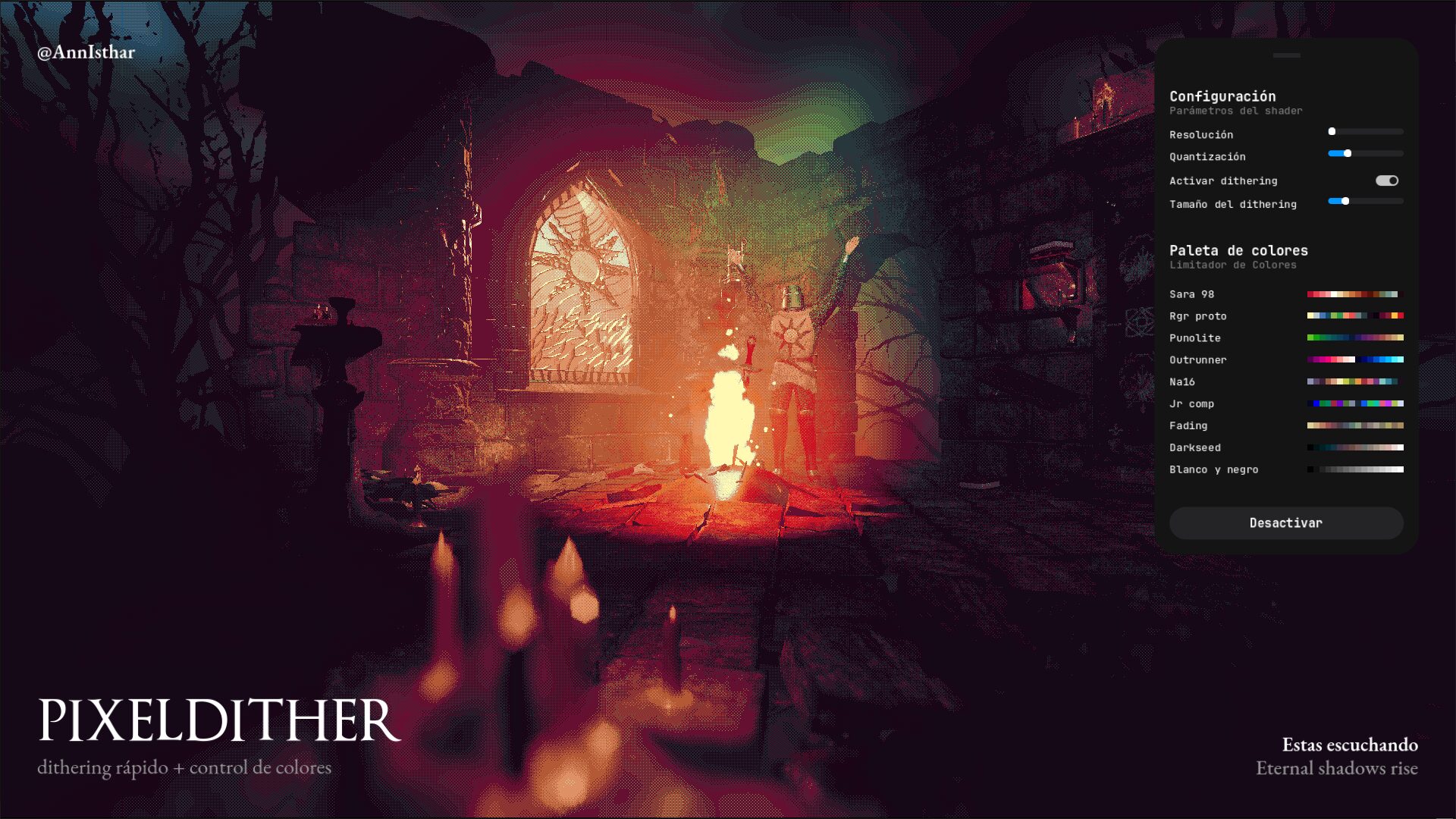
PixelDither is a versatile palette-based color quantization shader for canvas_item in Godot.
It reduces the color depth of a texture and maps the colors to the closest from a user-provided palette texture, optionally applying dithering for smoother gradients and visual quality. You can also control the resolution scale for pixelated effects.
-
🖼️ Supports external palette texture (1D horizontal strip).
-
🎚️ Adjustable quantization levels (2 to 16).
-
🎨 Optional dithering with configurable size for better color transitions.
-
📏 Resolution scale adjustment to create pixelated or blocky effects.
-
🔄 Can be toggled on/off with
shader_enableduniform. -
🎨 Recommended palette size: 16 pixels wide by 1 pixel high (or similar). You can find many palettes with 16 colors at Lospec Palette or customize the shader to your color needs.
📝 Español
PixelDither es un shader versátil de cuantización de color basada en paleta para canvas_item en Godot.
Reduce la profundidad de color de una textura y mapea los colores al más cercano de una paleta proporcionada por el usuario, aplicando opcionalmente dithering para transiciones más suaves y mejor calidad visual. También permite controlar la escala de resolución para lograr efectos pixelados.
-
🖼️ Soporta textura de paleta externa (una franja horizontal 1D).
-
🎚️ Niveles de cuantización ajustables (de 2 a 16).
-
🎨 Dithering opcional con tamaño configurable para mejorar las transiciones de color.
-
📏 Control de escala de resolución para crear efectos pixelados o con bloques visibles.
-
🔄 Se puede activar o desactivar con el uniform
shader_enabled. -
🎨 Recomendación para la paleta: que tenga 16 píxeles de ancho por 1 de alto (o similar). Puedes encontrar muchas paletas de 16 colores en Lospec Palette o ajustar el shader para la cantidad de colores que necesites.
Shader code
shader_type canvas_item;

uniform bool shader_enabled = true;

uniform sampler2D palette;
uniform bool dithering = false;
uniform int dithering_size : hint_range(1, 16) = 2;
uniform int resolution_scale : hint_range(1, 64) = 2;
uniform int quantization_level : hint_range(2, 16) = 16;

int dithering_pattern(ivec2 fragcoord) {
	const int pattern[] = {
		-4, +0, -3, +1,
		+2, -2, +3, -1,
		-3, +1, -4, +0,
		+3, -1, +2, -2
	};
	int x = fragcoord.x % 4;
	int y = fragcoord.y % 4;
	return pattern[y * 4 + x] * dithering_size;
}

float color_distance(vec3 a, vec3 b) {
	vec3 diff = a - b;
	return dot(diff, diff);
}

vec3 quantize_color(vec3 color, int levels) {
	if (levels <= 1) return vec3(0.0);
	float step = 1.0 / float(levels - 1);
	return round(color / step) * step;
}

void fragment() {
	vec4 final_color;

	if (!shader_enabled) {
		final_color = texture(TEXTURE, UV);
	} else {
		vec2 tex_size = vec2(textureSize(TEXTURE, 0));

		if (tex_size.x <= 0.0 || tex_size.y <= 0.0) {
			final_color = vec4(0.0);
		} else {
			ivec2 texel_coord = ivec2(floor(UV * tex_size / float(resolution_scale)));
			vec3 color = texelFetch(TEXTURE, texel_coord * resolution_scale, 0).rgb;

			if (dithering) {
				int dither = dithering_pattern(texel_coord);
				color += vec3(float(dither) / 255.0);
			}
			color = clamp(color, 0.0, 1.0);
			color = quantize_color(color, quantization_level);

			int palette_size = 16;
			float closest_distance = 9999.0;
			vec4 closest_color = vec4(0.0);

			for (int i = 0; i < palette_size; i++) {
				float u = float(i) / float(palette_size - 1);
				vec3 palette_color = texture(palette, vec2(u, 0.0)).rgb;
				float dist = color_distance(color, palette_color);
				if (dist < closest_distance) {
					closest_distance = dist;
					closest_color = vec4(palette_color, 1.0);
				}
			}

			final_color = closest_color;
		}
	}

	COLOR = final_color;
}
Live Preview




this shader is a game changer. i know for a fact that this will be useful to so many people including me. thank you for your amazing work
EXACTLY what I’ve been looking for, thank you so much!
Made some tweaks to use a 64 color pal which doesn’t seem to have broken anything 👍
Hi there, I am very new to shaders. Why does my screen just go white when I apply the shader in my SubViewportContainer? Thank you!
Hi did you figure it out?
I thought its the missing texture but I loaded a 16*1 pixel color palet but its still withte.
if youre applying the shader to a colorrect, add this to the variable list:
uniform sampler2D SCREEN_TEXTURE:hint_screen_texture,filter_linear;
and replace every mention of “TEXTURE” with “SCREEN_TEXTURE”
This is god send. Thank you so much for this gorgeous piece of work
Is there any way this could be made so that palette is optional? I dont strictly need to re-index my color palette but like the other features.
hey i love this shader, just what I was looking for, but i have a lot of questions as a shader noob. Is there any way to use palettes with > 16 colors? or maybe to disable palettes entirely and just use original color? Also, when choosing the color of the pixel, does it match the color of that pixel to the nearest palette color? or does it select them based on b/w value ascending up the palette? ty in advance, if anyone actually answers all of this you are the goat.
shader_type canvas_item;

uniform bool shader_enabled = true;

uniform sampler2D palette: repeat_enable;
uniform bool dithering = false;
uniform int dithering_size : hint_range(1, 16) = 2;
uniform int resolution_scale : hint_range(1, 64) = 2;
uniform int quantization_level : hint_range(1, 64) = 16;
uniform int palette_size = 16;
uniform bool use_palette = true;

int dithering_pattern(ivec2 fragcoord) {
  const int pattern[] = {
    -4, +0, -3, +1,
    +2, -2, +3, -1,
    -3, +1, -4, +0,
    +3, -1, +2, -2
  };
  int x = fragcoord.x % 4;
  int y = fragcoord.y % 4;
  return pattern[y * 4 + x] * dithering_size;
}

float color_distance(vec3 a, vec3 b) {
  vec3 diff = a - b;
  return dot(diff, diff);
}

vec3 quantize_color(vec3 color, int levels) {
  if (levels <= 1) return vec3(0.0);
  float step = 1.0 / float(levels - 1);
  return round(color / step) * step;
}

void fragment() {
  vec4 final_color;

  if (!shader_enabled) {
    final_color = texture(TEXTURE, UV);
  } else {
    vec2 tex_size = vec2(textureSize(TEXTURE, 0));

    if (tex_size.x <= 0.0 || tex_size.y <= 0.0) {
      final_color = vec4(0.0);
    } else {
      ivec2 texel_coord = ivec2(floor(UV * tex_size / float(resolution_scale)));
      vec3 color = texelFetch(TEXTURE, texel_coord * resolution_scale, 0).rgb;

      if (dithering) {
        int dither = dithering_pattern(texel_coord);
        color += vec3(float(dither) / 255.0);
      }
      color = clamp(color, 0.0, 1.0);
      color = quantize_color(color, quantization_level);
      if (use_palette) {

        float closest_distance = 9999.0;
        vec4 closest_color = vec4(0.0);

        for (int i = 0; i < palette_size; i++) {
          float u = float(i) / float(palette_size - 1);
          vec3 palette_color = texture(palette, vec2(u, 0.0)).rgb;
          float dist = color_distance(color, palette_color);
          if (dist < closest_distance) {
            closest_distance = dist;
            closest_color = vec4(palette_color, 1.0);
          }
        }

      final_color = closest_color;
      } else{
        final_color = vec4(color, 1.0);
      }
    }
  }

  COLOR = final_color;
}
replying to myself in case anyone else had the same questions. this is a version of the shader that has customizable palette size, and use palette toggle. (btw it does select colors by finding the closest palette color)