
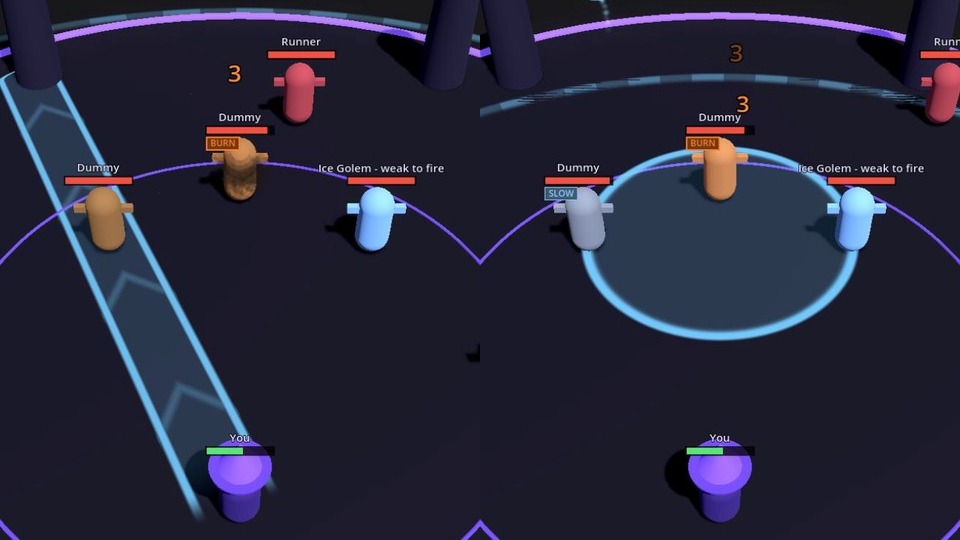
Skillshot Lane + AoE Ground Indicators (one shader, 4 shapes)

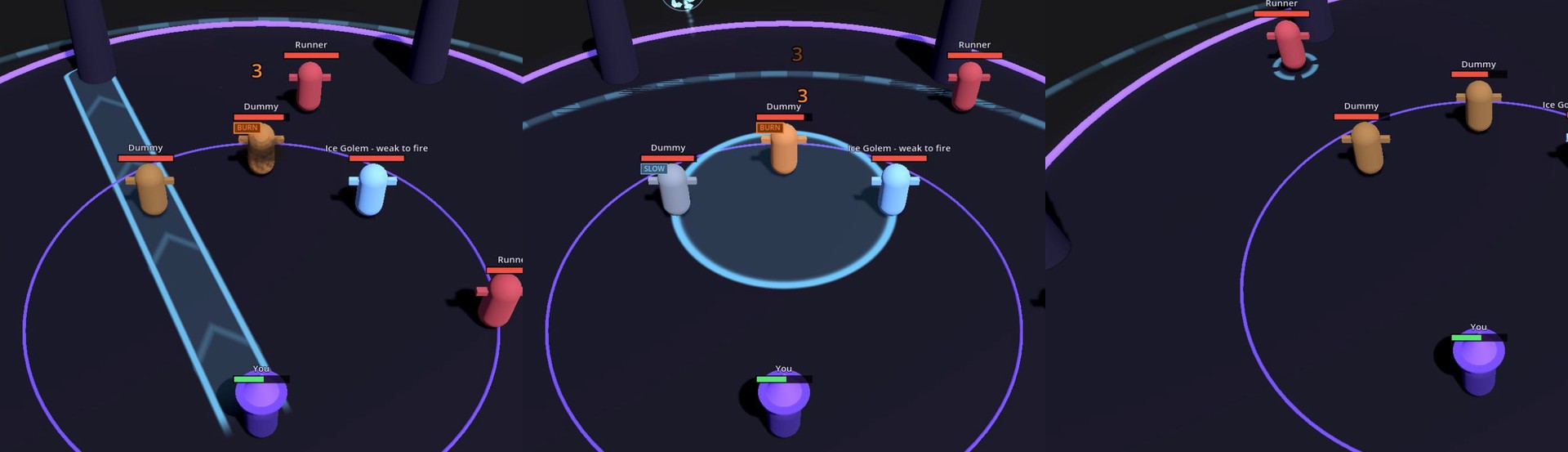
One shader for the ground aim shapes of action RPG and MOBA spells: a dashed range ring, a filled AoE circle with a pulse running outward, a skillshot lane with moving chevrons and an arrow head, and rotating brackets under a target.
Everything is drawn from UV, no textures, so one flat quad per shape scales to any size. Tested in Godot 4.7 (Compatibility renderer); unshaded, no depth write, no Forward+-only features.
How to use
- Add a MeshInstance3D with a QuadMesh (orientation Face Y, size 1 x 1) on the ground.
- Give it a ShaderMaterial with this shader.
- Set shape: 0 = range ring, 1 = AoE circle, 2 = skillshot lane, 3 = target ring.
- Scale the node to the size you need. For the lane, scale X = width and Z = length, and set aspect = length / width so the chevrons keep their shape.
- tint = color (switch to red when the spell is on cooldown), edge = outline thickness, fill = inside alpha, pulse = 0 for a steady shape.
Code written with AI assistance, tested by hand in Godot 4.7.
This is the aim shader from my Spell Casting Kit for Godot 4, which adds the rest: casting, charge and channel spells, mana, cooldowns, AoE damage, elements, status effects, an action bar and 41 projectile effects. https://pixeldreamerstd.gumroad.com/l/spellkit?utm_source=godotshaders
Shader code
shader_type spatial;
// Pixel Dreamer Spell Casting Kit - ground aim shapes (range ring, AoE disc, skillshot lane, target ring).
// One flat quad per shape; everything is drawn from UV so it scales to any size and works in Compatibility.
render_mode unshaded, blend_mix, depth_draw_never, cull_disabled, shadows_disabled;

uniform vec4 tint : source_color = vec4(0.45, 0.8, 1.0, 0.85);
uniform int shape = 0;            // 0 ring - 1 disc - 2 lane (arrow) - 3 target ring
uniform float edge = 0.04;        // ring / outline thickness (fraction of the radius)
uniform float fill = 0.18;        // inside alpha of disc and lane
uniform float pulse = 1.0;        // 0 = steady
uniform float aspect = 1.0;       // lane: length / width

void fragment() {
	vec2 p = UV * 2.0 - 1.0;
	float a = 0.0;
	float t = TIME * 3.0;
	if (shape == 0 || shape == 3) {
		float r = length(p);
		float w = shape == 3 ? edge * 2.5 : edge;
		a = smoothstep(1.0, 1.0 - w * 0.5, r) * smoothstep(1.0 - w * 2.0, 1.0 - w, r);
		if (shape == 3) {
			// four brackets that turn slowly
			float ang = atan(p.y, p.x) + TIME * 1.2;
			a *= step(0.35, abs(sin(ang * 2.0)));
		} else {
			// dashed outer ring
			float ang = atan(p.y, p.x);
			a *= 0.55 + 0.45 * step(0.0, sin(ang * 48.0 - TIME * 2.0));
		}
	} else if (shape == 1) {
		float r = length(p);
		float rim = smoothstep(1.0, 1.0 - edge * 0.5, r) * smoothstep(1.0 - edge * 2.0, 1.0 - edge, r);
		float inside = smoothstep(1.0, 0.97, r) * fill;
		float wave = smoothstep(0.06, 0.0, abs(r - fract(TIME * 0.6))) * 0.35 * pulse;  // a ring that runs outwards
		a = max(rim, inside + wave * step(r, 1.0));
	} else {
		// lane: UV.y 0 = caster, 1 = far end; arrow head at the far end
		float x = abs(p.x);
		float y = UV.y;
		float head = smoothstep(0.86, 0.9, y);
		float body_w = mix(1.0, 0.0, head * (y - 0.86) / 0.14 * 7.0);
		float side = smoothstep(body_w, body_w - edge * 2.0, x) * smoothstep(body_w - edge * 6.0, body_w - edge * 4.0, x);
		float inside = smoothstep(body_w, body_w - 0.05, x) * fill * smoothstep(0.0, 0.08, y);
		float chevron = smoothstep(0.08, 0.0, abs(fract(y * aspect * 0.5 - TIME * 0.8) - 0.5 + x * 0.3)) * 0.25 * pulse;  // tips point at the far end and run that way
		a = max(side, inside + chevron * step(x, body_w)) * smoothstep(0.0, 0.04, y);
	}
	float glow = 1.0 + 0.15 * sin(t) * pulse;
	ALBEDO = tint.rgb * glow;
	ALPHA = clamp(a * tint.a, 0.0, 1.0);
}
Live Preview

Comments 0
No comments yet.