
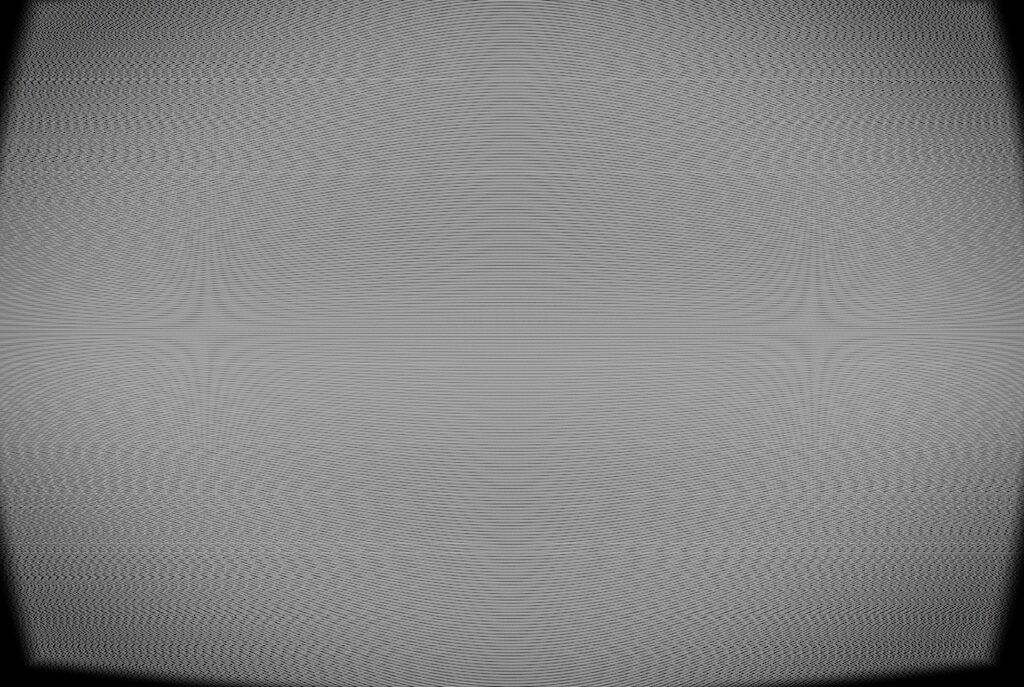
CRT + VHS

crt + vhs (CanvasItem)
Full-screen retro CRT/VHS post-process shader for Godot 4.5 / 4.6.
I am still learning shaders, so feedback is welcome. This is free to use.
This shader adds:
– CRT curvature
– Vignette
– Rounded screen corners
– Scanlines
– Optional RGB triad / shadow mask effect
– VHS/VCR artifacts:
– chroma shift
– horizontal smear
– per-line jitter
– slow wobble
– tracking lines
– rolling bar
– tape grain / specks
– Cheap glow on bright pixels
– Simple color grading:
– brightness
– contrast
– saturation
– gamma
## How to use
1. Create a `CanvasLayer`.
2. Add a `ColorRect` as a child.
3. Select the `ColorRect` and set:
`Layout` → `Full Rect`
4. On the `ColorRect`, create a new `ShaderMaterial`.
5. In the `ShaderMaterial`, create a new `Shader`.
6. Paste this shader code into the new shader.
7. Optional but recommended:
Set `ColorRect` → `Mouse` → `Filter` → `Ignore`
This prevents the full-screen ColorRect from blocking UI clicks.
## Important: UI / HUD layering
This shader uses `hint_screen_texture` and `SCREEN_UV`, so it affects whatever has already been drawn behind the shader.
That means draw order matters.
If some UI elements get the CRT effect and other UI elements stay clean/flat, check your `CanvasLayer`, `Layer`, and `z_index` values.
### Option A: Make the CRT/VHS effect apply to the game only
Use this if you want your HUD, menus, health bars, subtitles, or progress bars to stay clean.
Recommended setup:
“`text
Game world / 3D scene
CanvasLayer 0
└── CRT Shader ColorRect
CanvasLayer 1 or higher
└── UI / HUD / ProgressBars
(050526_update_cleaned comments and added clearer notes about CanvasLayer / z_index setup. shader behavior is unchanged)
Shader code
shader_type canvas_item;
render_mode unshaded;

/*
	CRT + VHS full-screen post-process shader for Godot 4.5 / 4.6.

	How it works:
	This shader reads the already-rendered screen using hint_screen_texture + SCREEN_UV,
	then redraws it with CRT/VHS effects.

	Important layering note:
	This shader only affects things drawn behind this ColorRect.

	Clean UI setup:
	- Put the CRT shader ColorRect on a lower CanvasLayer.
	- Put your UI/HUD on a higher CanvasLayer.

	CRT/VHS UI setup:
	- Put your UI/HUD behind the shader.
	- Put the CRT shader ColorRect on a higher CanvasLayer.

	Same CanvasLayer setup:
	- Give the CRT shader ColorRect a higher z_index than the things you want affected.
	- Anything with a higher z_index than the shader will be drawn clean above it.

	Also recommended:
	Set the shader ColorRect Mouse Filter to Ignore so it does not block UI clicks.
*/

uniform sampler2D screen_texture : hint_screen_texture, repeat_disable, filter_nearest;

// --- Color controls ---
uniform float brightness : hint_range(0.0, 2.0) = 1.02;
uniform float contrast : hint_range(0.0, 2.0) = 1.08;
uniform float saturation : hint_range(0.0, 2.0) = 1.10;
uniform float gamma : hint_range(0.2, 3.0) = 1.05;

// --- CRT geometry / lens ---
uniform float curvature : hint_range(0.0, 0.40) = 0.14;
uniform float corner_soften : hint_range(0.0, 0.20) = 0.06;
uniform float vignette : hint_range(0.0, 1.00) = 0.38;

// --- Scanlines / phosphor ---
uniform float scanline_strength : hint_range(0.0, 2.0) = 0.95;
uniform float scanline_density : hint_range(0.5, 3.0) = 1.15;
uniform float interlace_strength : hint_range(0.0, 1.0) = 0.20;

// Shadow mask / RGB triads.
// Turn mask_strength down if the screen-door effect is too strong.
uniform float mask_strength : hint_range(0.0, 1.0) = 0.22;
uniform float mask_scale : hint_range(0.5, 4.0) = 1.0;

// --- VHS / VCR artifacts ---
uniform float chroma_offset_px : hint_range(0.0, 6.0) = 1.6;
uniform float luma_smear_px : hint_range(0.0, 8.0) = 2.2;
uniform float jitter_px : hint_range(0.0, 8.0) = 1.8;
uniform float wobble_px : hint_range(0.0, 10.0) = 1.5;

uniform float tape_noise : hint_range(0.0, 1.0) = 0.22;
uniform float tape_lines : hint_range(0.0, 1.0) = 0.35;

uniform float roll_speed : hint_range(0.0, 1.5) = 0.10;
uniform float roll_strength : hint_range(0.0, 0.6) = 0.15;

// --- Cheap bloom-ish glow ---
uniform float glow_strength : hint_range(0.0, 2.0) = 0.25;
uniform float glow_threshold : hint_range(0.0, 1.0) = 0.65;

float hash11(float n) {
	return fract(sin(n) * 43758.5453123);
}

float hash12(vec2 p) {
	return fract(sin(dot(p, vec2(127.1, 311.7))) * 43758.5453123);
}

vec2 crt_curve(vec2 uv, float k) {
	// Barrel distortion style curve.
	vec2 cc = uv * 2.0 - 1.0;
	vec2 d = cc * cc;
	cc *= 1.0 + k * vec2(d.y, d.x);
	return cc * 0.5 + 0.5;
}

float inside01(vec2 uv) {
	// Returns 1.0 if uv is inside the 0.0 to 1.0 screen area.
	return step(0.0, uv.x) * step(uv.x, 1.0) * step(0.0, uv.y) * step(uv.y, 1.0);
}

vec3 apply_color_controls(vec3 color) {
	// Brightness.
	color *= brightness;

	// Contrast around 0.5.
	color = mix(vec3(0.5), color, contrast);

	// Saturation.
	float luma = dot(color, vec3(0.2126, 0.7152, 0.0722));
	color = mix(vec3(luma), color, saturation);

	// Gamma.
	color = pow(max(color, vec3(0.0)), vec3(1.0 / max(gamma, 0.0001)));

	return color;
}

vec3 triad_mask(vec2 frag_xy) {
	// Simple RGB triad mask across the X axis.
	float x = floor(frag_xy.x / max(mask_scale, 0.0001));
	float triad_index = mod(x, 3.0);

	if (triad_index < 1.0) {
		return vec3(1.10, 0.85, 0.85);
	}

	if (triad_index < 2.0) {
		return vec3(0.85, 1.10, 0.85);
	}

	return vec3(0.85, 0.85, 1.10);
}

vec3 sample_screen(vec2 uv) {
	return textureLod(screen_texture, uv, 0.0).rgb;
}

void fragment() {
	vec2 px = SCREEN_PIXEL_SIZE;
	vec2 res = 1.0 / px;
	float t = TIME;

	// Start from screen UV.
	vec2 uv = SCREEN_UV;

	// --- VHS line jitter ---
	float y_line = floor(uv.y * res.y);
	float jitter_random = hash11(y_line + floor(t * 15.0) * 37.0);
	float jitter = (jitter_random - 0.5) * 2.0;
	uv.x += jitter * jitter_px * px.x;

	// --- Slow horizontal wobble ---
	uv.x += sin(uv.y * 8.0 + t * 1.2) * wobble_px * px.x;

	// --- CRT curve ---
	vec2 cuv = crt_curve(uv, curvature);
	float in_bounds = inside01(cuv);

	// --- Rounded corners / soft screen edge ---
	vec2 corner_distance = abs(cuv - 0.5) * 2.0;
	float edge = max(corner_distance.x, corner_distance.y);
	float corner_mask = 1.0 - smoothstep(1.0 - corner_soften, 1.0, edge);

	// --- Chromatic aberration / VHS chroma shift ---
	vec2 chroma_offset = vec2(chroma_offset_px * px.x, 0.0);

	float red = sample_screen(cuv + chroma_offset).r;
	float green = sample_screen(cuv).g;
	float blue = sample_screen(cuv - chroma_offset).b;

	vec3 color = vec3(red, green, blue);

	// --- Luma smear / horizontal ghosting ---
	float smear = luma_smear_px * px.x;

	vec3 smear_right = sample_screen(cuv + vec2(smear, 0.0));
	vec3 smear_left = sample_screen(cuv - vec2(smear, 0.0));
	vec3 smeared_color = (color + smear_right + smear_left) / 3.0;

	color = mix(color, smeared_color, 0.35);

	// --- Scanlines ---
	float scanline_wave = sin(cuv.y * res.y * 3.14159 * scanline_density);
	float scanline_darkening = 0.5 - 0.5 * scanline_wave;
	float scanline_multiplier = 1.0 - scanline_strength * scanline_darkening;

	color *= scanline_multiplier;

	// --- Interlacing flicker ---
	float field = mod(floor(FRAGCOORD.y) + floor(t * 60.0), 2.0);
	color *= 1.0 - interlace_strength * field * 0.10;

	// --- Rolling tracking bar ---
	float roll_y = fract(t * max(roll_speed, 0.0001));
	float roll_distance = abs(cuv.y - roll_y);
	float roll_bar = smoothstep(0.20, 0.0, roll_distance);

	color += roll_bar * roll_strength * vec3(0.12);

	// --- Random horizontal tape tracking lines ---
	float line_random = hash11(y_line * 0.7 + floor(t * 12.0) * 11.0);
	float tape_line = smoothstep(0.985, 1.0, line_random) * tape_lines;

	color += tape_line * vec3(0.18);

	// --- Grain ---
	float noise = hash12(FRAGCOORD.xy + vec2(t * 120.0, t * 90.0));
	float grain = (noise - 0.5) * 2.0;

	color += grain * tape_noise * 0.06;

	// --- Occasional white specks ---
	float speck_random = hash12(FRAGCOORD.xy * 0.73 + t * 40.0);
	float speck = smoothstep(0.995, 1.0, speck_random);

	color += speck * tape_noise * 0.25;

	// --- Cheap glow on bright pixels ---
	vec3 center_color = color;

	vec3 glow_right = sample_screen(cuv + vec2(px.x, 0.0));
	vec3 glow_left = sample_screen(cuv - vec2(px.x, 0.0));
	vec3 glow_up = sample_screen(cuv + vec2(0.0, px.y));
	vec3 glow_down = sample_screen(cuv - vec2(0.0, px.y));

	vec3 blur = (center_color + glow_right + glow_left + glow_up + glow_down) / 5.0;
	float brightness_value = dot(blur, vec3(0.2126, 0.7152, 0.0722));
	vec3 glow = max(blur - vec3(glow_threshold), vec3(0.0));

	color += glow * glow_strength * (0.5 + 0.5 * brightness_value);

	// --- Vignette ---
	vec2 vignette_uv = cuv - 0.5;
	float vignette_mask = smoothstep(0.9, 0.2, dot(vignette_uv, vignette_uv) * 2.2);

	color *= mix(1.0 - vignette, 1.0, vignette_mask);

	// --- Shadow mask / RGB triads ---
	vec3 mask = triad_mask(FRAGCOORD.xy);
	color *= mix(vec3(1.0), mask, mask_strength);

	// --- Color grading ---
	color = apply_color_controls(color);

	// Outside the curved screen / rounded edges fades to black.
	color *= in_bounds * corner_mask;

	COLOR = vec4(color, 1.0);
}
Thank you but if you have UI and that ui has to progressbars:
progressbar
progressbar
the ui is broken and 1is correct but the other dont makes the 3d effect and stays 2D
Sorry was my error but its not explined you need to put z-index to 100 or 1000 to stay over all my progressbars was in z 1 and the shader in z 0
thanks for pointing that out!!! u are right I should explain the layering better….the shader only affects what is drawn behind it, so UI above the shader can stay clean…I updated the description with CanvasLayer and z_index examples sorry im still learning love u
added YouTube link
I used this for a Game Jam. It worked perfectly and added a lot of character. Thanks!
https://shadowglass.itch.io/watchmeman