
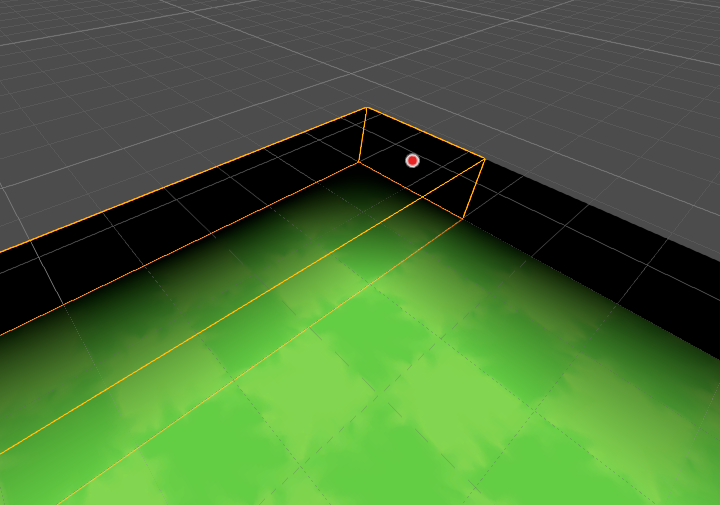
Fade Volume

When put on a cube mesh, the cube will fade from completely transparent (local -x face) to completely black (local +x face). Make sure to set the x_len parameter to the length of your cube on the x axis. Use exponent to tweak the fade intensity.
Tested on Godot v4.7.1 (at this time the maximum version Godot shaders has in the “tested with” dropdown is v4.6, which I haven’t tested it for).
Shader code
shader_type spatial;
render_mode unshaded, blend_mix;

uniform sampler2D depth_texture : hint_depth_texture, filter_nearest;

uniform float x_len : hint_range(0.0, 10.0) = 1.0;
uniform float exponent : hint_range(0.0, 10.0) = 1.0;

varying vec3 pos_object;
varying vec3 cam_pos_object;

void vertex() {

    pos_object = VERTEX;

    vec3 cam_pos_world  = (INV_VIEW_MATRIX * vec4(0.0, 0.0, 0.0, 1.0)).xyz;

	cam_pos_object = (inverse(MODEL_MATRIX) * vec4(cam_pos_world, 1.0)).xyz;
}

float linearize(float raw_depth, vec2 screen_uv, mat4 inv_proj_matrix) {

    vec3 ndc = vec3(screen_uv * 2.0 - 1.0, raw_depth);
    vec4 view = inv_proj_matrix * vec4(ndc, 1.0);
    view.xyz /= view.w;

    return -view.z;
}

void fragment() {

	vec3 cam_dir_object = normalize(pos_object - cam_pos_object);

	float offset_into_fragment = linearize(texture(depth_texture, SCREEN_UV).x, SCREEN_UV, INV_PROJECTION_MATRIX) - linearize(FRAGCOORD.z, SCREEN_UV, INV_PROJECTION_MATRIX);

	vec3 position = pos_object + cam_dir_object * offset_into_fragment;

    ALBEDO = vec3(0., 0., 0.);
	ALPHA = pow(smoothstep(-x_len / 2., x_len / 2., position.x), exponent);
}