
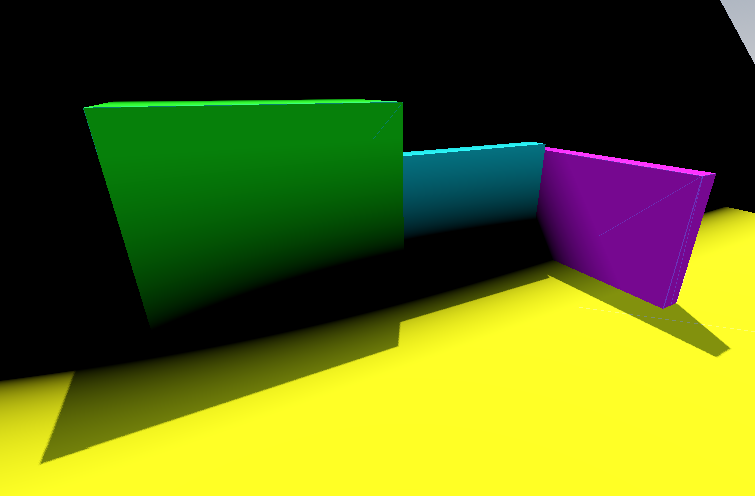
Depth based fade (Fog of war)

This shader blends the environment with a selected color based on how deep the environment penetrates the mesh. Similar to Fog of War.
Shader code
shader_type spatial;

render_mode unshaded;

uniform sampler2D screen_texture : hint_screen_texture, repeat_disable, filter_nearest;
uniform sampler2D depth_texture : hint_depth_texture, repeat_disable, filter_nearest;
uniform float max_visible_depth = 3.0;
uniform vec4 fog_color: source_color = vec4(0.0, 0.0, 0.0, 1.0);

float get_linear_depth(float log_depth, vec2 screen_uv, mat4 inv_proj_mat) {
	vec4 ndc = vec4(screen_uv * 2.0 - 1.0, log_depth, 1.0);
    vec4 upos = inv_proj_mat * ndc;
	vec3 pixel_pos = upos.xyz / upos.w;
	return -pixel_pos.z;
}

void fragment() {
	vec3 frag_world_pos = (INV_VIEW_MATRIX * vec4(VERTEX, 1.0)).xyz;
	vec3 camera_world_pos = (INV_VIEW_MATRIX * vec4(0.0, 0.0, 0.0, 1.0)).xyz;
	vec3 camera_dir = normalize(frag_world_pos - camera_world_pos);
	vec3 world_normal = normalize((INV_VIEW_MATRIX * vec4(NORMAL, 0.0)).xyz);

    float log_depth = textureLod(depth_texture, SCREEN_UV, 0.0).r;
	vec4 screen_albedo = textureLod(screen_texture, SCREEN_UV, 0.0);
	float linear_depth = get_linear_depth(log_depth, SCREEN_UV, INV_PROJECTION_MATRIX);
	float surface_depth = get_linear_depth(FRAGCOORD.z, SCREEN_UV, INV_PROJECTION_MATRIX);
	float penetration_depth = linear_depth - surface_depth;
	float effective_depth = -max_visible_depth / dot(world_normal, camera_dir);
	float mix_percent = clamp(penetration_depth / effective_depth, 0.0, 1.0);
	ALBEDO = mix(screen_albedo, fog_color, mix_percent).rgb;
}

Comments 3
I tried using your shader, there are no errors, but the ColorRect is all white, what am I doing wrong? Godot 4.5
attached a screenshot below
https://pasteboard.co/LVLRqbIbRFSc.png
I realized what the problem is, in godot 4+ you need to add this:
void vertex(){ POSITION = vec4(VERTEX.xy, 1.,1.); }Ported this to gles2. To disable greyscale or to show missing materials, you have to enable transparency on the other meshes. If you have the surface shader, this can be done with enabling flags->transparency and enable parameters->use alpha scissors via the surface shader
shader_type spatial;

//render_mode unshaded;


uniform float max_visible_depth = 3.0;
uniform vec4 fog_color: hint_color = vec4(0.0, 0.0, 0.0, 1.0);

/*
vec3 linearToSRGB(vec3 linearRGB) {
  bvec3 cutoff = lessThanEqual(linearRGB, vec3(0.0031308));
  vec3 higher = vec3(1.055) * pow(linearRGB, vec3(1.0 / 2.4)) - vec3(0.055);
  vec3 lower = linearRGB * vec3(12.92);
  return mix(higher, lower, cutoff);
}
*/
float get_linear_depth(float log_depth, vec2 screen_uv, mat4 inv_proj_mat) {
  vec4 ndc = vec4(screen_uv * 2.0 - 1.0, log_depth, 1.0);
  vec4 upos = inv_proj_mat * ndc;
  vec3 pixel_pos = upos.xyz / upos.w;
  return -pixel_pos.z;
}

void fragment() {
  vec3 frag_world_pos = (CAMERA_MATRIX * vec4(VERTEX, 1.0)).xyz;
  vec3 camera_world_pos = (CAMERA_MATRIX * vec4(0.0, 0.0, 0.0, 1.0)).xyz;
  vec3 camera_dir = normalize(frag_world_pos - camera_world_pos);
  vec3 world_normal = normalize((INV_CAMERA_MATRIX * vec4(NORMAL, 0.0)).xyz);

  float log_depth = textureLod(DEPTH_TEXTURE, SCREEN_UV, 0.0).r;
  vec4 screen_albedo = textureLod(SCREEN_TEXTURE, SCREEN_UV, 0.0);
  vec4 screen_albedoo=texture(SCREEN_TEXTURE, SCREEN_UV);
  float linear_depth = get_linear_depth(log_depth, SCREEN_UV, INV_PROJECTION_MATRIX);
  float surface_depth = get_linear_depth(FRAGCOORD.z, SCREEN_UV, INV_PROJECTION_MATRIX);
  float penetration_depth = linear_depth - surface_depth;
  float effective_depth = -max_visible_depth / dot(world_normal, camera_dir);
  float mix_percent = clamp(penetration_depth / effective_depth, 0.0, 1.0);
  ALBEDO = mix(screen_albedo, fog_color, mix_percent).rgb;
  //vec3 color = linearToSRGB(screen_albedo);

  //ALBEDO = linearToSRGB(mix(screen_albedo, fog_color, mix_percent).rgb);
  ALPHA = screen_albedoo.a;
}