
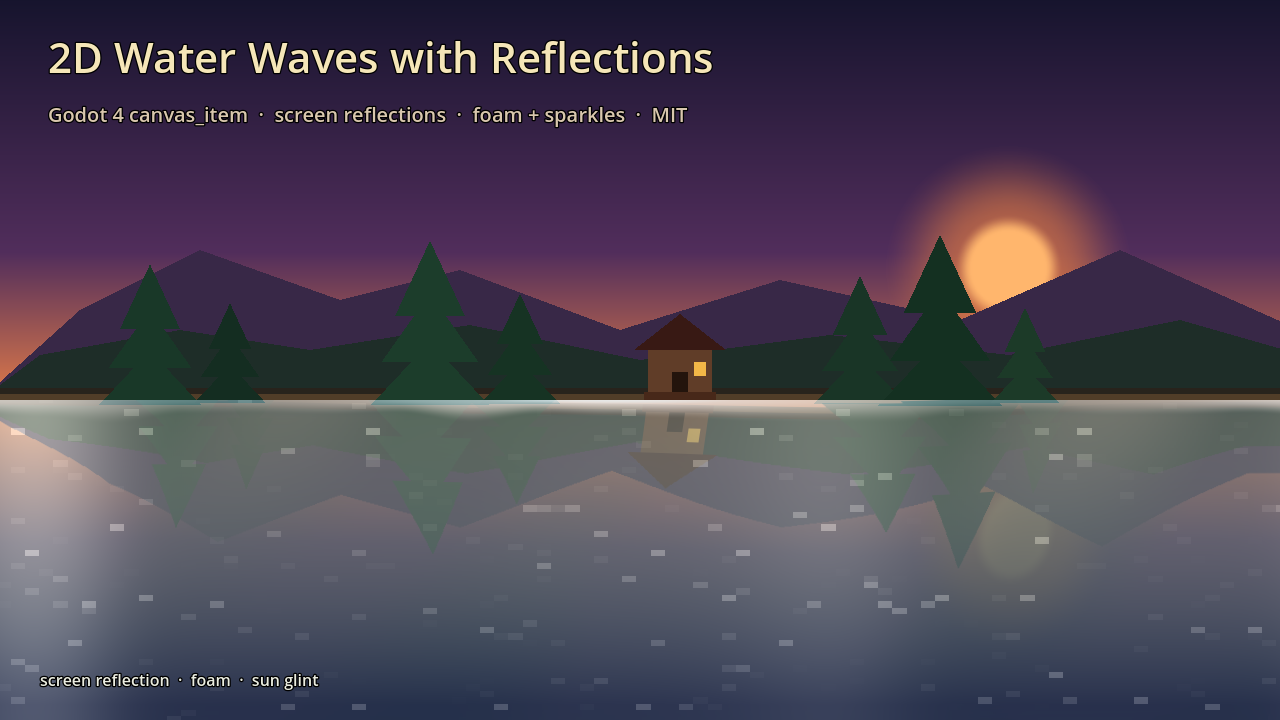
2D Water Waves with Reflections

A drop-in canvas_item water shader for side-view lakes and oceans, or top-down water tiles. It bends the surface with layered sine waves, reflects whatever is already on screen (or a texture you pass in), and adds a sun glint, sparkles, and a noisy foam line at the surface. No extra textures are required.
USAGE:
Side-view (lake / ocean): add a ColorRect for the water, put a BackBufferCopy node (Copy Mode: Viewport) just above it in the tree so the reflection can see the shore, assign a ShaderMaterial with this shader, and keep UV.y = 0 at the water line (the top of the ColorRect).
Top-down: drop the same material on a Sprite2D / TextureRect of your water tile, turn off `use_screen_reflection` (or point `reflection_texture` at a ViewportTexture), and set `foam_width` to 0.
Tune in the Inspector:
- wave_speed — how fast the waves travel
- wave_amplitude — how far UVs are pushed (bigger = choppier)
- wave_frequency — number of wave crests across the sprite
- time_offset — shifts the animation in seconds (useful for a still preview or desyncing several bodies of water)
- shallow_color / deep_color — tint at the surface and at the bottom. Alpha controls how strong the overlay is
- depth_fade — how quickly the tint moves from shallow to deep (higher = deep color sooner)
- reflection_strength — how much of the reflection is mixed in
- reflection_fresnel — reflections stay stronger near the surface and fade with depth (0 = even mix)
- use_screen_reflection — sample the back buffer, flipped over the water line (default on)
- auto_surface_y — when on, the water line is inferred from this node’s top edge. Turn off to set surface_y yourself
- surface_y — water line as a 0–1 screen Y (0 = top of the window). Used when auto_surface_y is off. 0.5 = halfway down
- use_reflection_texture / reflection_texture — use your own texture (or a ViewportTexture) instead of the screen
- specular_amount / specular_tightness — brightness and tightness of the sun glint on the crests
- light_direction — 2D direction of the glint (point it at your sun)
- specular_color — color of the glint and sparkles
- sparkle_amount — density of tiny twinkling highlights
- foam_width — height of the foam band at UV.y = 0 (0 = no foam, good for top-down)
- foam_color / foam_noise — foam tint and how broken up the edge is
- texture_distort — how much the node’s own TEXTURE is warped (1 = follow the waves; 0 = leave the tile still)
Works in Godot 4.3+ (Compatibility, Forward+, Mobile).
AI-assisted (code + text)
Need a splash or swim cue to go with the water? Free Combat SFX sampler: https://crtforge.pages.dev/combat-sfx-sampler/ and the full Fantasy RPG Combat SFX pack: https://assetsmithpixels.itch.io/fantasy-rpg-combat-sfx
Shader code
// 2D Water Waves with Reflections — Godot 4 canvas_item shader
// MIT License. Copyright (c) 2026 Assetsmith
// Permission is hereby granted, free of charge, to any person obtaining a copy of this
// software, to deal in it without restriction, including the rights to use, copy, modify,
// merge, publish, distribute, sublicense, and/or sell copies. Provided "as is", without warranty.
shader_type canvas_item;

uniform float wave_speed : hint_range(0.0, 5.0) = 1.2;
uniform float wave_amplitude : hint_range(0.0, 0.15) = 0.028;
uniform float wave_frequency : hint_range(0.5, 48.0) = 10.0;
uniform float time_offset : hint_range(0.0, 100.0) = 0.0;
uniform vec4 shallow_color : source_color = vec4(0.28, 0.68, 0.78, 0.55);
uniform vec4 deep_color : source_color = vec4(0.04, 0.16, 0.34, 0.88);
uniform float depth_fade : hint_range(0.2, 4.0) = 1.15;
uniform float reflection_strength : hint_range(0.0, 1.0) = 0.6;
uniform float reflection_fresnel : hint_range(0.0, 5.0) = 1.6;
uniform bool use_screen_reflection = true;
uniform bool auto_surface_y = true;
uniform float surface_y : hint_range(0.0, 1.0) = 0.5;
uniform bool use_reflection_texture = false;
uniform sampler2D reflection_texture : filter_linear, repeat_disable, hint_default_black;
uniform sampler2D screen_texture : hint_screen_texture, filter_linear, repeat_disable;
uniform float specular_amount : hint_range(0.0, 2.0) = 0.95;
uniform float specular_tightness : hint_range(4.0, 80.0) = 22.0;
uniform vec2 light_direction = vec2(0.45, -0.7);
uniform vec4 specular_color : source_color = vec4(1.0, 0.97, 0.88, 1.0);
uniform float sparkle_amount : hint_range(0.0, 1.0) = 0.35;
uniform float foam_width : hint_range(0.0, 0.3) = 0.07;
uniform vec4 foam_color : source_color = vec4(0.93, 0.98, 1.0, 0.92);
uniform float foam_noise : hint_range(0.0, 1.0) = 0.5;
uniform float texture_distort : hint_range(0.0, 2.0) = 1.0;

float hash(vec2 p) {
	p = fract(p * vec2(123.34, 456.21));
	p += dot(p, p + 45.32);
	return fract(p.x * p.y);
}

float value_noise(vec2 p) {
	vec2 i = floor(p);
	vec2 f = fract(p);
	vec2 u = f * f * (3.0 - 2.0 * f);
	float a = hash(i);
	float b = hash(i + vec2(1.0, 0.0));
	float c = hash(i + vec2(0.0, 1.0));
	float d = hash(i + vec2(1.0, 1.0));
	return mix(mix(a, b, u.x), mix(c, d, u.x), u.y);
}

vec2 waves(vec2 uv, float t) {
	float f = wave_frequency;
	float w1 = sin(uv.x * f + t);
	float w2 = sin(uv.x * f * 1.73 - t * 1.28 + uv.y * 3.5);
	float w3 = sin((uv.x * 0.55 + uv.y * 0.35) * f * 0.85 + t * 0.7);
	float n = value_noise(vec2(uv.x * f * 0.35 + t * 0.12, uv.y * 2.2 + t * 0.08));
	float h = (w1 + 0.55 * w2 + 0.3 * w3) / 1.85;
	return vec2(h, n * 2.0 - 1.0) * wave_amplitude;
}

void fragment() {
	float t = (TIME + time_offset) * wave_speed;
	vec2 w = waves(UV, t);
	vec2 tex_uv = UV + w * texture_distort;
	vec4 tex = texture(TEXTURE, tex_uv);

	float depth = clamp(UV.y * depth_fade, 0.0, 1.0);
	vec4 water = mix(shallow_color, deep_color, depth);

	vec2 wave_off = w * vec2(1.15, 0.55);
	vec4 refl = vec4(0.0);
	if (use_reflection_texture) {
		vec2 ruv = vec2(UV.x, 1.0 - UV.y) + wave_off;
		refl = texture(reflection_texture, ruv);
	} else if (use_screen_reflection) {
		float sy = surface_y;
		if (auto_surface_y) {
			float dy = dFdy(UV.y);
			float dsy = dFdy(SCREEN_UV.y);
			float h = (abs(dy) < 0.000001) ? 0.0 : dsy / dy;
			sy = SCREEN_UV.y - UV.y * h;
		}
		vec2 ruv = vec2(SCREEN_UV.x, 2.0 * sy - SCREEN_UV.y) + wave_off;
		// Clamp X so waves at the sides don't go black; fade only if Y leaves the screen.
		float inb = smoothstep(-0.02, 0.0, ruv.y) * (1.0 - smoothstep(1.0, 1.02, ruv.y));
		refl = texture(screen_texture, clamp(ruv, vec2(0.001), vec2(0.999))) * inb;
	}

	float fres = pow(1.0 - depth, max(reflection_fresnel, 0.001));
	float refl_amt = reflection_strength * mix(0.28, 1.0, fres);
	vec3 col = mix(water.rgb, refl.rgb, refl_amt * refl.a);
	col = mix(col, tex.rgb * water.rgb, tex.a * 0.12);

	float slope = cos(UV.x * wave_frequency + t) + 0.45 * cos(UV.x * wave_frequency * 1.73 - t * 1.28);
	vec3 N = normalize(vec3(-slope * wave_amplitude * wave_frequency, 0.55, 1.0));
	vec3 L = normalize(vec3(light_direction.x, 0.35, -light_direction.y));
	float spec = pow(max(dot(N, L), 0.0), specular_tightness);
	col += specular_color.rgb * spec * specular_amount * (1.0 - depth * 0.45);

	float sp = hash(floor((UV + vec2(t * 0.04, t * 0.01)) * vec2(90.0, 50.0)));
	float twinkle = 0.5 + 0.5 * sin(t * 7.0 + sp * 40.0);
	float spark = step(1.0 - sparkle_amount * 0.10, sp) * twinkle;
	col += specular_color.rgb * spark * sparkle_amount * (1.0 - depth * 0.3);

	float foam_n = value_noise(vec2(UV.x * 18.0 + t * 0.45, t * 0.25));
	float wobble = max(w.x, 0.0) * 4.0;
	float foam_line = foam_width * (0.55 + foam_noise * foam_n) + wobble * 0.015;
	float foam = 1.0 - smoothstep(0.0, max(foam_line, 0.0001), UV.y);
	foam *= 0.7 + 0.3 * sin(UV.x * wave_frequency * 0.9 + t);
	col = mix(col, foam_color.rgb, clamp(foam, 0.0, 1.0) * foam_color.a);

	float a = mix(water.a, max(water.a, 0.92), refl_amt * refl.a);
	a = max(a, foam * foam_color.a);
	a *= tex.a;
	COLOR = vec4(col, a);
}

Comments 0
No comments yet.