

2D Circular Outline Shader

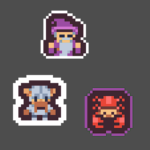
A versatile shader that adds a clean, customizable circular outline to any 2D sprite, perfect for both pixel art and regular 2D art. Adjustable thickness and color allow for sharp pixel-perfect edges or smooth gradients. Great for highlighting objects, UI elements, or stylized effects!
Using the Midpoint Circle Algorithm to define circles (watch NoBS Code’s video for more details).
TODO:
- allow fractional pixel thickness
- add true anti-aliasing for sharp corners
- fix: makes texture smaller when used with a rescaled TextureRect
Shader code
shader_type canvas_item;

uniform bool allow_out_of_bounds = true;
uniform float outline_thickness: hint_range(0.0, 16.0, 1.0) = 1.0;
uniform vec4 outline_color: source_color = vec4(1.0);

bool is_inside_usquare(vec2 x) {
	return x == clamp(x, vec2(0.0), vec2(1.0));
}

vec4 blend(vec4 bottom, vec4 top) {
    float alpha = top.a + bottom.a * (1.0 - top.a);
    if (alpha < 0.0001) return vec4(0.0);

    vec3 color = mix(bottom.rgb * bottom.a, top.rgb, top.a) / alpha;
    return vec4(color, alpha);
}

void vertex() {
	if (allow_out_of_bounds) VERTEX += (UV * 2.0 - 1.0) * outline_thickness;
}

void fragment() {
	if (outline_thickness > 0.0 && outline_color.a > 0.0) {
		vec2 uv = UV;
		vec4 texture_color = texture(TEXTURE, UV);

		if (allow_out_of_bounds) {
			vec2 texture_pixel_size = vec2(1.0) / (vec2(1.0) / TEXTURE_PIXEL_SIZE + vec2(outline_thickness * 2.0));
			uv = (uv - texture_pixel_size * outline_thickness) * TEXTURE_PIXEL_SIZE / texture_pixel_size;

			if (is_inside_usquare(uv)) {
				texture_color = texture(TEXTURE, uv);
			} else {
				texture_color = vec4(0.0);
			}
		}

		float alpha = 0.0;

		for (float y = 1.0; y <= outline_thickness; y++) {
			for (float x = 0.0; x <= y; x++) {
				if (length(vec2(x, y - 0.5)) > outline_thickness) break;

				float look_at_alpha;
				vec2 look_at_uv[8] = {
					uv + vec2(x, y) * TEXTURE_PIXEL_SIZE,
					uv + vec2(-x, y) * TEXTURE_PIXEL_SIZE,
					uv + vec2(x, -y) * TEXTURE_PIXEL_SIZE,
					uv + vec2(-x, -y) * TEXTURE_PIXEL_SIZE,
					uv + vec2(y, x) * TEXTURE_PIXEL_SIZE,
					uv + vec2(-y, x) * TEXTURE_PIXEL_SIZE,
					uv + vec2(y, -x) * TEXTURE_PIXEL_SIZE,
					uv + vec2(-y, -x) * TEXTURE_PIXEL_SIZE
				};

				for (int i = 0; i < 8; i++) {
					if (is_inside_usquare(look_at_uv[i])) {
						look_at_alpha = texture(TEXTURE, look_at_uv[i]).a;
						if (look_at_alpha > alpha) alpha = look_at_alpha;
						if (1.0 - alpha < 0.0001) break;
					}
				}

				if (1.0 - alpha < 0.0001) break;
			}

			if (1.0 - alpha < 0.0001) break;
		}

		COLOR = blend(vec4(outline_color.rgb, alpha * outline_color.a), texture_color);
	}
}
Live Preview



If you want to be able to change the modulation of the sprite change Line 71 to
COLOR = blend(vec4(outline_color.rgb, alpha * outline_color.a), COLOR);
and uncheck allow_out_of_bounds
Thanks for the suggestion! I’ll try to work out a way that both can work at the same time.
I’ve did this:
vec4 final_color = blend(vec4(outline_color.rgb, alpha * outline_color.a), texture_color);
COLOR = final_color * vertex_color;
Very well made shader! Is it possible to refactor this code to use it with CanvasGroup?
I haven’t looked a lot into CanvasGroups yet, but once I do I’ll try to update this. Thanks!
Hello, I just made a version that works with CanvasGroups! It’s available on my GitHub here.
Thank you!! Will check it out and use in the future for sure <3