Alpha Erosion VisualShaderNode 4.4
This visual shader node allows you to create better masks for effects and height blending purposes. It’s a very common technique used in realtime VFX
Setup instructions:
- Create a new .gd file, I called mine VSNode_Erosion.gd
- Paste the below code into the .gd file, save, and reload it in Godot. You might have to reload your godot project for it to show up in the addons list. It’s under “FX”.
Usage instructions
- Create the node and plug in at least a texture and the alpha threshold.
the inputs do the following:
-
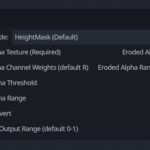
- Alpha Mode – Erosion can be used for either a mask, or as subtractive-only for fx:
- HeightMask (Default) – Use this when you want to create a mask that is fully white when the alpha threshold is 1, and fully black when the alpha threshold is 0. Common use case is mixing material layers using a height map. Internal values are clamped so that, when the alpha threshold is 1, the node will always return a flat white alpha, and vice versa for 0, and you only get texture gradients at the mid-ranges.
- Subtractive – Use this for when you want to fade away an alpha with control over the edge contrast. This is useful for VFX when fading away smoke or lightning alphas, etc. In this case, when alpha threshold is 1, the output mask will not be flat white, and will instead use the texture mask.
- Alpha Texture – An RGBA texture input whose channels can be used to determine the mask. By default, only the red channel is used for masking. For grayscale textures, this will work fine as is, the multi channel setup is for use with channel-packed mask textures.
- Alpha Channel Weights – A V4 which determines how much of each channel in the alpha texture to use, when using a channel-packed masks texture. If you are using a grayscale texture mask, you can leave this without any input or change. Values may be positive or negative.
- Alpha Threshold – The primary “mask weight” value. Use this to modulate how dark or light the mask is using a constant or animated value between 0 and 1. Values outside that range are clamped.
- Alpha Range – Affects the softness of the mask. Smaller = sharper. Zero = clipped.
- Invert – Flips the mask.
- Output Range – A convenience function in case you need your output range remapped to something other than 0-1
- Alpha Mode – Erosion can be used for either a mask, or as subtractive-only for fx:
Outputs:
- Eroded Alpha – The manipulated mask. It always ranges from 0-1.
- Eroded Alpha Ranged – If you set the output range input, use this output instead. It will use the range you specified at the cost of an additional mix instruction.
Gif example
The glowing monkey is using the Default erosion path to produce a mask which I gradient ramped with an emissive color ramp, then used the same ramp to clip out the alpha at dark values in the mask. It is animated with a sine wave plugged into the alpha threshold. This is an example of the HeightMask mode.
The cloud is even simpler, it’s just the texture with a slight uv distortion wobble with a sine wave plugged into the alpha threshold. This is an example of the Subtractive mode.
Shader code
@tool
extends VisualShaderNodeCustom
class_name VSNode_Erosion


func _get_name() -> String:
	return "Erosion"


func _get_category() -> String:
	return "FX"


func _get_description() -> String:
	return "Takes an input alpha and applies an erosion effect (shrink, grow / contrast) based on a threshold and a range. Created by LKS"


func _get_return_icon_type() -> PortType:
	return PORT_TYPE_SCALAR


func _get_input_port_count() -> int:
	return 6


func _get_input_port_name(port: int) -> String:
	match port:
		0: return "Alpha Texture (Required)"
		1: return "Alpha Channel Weights (default R)"
		2: return "Alpha Threshold"
		3: return "Alpha Range"
		4: return "Invert"
		5: return "Output Range (default 0-1)"
	return ""


func _get_input_port_default_value(port: int) -> Variant:
	match port:
		0: return Color(1,1,1,1)
		1: return Color(1,0,0,0)
		2: return 0.5
		3: return 1.0
		4: return false
		5: return Vector2(0,1)
	return Vector3(0, 0, 0)

func _get_input_port_type(port: int) -> PortType:
	match port:
		0: return PORT_TYPE_VECTOR_4D
		1: return PORT_TYPE_VECTOR_4D
		2: return PORT_TYPE_SCALAR
		3: return PORT_TYPE_SCALAR
		4: return PORT_TYPE_BOOLEAN
		5: return PORT_TYPE_VECTOR_2D
	return PORT_TYPE_SCALAR


func _get_output_port_count() -> int:
	return 2

func _get_output_port_name(port: int) -> String:
	match port:
		0: return "Eroded Alpha"
		1: return "Eroded Alpha Ranged"
	return ""


func _get_output_port_type(port: int) -> PortType:
	return PORT_TYPE_SCALAR

######################
## Node properties
######################

func _get_property_count() -> int:
	return 1


func _get_property_name(index: int) -> String:
	match index:
		0: return "Alpha Mode"
	return ""


func _get_property_options(index: int) -> PackedStringArray:
	match index:
		0: return ["HeightMask (Default)", "Subtractive"]
	return []


func _get_property_default_index(index: int) -> int:
	match index:
		0: return 0
	return 0

#######################
## Main shader code
#######################

func _get_code(input_vars: Array[String], output_vars: Array[String],
		mode: Shader.Mode, type: VisualShader.Type) -> String:

	## If we have selected heightmask mode, we want the midpoint to span from -0.5 to 1.5, so
	## we use "erosion_midpoint = (erosion_midpoint * 2.0) - 0.5;"
	## If we use subtractive mode, we want the midpoint to span from -0.5 to 0.5, so
	## we use "erosion_midpoint = (erosion_midpoint - 0.5);

	var alpha_texture_str : String = input_vars[0] if input_vars[0] != "" else "vec4(1.0,1.0,1.0,0.0)"
	var alpha_channel_weights_str : String = input_vars[1] if input_vars[1] != "" else "vec4(1.0,0.0,0.0,0.0)"
	var alpha_threshold_str : String = input_vars[2] if input_vars[2] != "" else "0.5"
	var alpha_range_str : String = input_vars[3] if input_vars[3] != "" else "1.0"
	var invert_str : String = input_vars[4] if input_vars[4] != "" else "false"
	var output_range_str : String = input_vars[5] if input_vars[5] != "" else "vec2(0.0,1.0)"
	var output_alpha_str : String = output_vars[0]
	var output_ranged_alpha_str : String = output_vars[1]

	var erosion_midpoint_str : String = ""

	var alpha_mode = get_option_index(0)
	if alpha_mode == 0: # HeightMask
		erosion_midpoint_str = "erosion_midpoint = (erosion_midpoint * 2.0) - 0.5;"

	elif alpha_mode == 1: # Subtractive
		erosion_midpoint_str = "erosion_midpoint = (erosion_midpoint + 0.5);"


	var str_dict = {
		"alpha_texture_str": alpha_texture_str,
		"alpha_channel_weights_str": alpha_channel_weights_str,
		"alpha_threshold_str": alpha_threshold_str,
		"alpha_range_str": alpha_range_str,
		"invert_str": invert_str,
		"output_range_str": output_range_str,
		"output_alpha_str": output_alpha_str,
		"output_ranged_alpha_str": output_ranged_alpha_str,
		"erosion_midpoint_str": erosion_midpoint_str,
	}
	return\
"""

// Sample the texture and determine the alpha from summing the components
vec4 tex_color = {alpha_texture_str}; // Input texture
tex_color *= {alpha_channel_weights_str}; // Channel weights
float alpha = saturate(sum_components(tex_color));

if  ({invert_str}) { // invert
	alpha = 1.0 - alpha;
}

// Erosion factor is inverted to maintain values post-smoothstep
float erosion_midpoint = saturate(1.0 - {alpha_threshold_str}); // Erosion threshold

// At this point, the alpha is always between 0 and 1, and the erosion factor
// is also between 0 and 1.
// If you imagine the ranges produced by erosion_midpoint - half_range and erosion_midpoint + half_range,
// there will still be overlap between alpha and the erosion range when the erosion threshold is 0 or 1.
// This will cause graiients in the output. To avoid this, when erosion_threshold is zero or one, we can
// expand the range of erosion_midpoint to extend from -0.5 to 1.5 and clamp the half-range slightly
// to ensure that there is never value overlap in the case of 0 or 1.

{erosion_midpoint_str}

// Clamp is to ensure exact 0 / 1 alpha values do not overlap with smootstep range
// when erosion threshold is 0 / 1
float half_range = clamp({alpha_range_str}, 0.01, 0.99) / 2.0; // Erosion range

// Apply erosion
alpha = smoothstep(
	erosion_midpoint - half_range,
	erosion_midpoint + half_range,
	alpha
);
float ranged_alpha = mix({output_range_str}.x, {output_range_str}.y, alpha);
{output_alpha_str} = alpha;

{output_ranged_alpha_str} = ranged_alpha;

""".format(str_dict)


func _get_global_code(mode: Shader.Mode) -> String:
	return\
"""

float sum_components(vec4 color) {
	return color.r + color.g + color.b + color.a;
}

float saturate(float value) {
	return clamp(value, 0.0, 1.0);
}
"""
Live Preview