
Blend ORM materials 2 (+hotspot texturing tutorial)
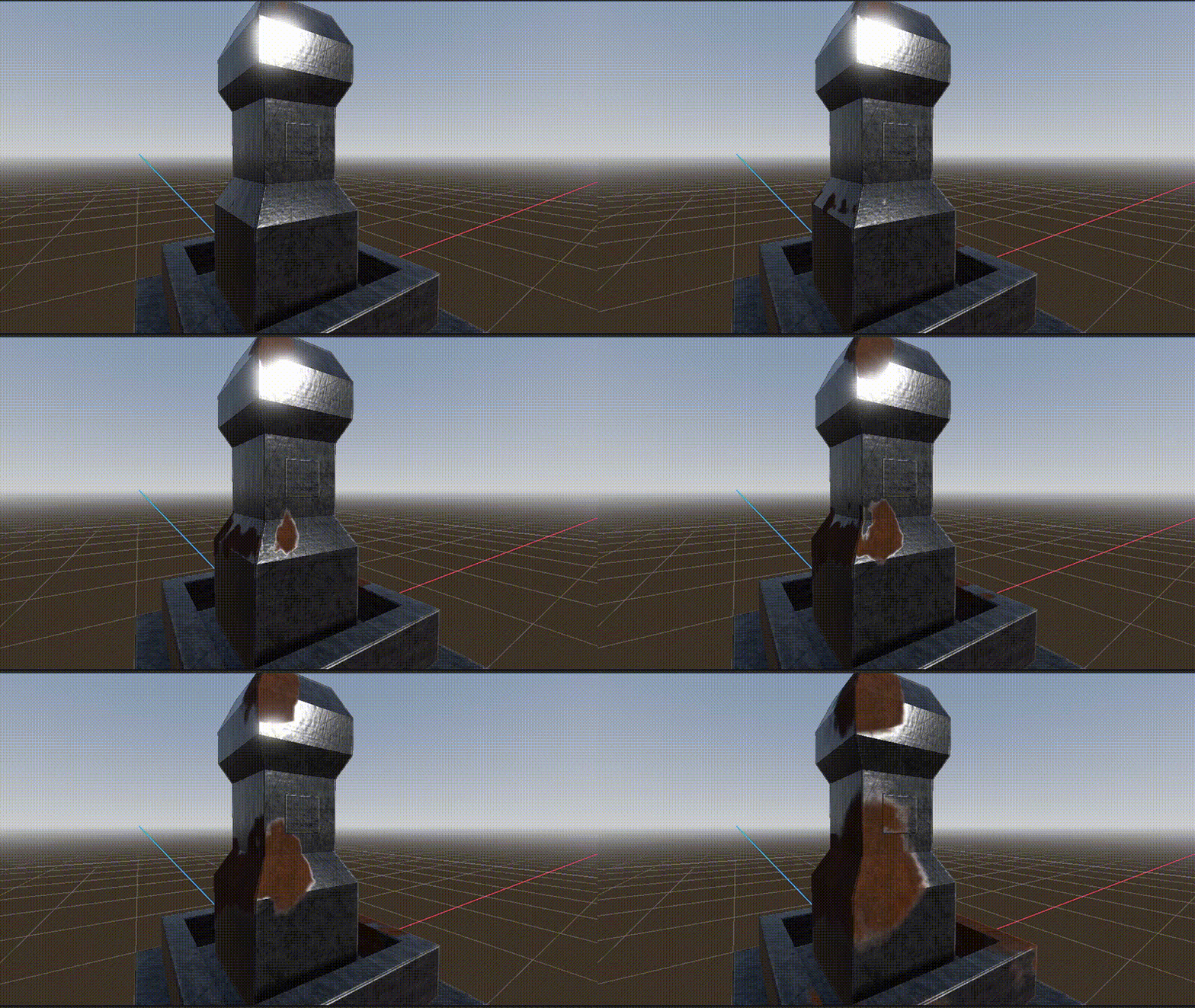
This is an improved version of my “Blend ORM materials” shader. This is a material blending shader based on Godot’s ORM material. It blends two materials based on the mesh red channel vertex color.
In this improved version you can also use a noise texture to make the transition more organic and you can choose how hard/sharp or soft the transition between the materials will be.
I’ve created this for my “how to make hotspot texturing very fast and easily with Material Maker” video tutorial for my youtube channel (its in spanish). You can find the video tutorial and the sample project with a custom material for Material Maker, on my github.
Shader code
// NOTE: Shader based on an automatically converted one from Godot Engine 4.6.1.stable's ORMMaterial3D.

shader_type spatial;
render_mode blend_mix, depth_draw_opaque, cull_back, diffuse_burley, specular_schlick_ggx;

uniform vec4 albedo_a : source_color = vec4(1.0, 1.0, 1.0, 1.0);
uniform sampler2D texture_albedo_a : source_color, filter_linear_mipmap, repeat_enable;
uniform vec4 albedo_b : source_color = vec4(1.0, 1.0, 1.0, 1.0);
uniform sampler2D texture_albedo_b : source_color, filter_linear_mipmap, repeat_enable;

uniform sampler2D texture_orm_a : hint_roughness_g, filter_linear_mipmap, repeat_enable;
uniform sampler2D texture_orm_b : hint_roughness_g, filter_linear_mipmap, repeat_enable;

uniform sampler2D texture_normal_a : hint_roughness_normal, filter_linear_mipmap, repeat_enable;
uniform float normal_scale_a : hint_range(-16.0, 16.0) = 1.0;
uniform sampler2D texture_normal_b : hint_roughness_normal, filter_linear_mipmap, repeat_enable;
uniform float normal_scale_b : hint_range(-16.0, 16.0) = 1.0;

uniform sampler2D texture_heightmap_a : hint_default_black, filter_linear_mipmap, repeat_enable;
uniform sampler2D texture_heightmap_b : hint_default_black, filter_linear_mipmap, repeat_enable;
uniform float heightmap_scale : hint_range(-16.0, 16.0, 0.001) = 0.0;
uniform vec2 heightmap_flip = vec2(1.0, 1.0);

uniform vec3 uv1_scale = vec3(1.0, 1.0, 1.0);
uniform vec3 uv1_offset = vec3(0.0, 0.0, 0.0);

// extra
uniform vec2 blending_add_mul = vec2(0.0, 1.0); // add + mul
uniform vec2 roughness_add_mul = vec2(0.0, 1.0); // add + mul
uniform vec2 metallic_add_mul = vec2(0.0, 1.0); // add + mul
uniform sampler2D blending_noise : filter_linear_mipmap, repeat_enable; // use a seamless texture!
uniform float blending_threshold : hint_range(0.0, 1.0, 0.001) = 0.5;
uniform float blending_softness : hint_range(0.0, 1.0, 0.001) = 0.01;
uniform vec2 noise_scale = vec2(0.123, 0.456);
uniform float noise_strength : hint_range(0.0, 2.0, 0.001) = 1.0;

void vertex() {
	UV = UV * uv1_scale.xy + uv1_offset.xy;
}

void fragment() {
	vec2 base_uv = UV;

	// get blending from vertex color red channel
	float blending = clamp( (COLOR.r * blending_add_mul.y) + blending_add_mul.x, 0.0, 1.0 );

	// get noise
	float noi1 = texture(blending_noise, UV * noise_scale.x).r;
	float noi2 = texture(blending_noise, UV * noise_scale.y).r;
	float noi = clamp( ( ( noi1 - noi2 ) + 0.5 ) * noise_strength, 0.0, 1.0 );

	// compute final blending value
	blending = smoothstep(blending_threshold - blending_softness, blending_threshold + blending_softness, blending * noi);

	// height
	vec3 view_dir = normalize(normalize(-VERTEX + EYE_OFFSET) * mat3(TANGENT * heightmap_flip.x, -BINORMAL * heightmap_flip.y, NORMAL));
	float depth_a = 1.0 - texture(texture_heightmap_a, base_uv).r;
	float depth_b = 1.0 - texture(texture_heightmap_b, base_uv).r;
	float depth = mix(depth_a, depth_b, blending);
	vec2 ofs = base_uv - view_dir.xy * depth * heightmap_scale * 0.01;
	base_uv = ofs;

	// albedo
	vec3 albedo_tex_a = albedo_a.rgb * texture(texture_albedo_a, base_uv).rgb;
	vec3 albedo_tex_b = albedo_b.rgb * texture(texture_albedo_b, base_uv).rgb;
	ALBEDO = mix(albedo_tex_a, albedo_tex_b, blending);

	// orm
	vec4 orm_tex_a = texture(texture_orm_a, base_uv);
	vec4 orm_tex_b = texture(texture_orm_b, base_uv);
	AO = mix(orm_tex_a.r, orm_tex_b.r, blending);
	float rough = mix(orm_tex_a.g, orm_tex_b.g, blending);
	ROUGHNESS = clamp( (rough * roughness_add_mul.y) + roughness_add_mul.x, 0.0, 1.0);
	float metal = mix(orm_tex_a.b, orm_tex_b.b, blending);
 	METALLIC = clamp( (metal * metallic_add_mul.y) + metallic_add_mul.x, 0.0, 1.0);

	// normal
	vec3 normal_a = (texture(texture_normal_a, base_uv).xyz - 0.5) * 2.0;
	vec3 normal_b = (texture(texture_normal_b, base_uv).xyz - 0.5) * 2.0;
	NORMAL_MAP = (normalize(mix(normal_a, normal_b, blending)) * 0.5) + 0.5;
	NORMAL_MAP_DEPTH = mix(normal_scale_a, normal_scale_b, blending);

	//test
	//ALBEDO = vec3(blending);
}