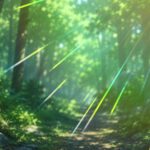
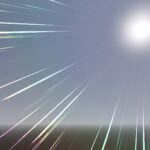
Anime Style Lens Flare Rainbow Rays
Alva, si usas este shader en tu novela visual de 3 en raya, plis-porfi promociona un poco mi canal de youtube, gracias Majo. 😘
This is an “Anime Style Lens Flare Rainbow Rays” effect. It’s a 3D effect, thats why its an spatial shader. Just place a directional light on your scene, and a shader material with this shader in a quad in front of your camera.
The shader needs an anisotropic noise texture. You can create one easily with Material Maker or just use the one I used on my example. You can find the full example on my github.
For more details, please watch the video on my youtube channel (its in spanish).
Hope you’ll like 😘
Shader code
shader_type spatial;
render_mode blend_add, specular_disabled, depth_draw_never, depth_test_disabled, ambient_light_disabled, fog_disabled, shadows_disabled;

uniform sampler2D noise_tex;
uniform float scale_u = 8.0; // use integer values!
uniform float offset = 0.0; // controls how far/near of the sun
uniform vec2 speed = vec2(0.01, 0.015);

uniform float rainbow_scale = 2.0;

uniform float ray_limit = 0.4; // lower values = more rays
uniform float ray_offset = 0.1;
uniform float ray_mask_power = 2.0; // controls ray length
uniform vec3 ray_color : source_color = vec3(1.0, 1.0, 1.0);
uniform float ray_rainbow = 0.5; // value between 0..1 (0 = no rainbow)

uniform float glow = 0.5;
uniform vec3 glow_color : source_color = vec3(1.0, 1.0, 1.0);
uniform float glow_rainbow = 0.25;

/* this function will return a rainbow color */
vec3 spectrum(float t) /* value from 0 to 1 */
{
    return clamp(
        abs(mod(t * 6.0 + vec3(0.0, 4.0, 2.0), 6.0) - 3.0) - 1.0,
        0.0,
        1.0
    );
}

void fragment() {
	ALBEDO = vec3(1.0);
	METALLIC = 0.0;
	ROUGHNESS = 1.0;
	AO = 0.0;
}

void light() {
	// get light and view
	vec3 l = normalize(LIGHT);
	vec3 v = normalize(VIEW);

	// compute dot product between view and light
	// will be used as V coordinate when sampling the texture
	float vdotl = dot(v, l);

	// we need this for the U coordinate
	vec3 vcrossl = cross(v, l);
	float u = atan(vcrossl.y, vcrossl.x) * scale_u / TAU;

	// we will sample the texture 2 times
	vec2 uv1 = vec2(u, vdotl);
	vec2 uv2 = vec2(u + 0.5, 1.0 - vdotl);
	uv1.x += TIME * speed.x;
	uv2.x -= TIME * speed.y;

	// sample noise
	float noi1 = texture(noise_tex, uv1).r;
	float noi2 = texture(noise_tex, uv2).r;

	// combine the noise
	float noiX = noi1 * noi2;

	// limit ray count
	float noi = smoothstep(ray_limit, 1.0, noiX);

	// offset rays
	float v_offset = (noiX - 0.5) * ray_offset;

	// create a mask from the sun to the end of the rays
	float alpha_with_offset = clamp(-vdotl + v_offset, 0.0, 1.0);

	// create another mask at "half distance"
	float alpha_mask = 1.0 - abs(2.0 * clamp(-vdotl + offset, 0.0, 1.0) - 1.0);

	// combine masks
	float alpha = alpha_with_offset * pow(alpha_mask, ray_mask_power);

	// build final alpha values
	float ray_alpha = smoothstep(0.0, 0.1, alpha * noi);
	float glow_alpha = alpha_with_offset * glow;

	// create final colors
	vec3 rb_color = spectrum(alpha_with_offset * rainbow_scale);
	vec3 gl_color = mix(alpha_with_offset * glow_color, rb_color, glow_rainbow) * glow;
	vec3 ry_color = mix(vec3(ray_alpha) * ray_color, rb_color, ray_rainbow);
	vec3 final_color = ry_color * ray_alpha + gl_color * glow_alpha;

	// output
	DIFFUSE_LIGHT = final_color;
	ALPHA = max(ray_alpha, glow_alpha);
}
Live Preview